Home / Docs / Getting Started / How TelBuddy Works
How TelBuddy Works
TelBuddy is not a phone carrier, and it never carries a single call or text itself. It is a dashboard that sits on top of a business phone account you already own (a Twilio account, a Telnyx account, or both at the same time) and turns that raw carrier infrastructure into something a non-technical team can actually run day to day.
Twilio and Telnyx are built for developers. Their consoles are API dashboards, not front-desk tools: there is no shared inbox for a team, no phone-menu builder you can point and click through, no notes log for a customer, no AI receptionist. TelBuddy is the layer in between: the same carrier account, with an interface built for the people actually answering the phone and replying to texts every day.
Nothing about your account changes hands. Your phone numbers stay registered to your own Twilio or Telnyx account. Your API credentials are stored so TelBuddy can talk to that account on your behalf, but the account itself, and everything in it, remains yours. If you ever stop using TelBuddy, your numbers, your message history with the carrier, and your billing relationship with them are completely unaffected.
Provider is a setting on each phone number, not on your account. This is easy to miss and it matters: a single TelBuddy login, with one shared inbox and one team, can run some numbers through Twilio and others through Telnyx at the same time. There is no "pick a carrier" step for your whole account. This is useful if you are migrating from one carrier to the other gradually, want a second carrier as a backup, or already had numbers split across both before finding TelBuddy.
How billing actually splits. TelBuddy charges one flat membership price per month (or a discounted annual rate) for the software itself: the inbox, the AI, the IVR builder, the dialer, contacts, all of it. That price does not move based on how many texts you send or minutes you talk. Separately, your carrier usage, the literal cost of sending a message or connecting a call, is billed directly to you by Twilio or Telnyx at their own published rates. TelBuddy never sees that invoice, never marks it up, and never takes a cut of it.
The two accounts, and what each one does
Your carrier account owns the phone numbers, does the actual sending and connecting, and bills you for usage. You created it, you control it, and you can log into it any time.
Your TelBuddy account holds the things a carrier console has no concept of: who is on your team, which conversations are unread, what notes you have kept on a customer, what your phone menu says, what your AI knows about your business.
Neither one replaces the other. TelBuddy talks to the carrier through the API credentials you provide, which is why connecting your account is the first thing you do after signing up.
What this looks like day to day
Once connected, nobody on your team needs to open a carrier console again. Texts arrive in a shared inbox that everyone can see, colour-coded by which of your numbers they came in on.
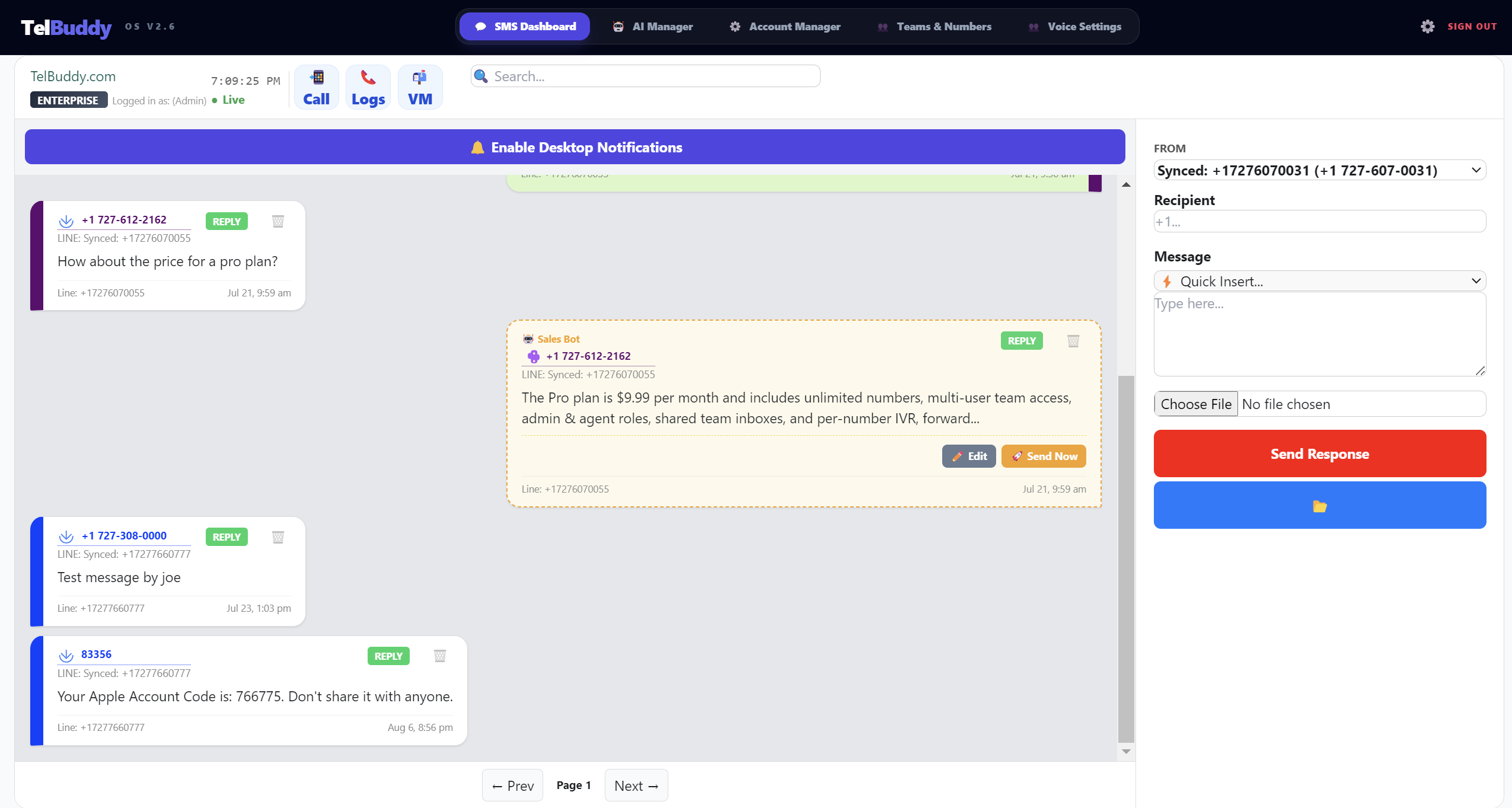
That difference is the whole point of the product. On a carrier console, a text is a row in a log. In TelBuddy it is a conversation with a person, attached to a contact record, visible to whoever is on shift, and answerable by any of them.
Running Twilio and Telnyx side by side
Because the provider is set per number, your numbers list can be mixed, and nothing about the rest of the app changes based on which carrier a number uses.
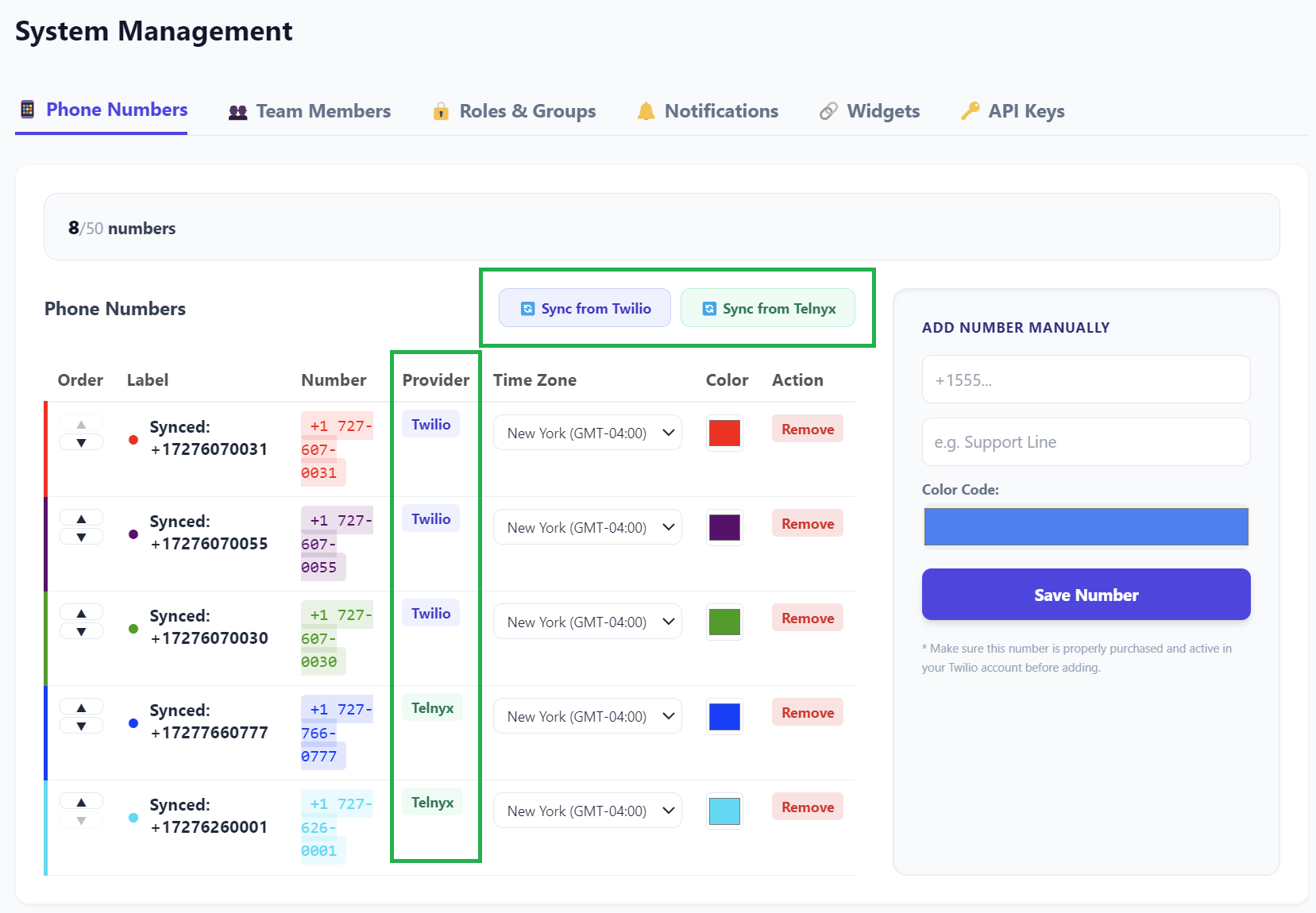
A Telnyx number gets the same phone menus, the same forwarding rules, the same AI receptionist, and lands in the same inbox as a Twilio one. See Twilio or Telnyx if you are deciding between them, or running both if you want them side by side.
Setting up call handling without code
Everything a carrier console makes you express in code or XML is a form here. Phone menus are the clearest example: you fill in what callers hear and what each key does, and it is live as soon as you save.
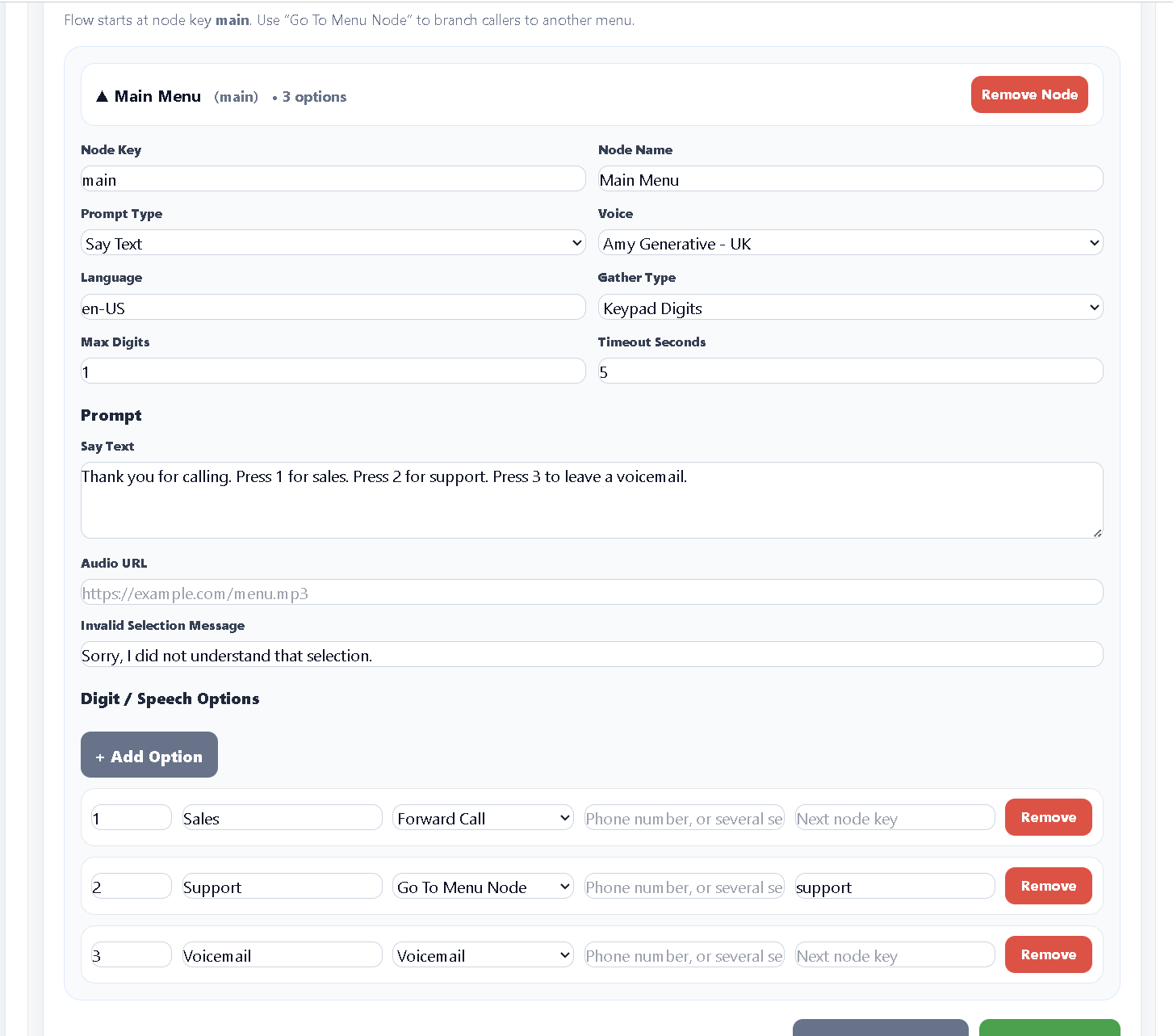
The same applies to forwarding, business hours, voicemail, and the AI. None of it requires touching the carrier console once your numbers are synced.
What's included on every plan
- Shared team SMS inbox, with per-number color coding
- MMS/image support, identical behavior on Twilio and Telnyx
- Saved message templates ("Quick Insert"), optionally with an attached image
- Full contact records: message history, editable contact info, and a dated notes log with file attachments
- No-code IVR / phone menu builder, including multi-level menus
- Call forwarding with a primary and backup number, plus a whisper message
- Voicemail with playback right in the dashboard
- Business hours routing
- In-app dialer for outbound calls (a real phone call, not browser audio)
- Bulk Sync webhook automation across many numbers at once
- Admin/Agent team roles and sub-accounts for running multiple businesses
- Add-to-Home-Screen iPhone app, no App Store required
Optional paid add-on
- AI SMS, in Draft Mode (human approves) or Auto Mode (AI replies on its own)
- AI Voice Receptionist: a real spoken conversation, not a button menu
- AI Appointment Setting: live Google Calendar booking during the call
The AI add-on is billed separately from your plan and metered in messages and voice minutes, because those calls have a real per-use cost. Everything in the list above it is included in the flat plan price regardless of volume.
Pricing at a glance
- Starter: $19/mo: 2 numbers, 2 seats
- Growth: $39/mo: 5 numbers, 5 seats
- Commercial: $79/mo: 10 numbers, 15 seats
- Enterprise: $149/mo: 50 numbers, 50 seats
- Annual billing: 2 months free on any plan
- Carrier usage (actual texts/calls) is billed separately, directly, at cost, no TelBuddy markup
Numbers are how many phone lines you can connect. Seats are how many people can log in. They are counted separately, so a two-person shop running five numbers and a fifteen-person team running two numbers are genuinely different situations, and the plans reflect that.
Both limits are shared across your whole account group, including any sub-accounts. See choosing your plan for help picking.
What you need before you start
Three things, and only the first one takes any real thought:
- A Twilio or Telnyx account with at least one phone number in it. If you do not have one yet, creating it is free and you only pay for what you use.
- API credentials from that account, which is what lets TelBuddy act on your behalf. Both connection guides walk through exactly where to find them: connecting Twilio and connecting Telnyx.
- A TelBuddy plan, which you can start on a free trial.
You do not need to move your numbers, port anything, or cancel anything. Connecting is additive.
What TelBuddy is not
Worth stating plainly, because it saves a wasted afternoon:
It is not a carrier, so it cannot sell you a phone number, and it cannot lower your per-message or per-minute cost. Those come from Twilio or Telnyx at their published rates.
It is not a replacement for A2P registration. Carrier compliance is still between you and them. TelBuddy can sync webhooks in bulk and explains what A2P 10DLC involves, but it cannot register on your behalf.
It does not take over your carrier account. You keep your own login, your own billing, and your own numbers. Nothing is locked in, and disconnecting TelBuddy leaves your carrier account exactly as it was.