Which carrier are you connecting?
Phase 1: Deployment
Connect your Twilio account
Paste your Twilio Account SID and Auth Token, run number sync, and TelBuddy points your numbers at the shared inbox, phone menus, forwarding, and voicemail. Setup is usually under two minutes and needs no code. The AI receptionist is optional: connect first, then add AI on any plan if you want it (AI is not included in the free trial).
Your Twilio account remains fully yours. TelBuddy simply connects via secure API access, nothing is transferred or migrated.
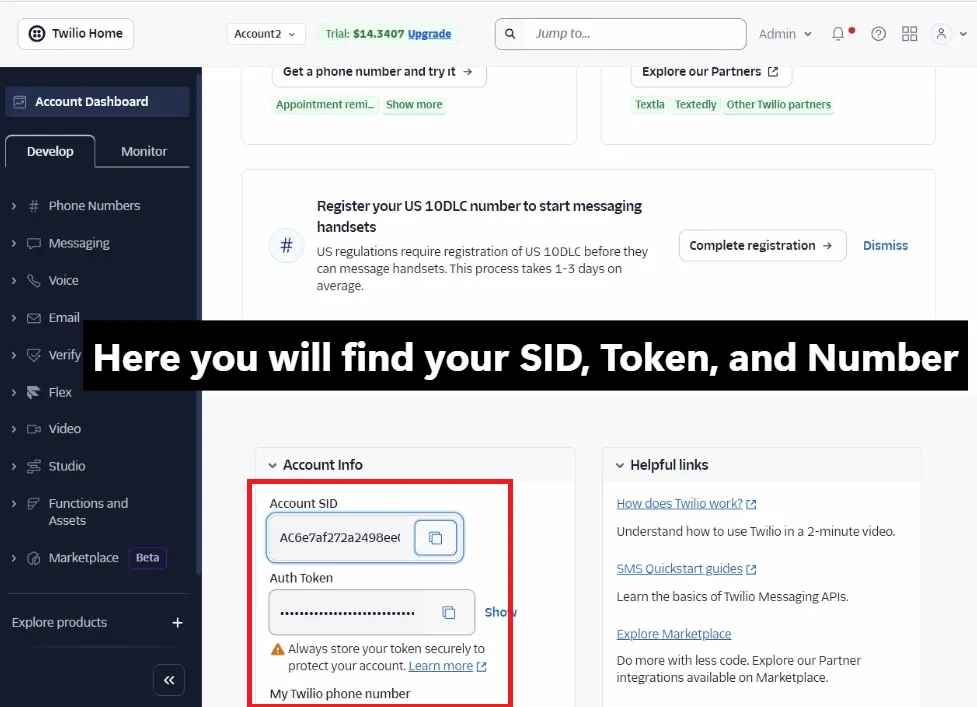
Extract Twilio Keys
Grab your Account SID and Auth Token from the Twilio Console. This authenticates API requests so TelBuddy can run messaging and voice features on numbers you already own.
- Login to Twilio Console.
- Copy Account SID.
- Reveal & Copy Auth Token.
🔒 Your Auth Token is encrypted in transit and stored securely. TelBuddy never shares your Twilio credentials and only uses them to authenticate API requests on your behalf.
You can connect multiple Twilio numbers later if your business has multiple locations or departments.
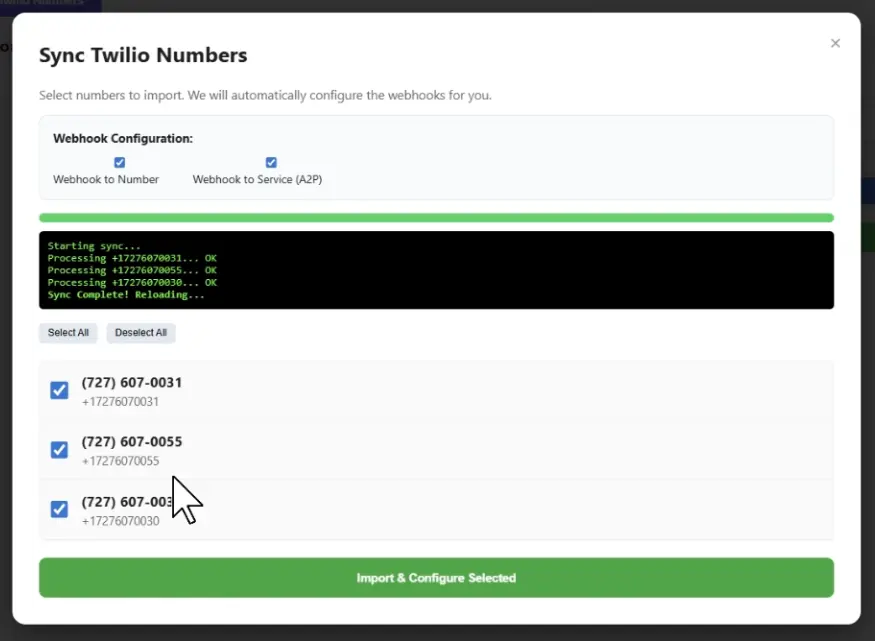
High-Speed Number Sync
Don’t enter numbers manually. Use our Automatic Number Sync to import your Twilio phone numbers and configure messaging and voice webhooks instantly.
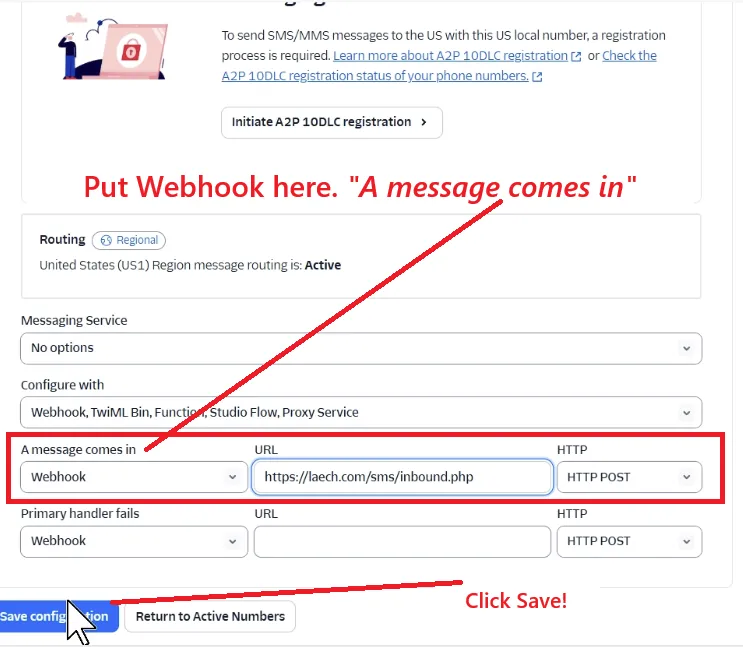
Optional: Manual Webhook Setup
Only use manual setup if you prefer to configure Twilio webhooks yourself. Most users can skip this step and use Automatic Sync.
https://telbuddy.com/sms/inbound
https://telbuddy.com/sms/voice-webhook
Phase 2: The Brain Setup
Knowledge Base (RAG)
Go to AI Manager > Knowledge Base. Paste your website URL or upload a PDF. Our scraper will index your data so the AI can answer pricing and support questions accurately.
Configure Brain →AI Voice Transfers
Set up Transfer Rules. Define "Trigger Words" (like 'Agent' or 'Help'). When a caller says these words, the AI Voice engine will instantly dial your human team.
Setup Ring Groups →Ready to use your Twilio numbers in TelBuddy?
Once connected, choose your AI plan and start automating conversations immediately.
Frequently Asked Questions
Do I lose control of my Twilio account?
No. Your Twilio account remains fully yours. TelBuddy connects via secure API access and does not transfer ownership or migrate your numbers.
How long does setup take?
Most users complete setup in under 2 minutes. Simply paste your Account SID and Auth Token, then run Automatic Sync.
Do I need to configure webhooks manually?
No. Automatic Sync configures messaging and voice webhooks for you. Manual setup is optional for advanced users.
Does this work with AI Voice and SMS?
Yes. After you connect, core SMS and voice features work on your synced numbers. AI SMS draft and auto modes and the AI voice receptionist need the optional AI add-on, which is not part of the free trial.