Build an IVR phone menu
on Twilio or Telnyx
Set up "Press 1 for Sales, Press 2 for Support" in a visual editor and route each option to a forward, voicemail, a call queue, the AI receptionist, a text, an email to your team, or another menu. TelBuddy writes the carrier instructions and configures webhooks on sync. Same builder on Twilio and Telnyx numbers. Core plan feature from $19/mo; you pay the carrier for usage.
On Telnyx too. The same visual editor builds the same keypad or speech menu, whichever carrier your number runs on.
📋 Greeting: "Thanks for calling Northside Plumbing."
▸ Press 1 → Forward to Sales (+1 555-0101)
▸ Press 2 → Open Support menu
↳ Press 1 → Billing (voicemail)
↳ Press 2 → Forward to Technician mobile
▸ Press 3 → Leave a voicemail (transcribed + emailed)
✅ Saved · Twilio voice webhook configured for you
Drag-and-Drop Flow Map
Each step is a card. Drag a line from one to the next, or drag into empty space to add a new step right there. Prefer typing? A form editor edits the same flow. No TwiML, no raw webhook URLs.
Keypad or Speech
Gather DTMF key presses, spoken answers, or both. Choose the say-voice and language, set timeouts, and add an "invalid input" reprompt.
Multi-Level Menus
Send any option to another menu to build full phone trees. Steps can forward, take voicemail, join a call queue, text the caller or a teammate, email your team, play a message, hang up, or hand off to the optional AI receptionist.
Success and failure, handled separately
Steps that can succeed or fail have two outputs, so you decide what happens for each. A caller leaves a voicemail and your team gets an email. Someone who reaches the beep and hangs up without speaking does not trigger it.
Texts and emails from a menu only go to the caller or to people on your account. There is no box to type an outside address or number, so your phone menu can never be used to message third parties.
The easy alternative to the Twilio Console
Building an IVR directly in Twilio means writing TwiML or wiring up Twilio Studio and Functions, then keeping webhook URLs in sync. Doing it in the Telnyx portal means Call Control or TeXML and the same webhook bookkeeping. TelBuddy turns either one into a single settings screen per number, and the menu you build behaves identically on both carriers. Pair your menu with call forwarding, voicemail, and business-hours routing for a complete phone system.
See It In TelBuddy
The real IVR builder, not a mockup.
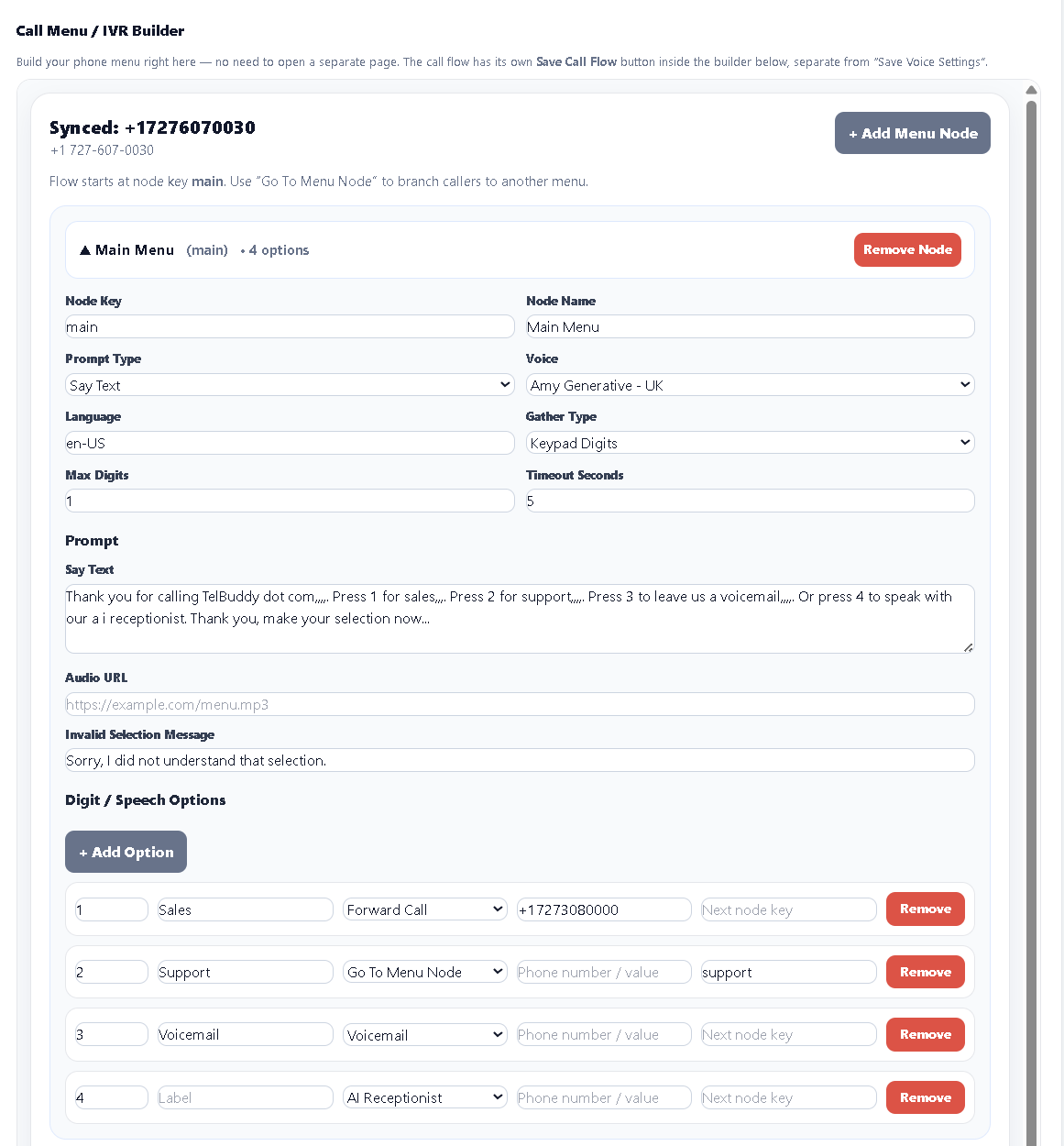
A few honest answers.
How do I set up an IVR on Twilio without coding?
With TelBuddy you build the IVR in a visual editor. Add a greeting, create options like 'Press 1 for Sales', and choose what each key does: forward to a number, send to voicemail, join a call queue, hand off to the AI receptionist, or open another menu. TelBuddy generates the TwiML and configures the Twilio webhook for you, so you never write code.
Can a Twilio IVR menu accept voice as well as keypad input?
Yes. Each menu can gather keypad presses (DTMF), spoken responses (speech), or both, so callers can press a number or simply say what they need.
Can I have multiple menus or sub-menus?
Yes. TelBuddy supports multi-level menus. Any option can route to another menu node, so you can build nested phone trees (for example, Support → Billing or Technical) without touching the Twilio Console.
Does the visual IVR builder work with Telnyx as well as Twilio?
Yes. Provider is set per phone number, so the same visual editor builds the same keypad or speech menu whichever carrier the number runs on, and you can mix Twilio and Telnyx numbers in one account. TelBuddy writes the TwiML or TeXML and configures the webhook for you either way. See Telnyx support.