No-Code IVR, Shared Inbox, Optional AI Receptionist,
on Twilio or Telnyx.
Most carrier consoles are just API endpoints. TelBuddy is a no-code dashboard for real teams. Build a phone menu, forward calls, take voicemail, set business hours, and text together, all without ever opening a developer console.
Every feature on this page runs on the Twilio or Telnyx account you already own. Pick one carrier, or both, on the same login. Nothing is ported. No per-minute markup from us.
Starter Plan is $19.00/mo. 7 days free on monthly plans (card required, nothing charged until day 8). The optional AI add-on is not in the trial.
▶ Watch a 10-minute build on YouTube: AI receptionist, phone menu and call queue
Build a Phone Menu in Minutes.
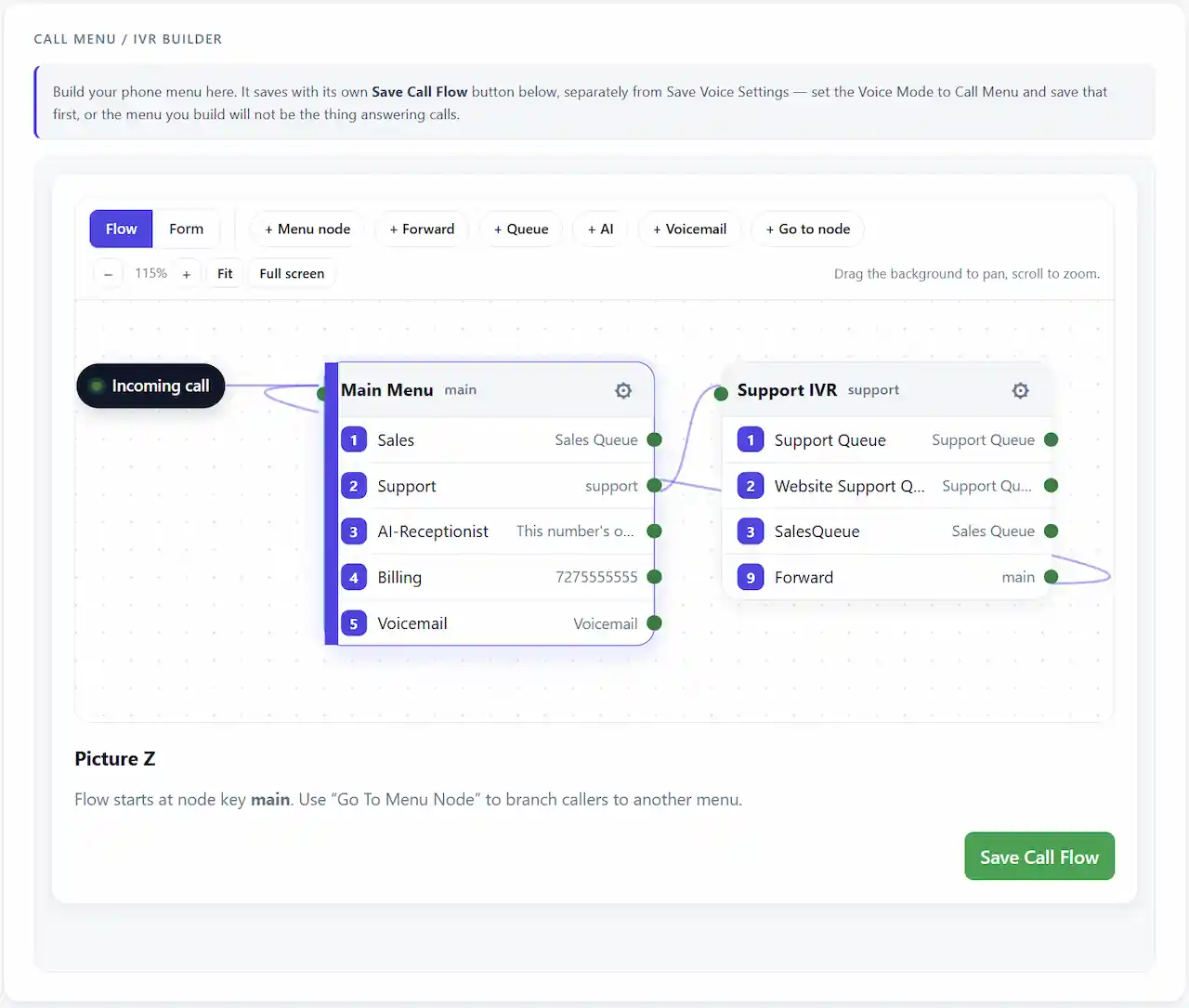
Create a professional IVR phone menu with a visual builder: "Press 1 for Sales, Press 2 for Support." Route each option to forwarding, voicemail, or another menu. No TwiML, no code, no Twilio Console.
- ✓ Visual IVR Builder (press a key or say it; form editor and drag-and-drop canvas)
- ✓ Call Forwarding with Backup Numbers
- ✓ Voicemail & Business-Hours Routing
- ✓ Works Identically on Telnyx
Manage Locations at Scale.
Perfect for teams managing multiple locations, departments, or brands. Several businesses under one login, each with its own carrier credentials, with roles and call and message routing managed from one dashboard.
- ✓ Multi-Account Dashboard Switching
- ✓ Seat and Line Limits Match the Plan (visible "x of y used")
- ✓ Account Separation: Credentials Never Shared Between Businesses
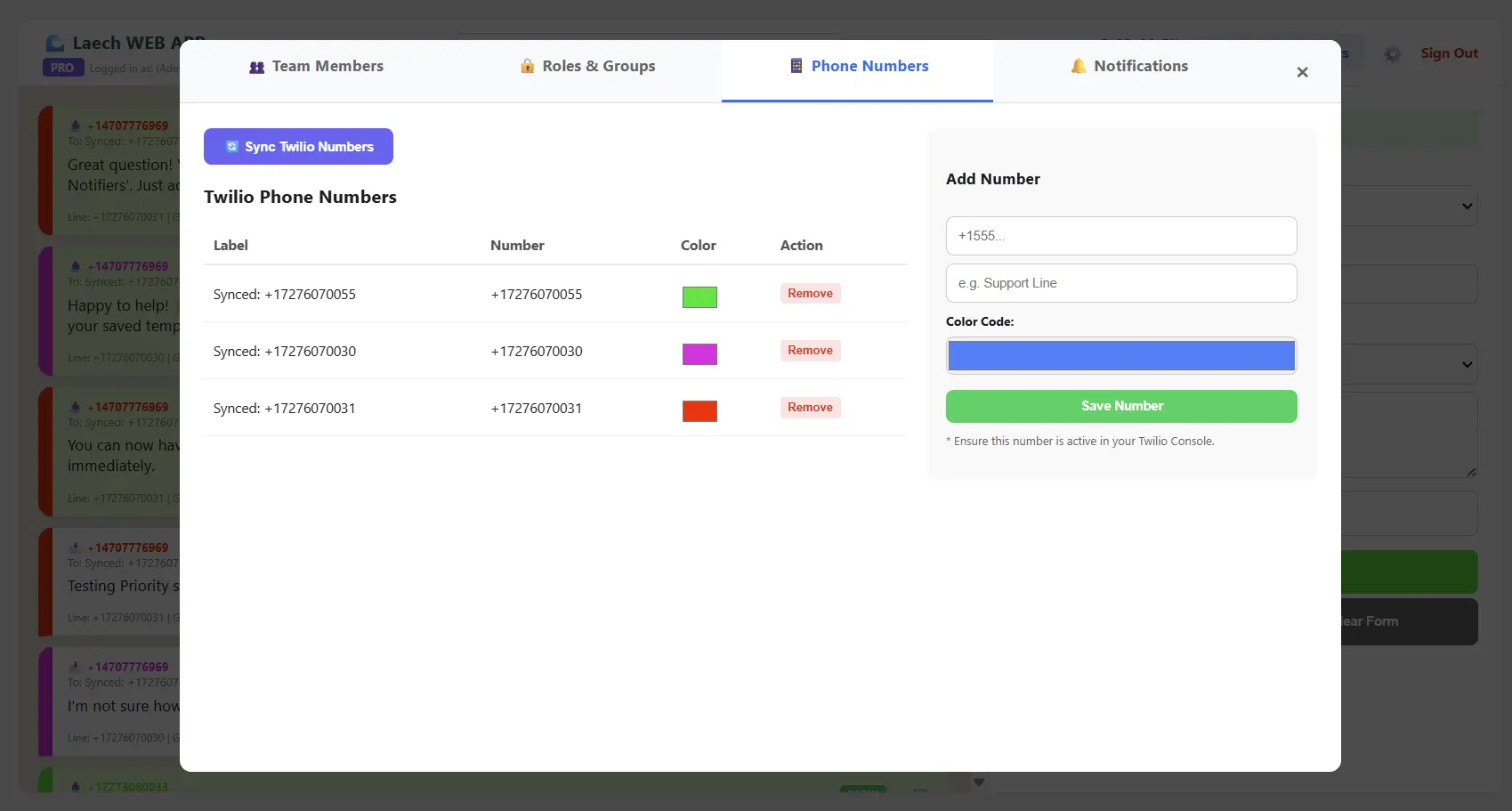
Multi-Account Dashboard
Want It Answered Automatically? Add AI.
Everything above works without AI. When you're ready, you can switch on an optional Twilio AI receptionist or Telnyx AI receptionist that answers calls and texts around the clock, trained on your website and documents. Optional. Starts at AI Starter, $19.99/mo, with 100 AI voice minutes and 2,000 AI messages. Those caps apply to AI usage only. Ordinary texting, menus, queues, and voicemail are not limited by it. AI is not in the free trial.
AI Voice Receptionist
A real two-way spoken conversation, not a menu. Answers calls and can transfer to a human. Works on Twilio and Telnyx.
AI Appointments
Connect Google Calendar, or one per person. The optional AI receptionist checks real availability and books it live, on the call or by text. AI is an add-on and is not in the free trial.
Knowledge Base
Paste in your own website content or documents so the AI answers real questions accurately, not generically.
Smart Call Transfers
The AI hands off to a human when a caller asks for one, or when a topic calls for it: a whole team at once on Twilio, one destination on Telnyx.
Under The Hood
Engineered for Power Teams
Shared Team Inbox
Turn a single number into a multi-user workspace. Invite teammates to see, reply to, and hand off the same conversations.
Unified Web App
Call logs, voicemail, team SMS, message templates, and AI replies (review-and-send or auto) in one dashboard. Contacts keep per-customer context. Not a texting tool bolted onto a separate calling tool.
Telnyx Support
Everything on this page, running on Telnyx instead of (or alongside) Twilio. Same dashboard, same price, your choice of carrier.
A2P 10DLC Bulk Sync
Select numbers and TelBuddy configures every SMS and voice webhook automatically. No manual Console copy-pasting, one at a time.
Rich Media (MMS)
Send and receive photos and images. View full-size previews directly in the conversation feed. Same behavior on both carriers.
Your Own Carrier Account
Every workspace connects its own dedicated Twilio or Telnyx account. Your numbers, your carrier billing, your compliance registration. Never shared with anyone else.
Website Chat
Put live teammate chat, AI answers from your knowledge base, or a contact form on your site. One script on the Twilio or Telnyx account you already have. Photos up to 8 MB, saved replies shared with texting, and it sits beside Call Us and Text Us in the same widget.
Explore Website Chat →
Call Queues
Callers hold in order with hold music instead of a busy signal. Agents press 1 to take the call. Four ring strategies, a cool-off, callback so callers keep their place, a live wallboard, and a live call board to hold or transfer any call. Included on every plan. Works on Twilio and Telnyx.
Outbound Dialer
Click to call. It rings your phone first, then bridges the customer with your business number as caller ID. Not a browser softphone. Works on Twilio and Telnyx.
Business Hours
Set open and closed hours per number, in that number's time zone. After hours, route to voicemail, a forward number, another menu, or AI. Same behavior on Twilio and Telnyx.
Ready to Simplify Your Phone System?
View All Plans & PricingBuilt to Scale With Your Team
Real-World Workflows
Built for Growing Teams
Bring on your whole team without giving up control. Everyone shares the inbox; only Admins touch the sensitive settings.
- • Up to 50 Numbers on Enterprise
- • Admin & Agent Roles
- • Shared Team Inboxes
- • Run Multiple Businesses from One Login
Compare plans & pricing.
Smart Call Routing & Transfers
Send every call to the right place. Route by menu choice, forward to a primary and backup number, and roll to voicemail after hours.
A few honest answers.
What can TelBuddy do that the Twilio or Telnyx console can't?
TelBuddy turns Twilio's or Telnyx's raw API and console into simple screens. You can build a phone menu (IVR), set call forwarding and voicemail, define business hours, and run a shared team SMS inbox with templates and MMS, all without writing TwiML or editing webhooks by hand.
Do I need to write code or configure webhooks?
No. TelBuddy imports your Twilio or Telnyx numbers and configures the voice and SMS webhooks automatically. You manage everything from point-and-click settings.
Is the AI receptionist required?
No. AI voice and SMS are an optional add-on. The core platform is a no-code dashboard for IVR, forwarding, voicemail, business hours, and team texting, on either carrier.
Does everything work the same on Telnyx as it does on Twilio?
Almost everything, identically. The one real difference: on Twilio, an AI-triggered call transfer can ring a whole team at once (a ring group); on Telnyx, it transfers to one destination at a time. Everything else (texting, forwarding, voicemail, business hours, the IVR builder, and AI Appointment Setting) behaves the same on both.
Ready to Make It Easy?
Connect your Twilio or Telnyx account and set up your phone menu, forwarding, voicemail, and team inbox in minutes.