The Model
How TelBuddy works on your own Twilio or Telnyx
One sentence version: you keep your own Twilio or Telnyx account, and TelBuddy adds the shared inbox, phone menu builder, forwarding, and voicemail the carrier console does not give you. An AI receptionist is available as an optional add-on (not included in core plans or the free trial). You pay TelBuddy a flat software fee and the carrier bills you directly for usage.
Card required, nothing charged until day 8. Core plans from $19/mo.
You bring your own Twilio or Telnyx
Every TelBuddy customer connects their own Twilio or Telnyx account, or both. No shared numbers, no shared credentials, ever. Your account, your numbers, your billing relationship with your carrier.
TelBuddy adds the dashboard
A shared team inbox for texting, a visual IVR/phone-menu builder, call forwarding, voicemail, and click-to-call dialing, all on top of the account you already control. An optional AI receptionist for calls and texts is available when you add that subscription.
A flat software fee, no markup
TelBuddy is a flat monthly software fee. Calls and texts stay on your own Twilio or Telnyx account, billed by your carrier at its published rates. TelBuddy never marks up your minutes.
Setup is a few steps, not a project
This is the whole first login, in order. Most people are texting from the inbox within ten minutes, and nothing here touches your carrier account beyond reading your numbers and pointing them at TelBuddy.
Paste your carrier credentials
Your Twilio Account SID and Auth Token, or your Telnyx API key. Both if you use both. They are encrypted at rest and never shown again. Where to find them.
Sync your numbers
One button per carrier. TelBuddy reads the numbers you already own and sets their webhooks so calls and texts reach the dashboard. Nothing is ported, nothing is bought, nothing changes at the carrier except where the traffic is sent.
Decide what each number does
You land in System Manager with your numbers listed. Texting works immediately. For calls, pick a number and choose: forward to a phone, a phone menu, a call queue, voicemail, or the optional AI receptionist. Set business hours and an after-hours path if you want them. Then open the inbox.
See all of it done in ten minutes
A phone menu, a call queue and an AI receptionist set up on a real Twilio or Telnyx number, start to finish, with the timers running.
Prefer YouTube? Desktop cut or phone cut.
What you actually get
Four things a typical Twilio Console user has to build (or hire a developer to build) themselves, already built, already working, inside one dashboard.
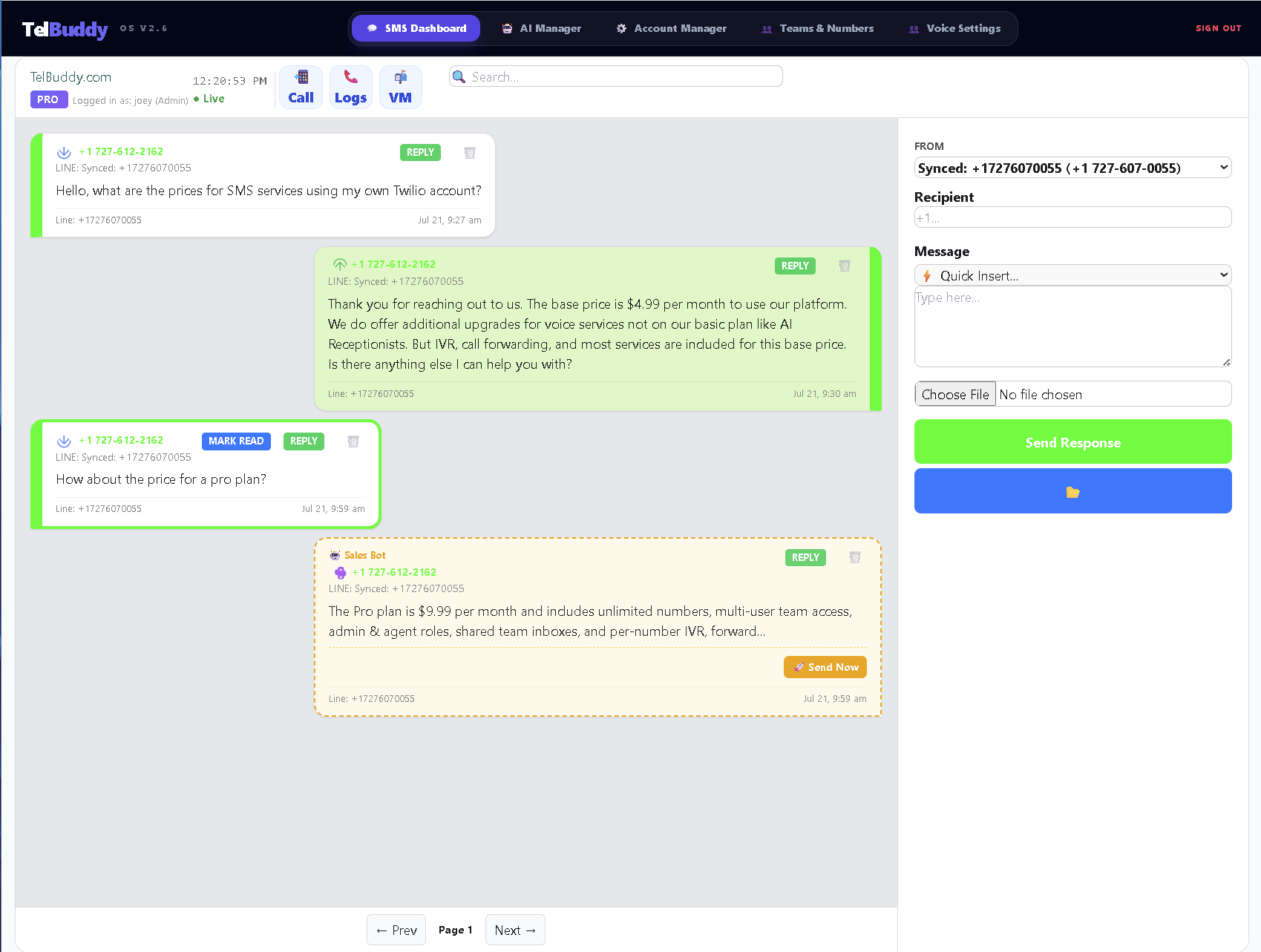
Shared Team SMS Inbox
Every text to every synced number lands in one inbox your whole team can see, reply to, and hand off, instead of everyone reading raw webhook payloads.
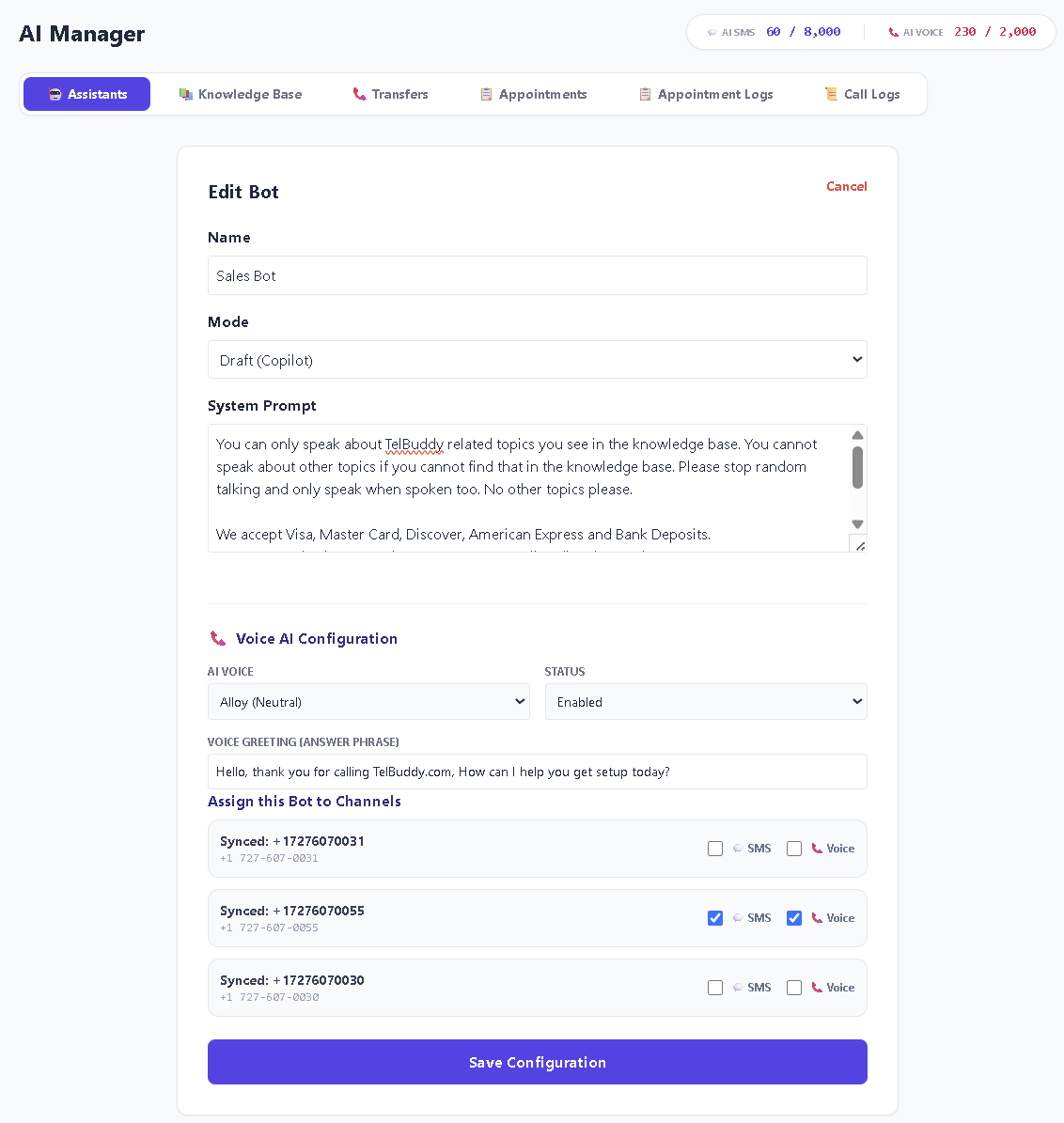
AI Receptionist (Voice + SMS) Optional add-on
Answers calls, replies to texts, books appointments on your Google Calendar, and can run in Draft mode (you approve every reply) or Autopilot (it replies on its own). Your choice, per number.
Not included in the core plans or the free trial. It is a separate subscription from $19.99/mo, added whenever you want it, because AI minutes cost real money to run.
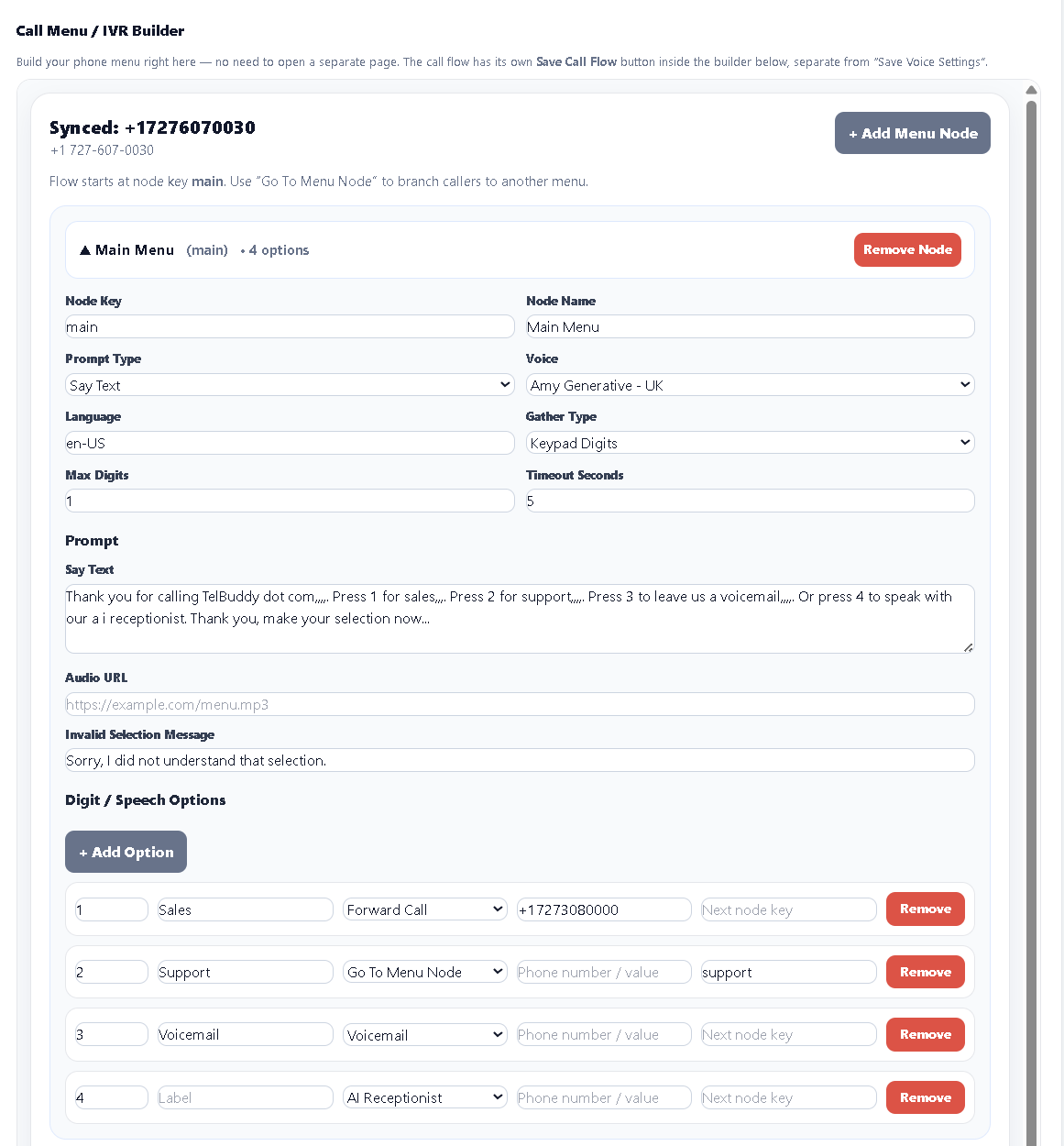
Visual IVR / Phone Menu Builder
"Press 1 for Sales, Press 2 for Support", built by clicking, not by hand-writing TwiML XML.
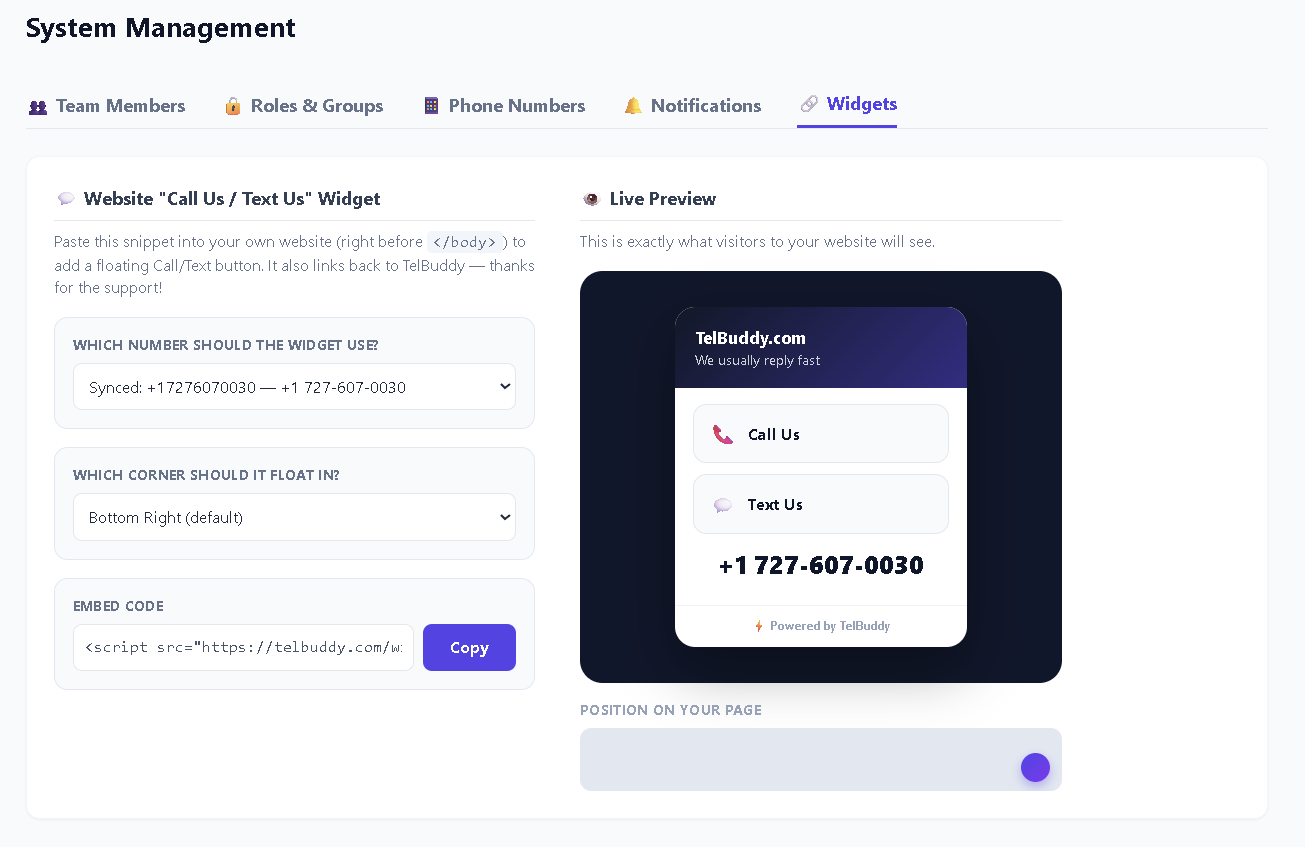
Website Chat for your own site
One script adds a chat to your site: live teammates, AI answers from your knowledge base, or a contact form, on the Twilio or Telnyx account you already have. Website Chat
The same widget still offers one-tap Call Us and Text Us buttons to your number. See Help.
What happens when someone calls, or texts
The carrier still carries the call. TelBuddy decides what happens to it, using rules you set per number.
A call comes in
Twilio or Telnyx asks TelBuddy what to do. TelBuddy checks the number's business hours in its own time zone, then runs whatever you chose under Answered By: ring a phone (or several at once), play a phone menu built on the flow map, hold the caller in a call queue until an agent picks up, take voicemail with a transcript, or hand the call to the AI receptionist if you have the add-on. After hours it can do something different: a closed message, a separate menu, an emergency number. Every call lands in the call log with its recording or transcript.
A text comes in
It appears in the shared inbox for that number, where anyone on the team with access to it can read the thread and reply from the same number, with templates, MMS, and a notes log per contact. With the AI add-on, the receptionist can draft the reply for you to approve (Draft) or answer on its own (Autopilot), and book appointments straight into Google Calendar from the conversation. Admins decide who sees which numbers, so a sales line and a support line can live on one account without the teams seeing each other's threads.
Bring Your Own Twilio, Explained
You rent their phone numbers and pay their marked-up per-minute and per-message rates, bundled into a per-seat subscription. Costs climb with every user and every message.
One flat TelBuddy subscription for the dashboard, with no per-message markup, and you pay Twilio directly at their wholesale rates. Plans scale by numbers and team seats, not by how much you use the platform.
Want the full breakdown? See TelBuddy vs. traditional business phone platforms.
Ready to connect Twilio or Telnyx?
Setup takes about two minutes. No coding, no migration, no losing your existing numbers.
Frequently Asked Questions
Is TelBuddy a replacement for Twilio?
No. TelBuddy runs on top of your own Twilio account. Think of it as the dashboard and AI layer Twilio doesn't give you out of the box, not a competing phone carrier.
Can I use TelBuddy with numbers I already own in Twilio?
Yes. Connect your Account SID and Auth Token, then sync your existing numbers, and nothing needs to be repurchased or ported.
Do multiple team members share one login?
No. You invite teammates as Admin or Agent users under your own company account, each with their own login, all sharing the same synced numbers and inbox.
What does TelBuddy actually charge for?
Only the software: the dashboard, inbox, IVR, forwarding, voicemail, and related core features. The AI receptionist is a separate optional subscription. Your carrier bills usage separately at their published rates.