Bulk-sync numbers
and webhooks
Stop pasting webhook URLs into the carrier Console one number at a time. Select the numbers to sync and TelBuddy configures messaging and voice webhooks for each one, with a live progress log. Works for Twilio and Telnyx numbers you already own. This is webhook setup, not A2P registration: Brand and Campaign filing still happens directly with the carrier using your legal details.
[16:42:05] SYNCING: +1 (727) 555-0134, configuring SMS webhook...
[16:42:07] SUCCESS: +1 (727) 555-0134, SMS webhook set.
[16:42:10] SYNCING: +1 (727) 555-0198, configuring voice webhook...
[16:42:12] SUCCESS: +1 (727) 555-0198, voice webhook set.
Skip the Console Clicking.
Every number needs its SMS and voice webhooks pointed at TelBuddy before it can send or receive anything through the dashboard. Doing that by hand in the Twilio Console, one number at a time, adds up fast once you have more than a couple.
One-Click Webhook Deployment
Select your numbers and TelBuddy points them at the right endpoints automatically. No manual URL typing in the Console.
Real-Time Processing Logs
Watch the sync happen live, one number at a time, with a clear log of exactly what got configured.
The Sync Advantage
- ✓ Messaging Service Aware: If a number's already attached to a Messaging Service in Twilio, its webhook stays in sync too. No separate step.
- ✓ Save Once, Reuse Anytime: Enter your Twilio credentials one time. Every future sync reuses them, no re-entering per number.
- ✓ Voice & SMS Unified: Configure both communication channels in a single sync pass.
See It In TelBuddy
The real synced numbers table, not a mockup.
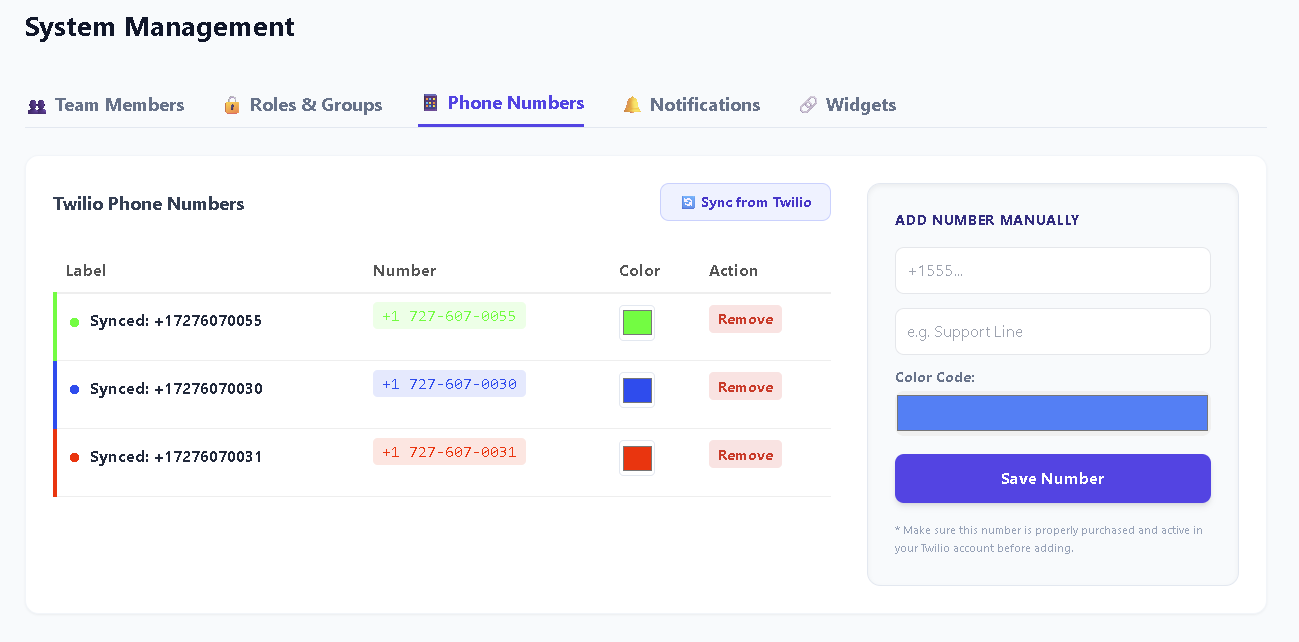
What a sync actually does.
Worth being precise, because this is an area where tools tend to imply more than they do.
Reads your numbers
Pulls the current list straight from your own carrier account using your stored credentials.
Sets the webhooks
Points messaging and voice at the correct endpoints for each number, one after another.
Logs every one
A live log shows each number as it is configured, so a failure is visible rather than silent.
What it does, and what it will never do.
The distinction matters because getting it wrong means assuming you are registered when you are not.
Handled for you
✓ Messaging webhook per number
✓ Voice webhook per number
✓ Re-syncing when you add numbers
✓ Credentials stored once, reused after
Yours to do
✕ Brand registration with the carrier
✕ Campaign registration and approval
✕ Attaching numbers to a Messaging Service
✕ Keeping your use case matching your traffic
No third-party dashboard can complete A2P registration for you, because it requires your business's real legal and tax details. Anything claiming otherwise is describing something that does not exist.
The same job, counted honestly.
For two numbers this is not worth automating. The maths changes quickly after that.
| In the Console | With sync | |
|---|---|---|
| Per number | Open it, paste two URLs, save | Nothing |
| Adding a number later | Repeat the whole thing | Re-run the sync |
| Mistyped URL | Silent failure you find later | Shown in the log |
| Credentials | Re-entered each session | Stored once |
A few honest answers.
Does this register my A2P 10DLC campaign?
No, and nothing can do that on your behalf. Brand and Campaign registration happens directly with your carrier using your real legal and EIN details. This explains the process.
What does sync actually change?
It points the messaging and voice webhooks for each number at the right endpoints. That is the part that is tedious by hand and identical every time.
Will it touch my Messaging Service?
It configures the webhooks. It does not attach numbers to a Messaging Service or alter your registration, because those are decisions with consequences you should make yourself.
How many numbers can it handle?
It is built for the case where clicking through the Console one number at a time stops being reasonable. The live log shows each number as it is configured.
Do I re-enter credentials every time?
No. They are stored once against your account and reused for every later sync.
Ready to Skip the Console?
Sync Your NumbersNext steps after registration
- A2P 10DLC explained
What the registration actually asks for, and the wording that passed.
- Shared team inbox
Where the messages arrive once your webhooks are synced.
- Connect Twilio
The two-minute setup that comes before syncing numbers.
- Using Telnyx instead
The same sync, on the other carrier.