Twilio A2P 10DLC: Stop Blocked Texts (Error 30034) in Plain English
If your business texts customers from a regular 10-digit US number, you've almost certainly run into A2P 10DLC, usually the hard way. Blocked messages, mysterious delivery failures, or a stern email from Twilio. You will usually meet it as Twilio error 30034: throttled or blocked messages until your Brand and Campaign are registered. This guide explains what A2P 10DLC is, why carriers require it, how to register step by step in the Twilio Console, and where TelBuddy fits afterwards, which is bulk webhook sync on numbers you already registered. TelBuddy does not submit Brand or Campaign registration for you.
What "A2P 10DLC" even means
Break the acronym apart and it's less scary:
- A2P = Application-to-Person. Any message sent by software rather than typed by a human on a phone. Appointment reminders, alerts, and automated replies are all A2P.
- 10DLC = 10-Digit Long Code. A standard local phone number (like
+1 727 555 0134), as opposed to a short code (12345) or a toll-free number.
So "A2P 10DLC" is simply the official program US carriers use to register businesses that send automated texts from local numbers. Since 2021, the major carriers (AT&T, T-Mobile, Verizon) have required this registration. Send unregistered A2P traffic and it gets throttled or blocked outright, often with Twilio error code 30034.
Why carriers force this on you
The short version: spam. Local numbers used to be a wide-open door for grey-route marketing blasts. A2P 10DLC ties every automated sender to a verified business identity and a declared use case, so carriers can trust legitimate traffic and filter the rest. Once you're registered, you also get higher throughput and better deliverability. It's a gate, but a gate that helps you once you're through it.
The two things you register: Brand and Campaign
This is the part that confuses everyone, so here it is clearly. Registration has two layers:
1. The Brand
Your Brand is your business identity. You submit your legal business name, EIN (tax ID), address, and contact details. The Campaign Registry (the industry body behind 10DLC) verifies that you're a real company. You do this once.
2. The Campaign
Your Campaign describes what you'll text people about: the use case. Examples: "Customer Care," "Appointment Reminders," "Two-Factor Authentication," "Account Notifications." You describe your message flow, provide sample messages, and confirm how customers opt in. Each phone number is then attached to a Campaign.
Think of it like this: the Brand is your driver's license, the Campaign is the specific trip you're registering for, and your phone numbers are the passengers along for the ride.
How to register, step by step
Here's the path most small businesses take through Twilio:
- Register your Brand. In the Twilio Console under Messaging → Regulatory Compliance → A2P 10DLC, submit your business details. A "Standard" Brand (with EIN) unlocks the best throughput; a "Sole Proprietor" path exists for very small senders without an EIN.
- Create a Campaign. Pick the use case that matches your real traffic, write 2 to 3 sample messages, and describe your opt-in. Be honest and specific here. Vague or mismatched Campaigns are the #1 reason registrations get rejected.
- Attach your numbers. Link each Twilio number to the Campaign so its traffic is recognized as registered.
- Wait for vetting. Brand verification is usually fast; Campaign approval can take a few days depending on the use case.
Once approved, your messages flow through the carriers' trusted A2P lanes.
The parts that trip people up
- Opt-in is not optional. Carriers want to see that recipients actually agreed to be texted. Your sample messages and opt-in description need to line up with reality.
- One Campaign per real use case. Don't jam transactional alerts and marketing into one vague Campaign. That invites rejection.
- Numbers must be attached. A registered Brand and Campaign do nothing if your sending numbers aren't linked to the Campaign.
- STOP/HELP must work. Honoring opt-out keywords isn't just polite; it's a compliance requirement carriers check for.
If your Campaign gets rejected
The single most common cause isn't anything about your business. It's that the reviewer opened your Terms of Service and Privacy Policy and found nothing in them about text messaging, or found consent language too vague to point at a real opt-in.
That part catches almost everyone the first time. Here's exactly what those two pages need to say, including the specific sentence about not selling or sharing mobile numbers that carriers look for, and the service-provider carve-out that keeps it accurate when you're handing numbers to a carrier to deliver the message.
Where TelBuddy fits
Registration itself (the Brand, the Campaign, attaching a number to it) happens directly in the Twilio Console. That's Twilio verifying who you are, and there's no dashboard that can do that step for you.
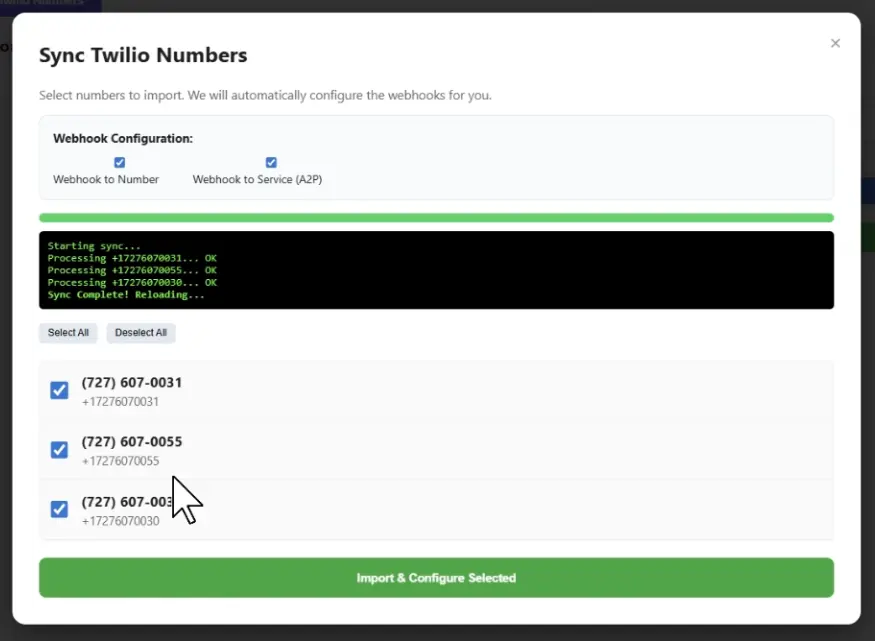
Where TelBuddy actually saves time is right after: once a number is registered and attached, TelBuddy's A2P 10DLC Bulk Sync configures its messaging and voice webhooks automatically, so you're not manually pasting URLs into the Console for every number, one at a time.
And because TelBuddy runs on top of your own Twilio account, your Brand, your Campaign, and your compliance registration stay entirely yours. We never pool your traffic with anyone else's, which is exactly how carriers expect a compliant sender to operate.
Once you're registered, see how TelBuddy connects to your Twilio account in about two minutes to skip the webhook copy-pasting.
Frequently asked questions
Is A2P 10DLC registration required?
Yes. For automated (application-to-person) texting from standard 10-digit US numbers, the major carriers require A2P 10DLC registration. Unregistered traffic is throttled or blocked, often with Twilio error code 30034.
What is the difference between a Brand and a Campaign?
The Brand is your verified business identity (legal name, EIN, address) and is registered once. The Campaign describes a specific messaging use case (like appointment reminders or customer care), including sample messages and opt-in. Phone numbers are attached to a Campaign.
How long does A2P 10DLC approval take?
Brand verification is usually quick. Campaign approval typically takes from a day to several days depending on the use case and how clearly your opt-in and sample messages are described.
Do I need an EIN to register?
A Standard Brand with an EIN gets the best throughput and deliverability. Very small senders without an EIN can use the Sole Proprietor path, but with lower limits.
Number Sync and A2P in TelBuddy
Sync your numbers and keep texting compliant on Twilio or Telnyx.
