How to Set Up Twilio Webhooks (The Easy Way)
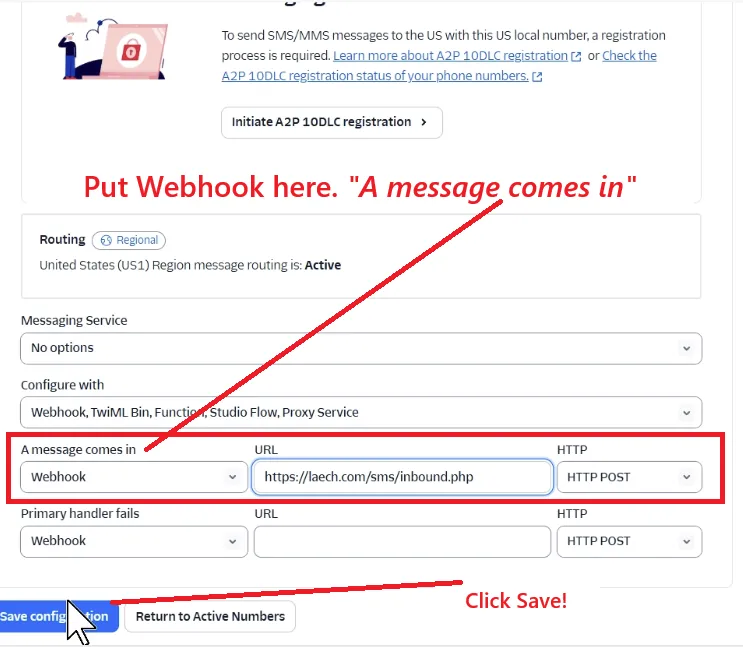
Webhooks are the single most common place a Twilio setup goes sideways. A number that "doesn't receive texts," an IVR that hangs up, an auto-reply that never fires. Nine times out of ten, it's a webhook that's missing, pointing at the wrong URL, or returning the wrong thing. Here's how they actually work, and how to get them right.
What a webhook actually is
A webhook is just Twilio making an HTTP request to a URL you control when something happens. That's the whole idea.
When someone texts your Twilio number, Twilio doesn't magically know what to do with the message. Instead, it looks at that number's configuration, finds the webhook URL you set, and sends an HTTP POST to it with the message details (who it's from, the body, any media). Your server reads that request, decides what to do, and replies. Same pattern for voice: an inbound call triggers a POST to your voice webhook.
So a webhook is a two-way conversation:
- Twilio → you: "Here's an event (a text arrived, a call came in). What should I do?"
- You → Twilio: an instruction, written in TwiML (Twilio's little XML language), like "reply with this message" or "play this menu."
The two webhooks that matter
Every Twilio phone number has configuration slots for:
- A Message Comes In: the messaging webhook. Fires on inbound SMS/MMS.
- A Call Comes In: the voice webhook. Fires on inbound calls.
You'll find these in the Twilio Console under Phone Numbers → your number → Configure. Each field takes a URL and an HTTP method (almost always POST).
What Twilio sends you
When the webhook fires, Twilio's POST includes form-encoded fields. For an inbound text, the ones you care about most are:
From: the sender's numberTo: your Twilio numberBody: the message textMediaUrl0,MediaUrl1…: attachments, if any (MMS)
Your endpoint reads these, does whatever your app needs (save it, alert your team, generate a reply), and responds.
What you send back: TwiML
Twilio expects your webhook to return TwiML, XML that tells it what to do next. A minimal "reply to a text" response looks like this:
<?xml version="1.0" encoding="UTF-8"?>
<Response>
  <Message>Thanks! We got your message and will reply shortly.</Message>
</Response>
If you don't want to auto-reply, you return an empty <Response></Response> and handle the message elsewhere. For voice, you'd return <Say>, <Dial>, or <Gather> verbs instead.
The mistakes that break webhooks
In roughly the order we see them:
- Wrong content type. Your endpoint must return
Content-Type: text/xml(orapplication/xml). Return HTML or plain text and Twilio can't parse it. The message silently fails. - Returning a non-200 status. If your server 500s (a PHP error, a bad database call), Twilio gets an error and the flow dies. Check your server logs first when things break.
- The URL isn't public.
localhostwon't work. Twilio has to reach your endpoint over the internet. During development, tunnels like ngrok expose a local server; in production it needs a real HTTPS URL. - HTTP method mismatch. The Console field is set to
GETbut your code only handlesPOST(or vice-versa). - The webhook was never set at all. A freshly purchased number has no webhook, so inbound events go nowhere. This is the most common "my number doesn't work" cause.
Do you even need to write this yourself?
Here's the honest answer: for a lot of businesses, hand-writing webhook endpoints and TwiML is solving a problem you don't actually want. You wanted a shared inbox, an auto-reply, or a phone menu, not an XML dialect and an HTTP debugging session.
That's the gap TelBuddy fills. When you connect your Twilio account, TelBuddy configures the messaging and voice webhooks on your numbers for you, points them at endpoints that already handle the TwiML correctly, and gives you a unified web app to actually read and reply to messages. You get the behavior you wanted without maintaining a single line of webhook code.
If you are a developer and you like living in TwiML, more power to you, and this guide should save you some debugging. If you're not, that's exactly who we built TelBuddy for. Either way, understanding what a webhook is makes everything downstream less mysterious.
Frequently asked questions
What is a Twilio webhook?
A webhook is an HTTP request Twilio sends to a URL you control when an event happens, for example an inbound text or call. Your server reads the event and responds with TwiML telling Twilio what to do next.
Why is my Twilio number not receiving messages?
The most common cause is a missing or misconfigured "A Message Comes In" webhook. Other frequent causes are returning the wrong content type (it must be text/xml), your endpoint returning a non-200 status, or the URL not being publicly reachable.
What is TwiML?
TwiML is Twilio's XML instruction language. Your webhook returns TwiML (like <Message>, <Say>, <Dial>, or <Gather>) to tell Twilio how to handle a message or call.
Do I have to configure Twilio webhooks manually?
No. A tool like TelBuddy connects to your Twilio account and configures the messaging and voice webhooks on your numbers automatically, so you never edit webhook URLs or write TwiML by hand.
TelBuddy Web App in TelBuddy
Run calls and texts on your Twilio or Telnyx account from a web app, without the carrier console.
