Home / Docs / Voice & Calling / Using the In-App Dialer
Using the In-App Dialer
The dialer is how outbound calls get made from inside TelBuddy: without opening a separate calling app, without granting browser microphone access, and without losing your business caller ID.
How the call actually connects. This is not browser-based (WebRTC) calling. It is a real phone call, placed the traditional way. The dialer rings your own phone first. Once you pick up, it bridges you to the number you are calling, with your TelBuddy number showing as the caller ID on the receiving end instead of your personal number. From the person you are calling, it looks exactly like a normal call from your business line.
Entering the number to call. You can type a number directly, paste one in, or use the on-screen keypad. All three work interchangeably, so there is no single "correct" way to enter it.
Your own phone number is remembered. The first time you use the dialer, it saves the phone number it should ring to reach you, so subsequent outbound calls do not require re-entering it every time.
Choosing which line you are calling from. If you have more than one number synced, the dialer lets you pick which one to use as the outbound caller ID for that specific call. This is useful if different numbers represent different departments, locations, or brands.
No carrier-specific behavior. The dialer works the same way whether the number you are calling from is on Twilio or Telnyx.
Features at a glance
- Rings your own phone first, then bridges to the number you are calling
- Shows your TelBuddy number as caller ID, not your personal number
- No browser microphone permissions needed: it is a real phone call, not WebRTC audio
- Works on any device that can take a phone call, including a desk phone
- Accepts typed, pasted, or keypad-entered numbers
- Remembers your own number after first use
- Choose which synced number to call from, per call
- Identical behavior on Twilio and Telnyx numbers
Why it rings you first
This is the part that surprises people, so it is worth being clear about what happens in what order:
- You press Call.
- Your phone rings. The call is coming from your own TelBuddy number, so that is what you will see on screen.
- You answer.
- Only then does the other person's phone start ringing.
- When they answer, the two of you are connected.
The upside of working this way is that the audio never touches your browser. There is no microphone permission to grant, no headset to configure, and nothing to go wrong with audio drivers or a flaky wifi connection. The call quality is whatever your phone's normal call quality is.
It also means the dialer works from a device that cannot do browser audio at all. You can start a call from a desktop and take it on your mobile, or on a desk phone, as long as that is the number you told it to ring.
Because your phone rings first, answer it even though you are the one placing the call. The person you are calling does not hear anything until you have picked up, so there is no rush and nobody is left waiting in silence.
Step by step: placing a call
-
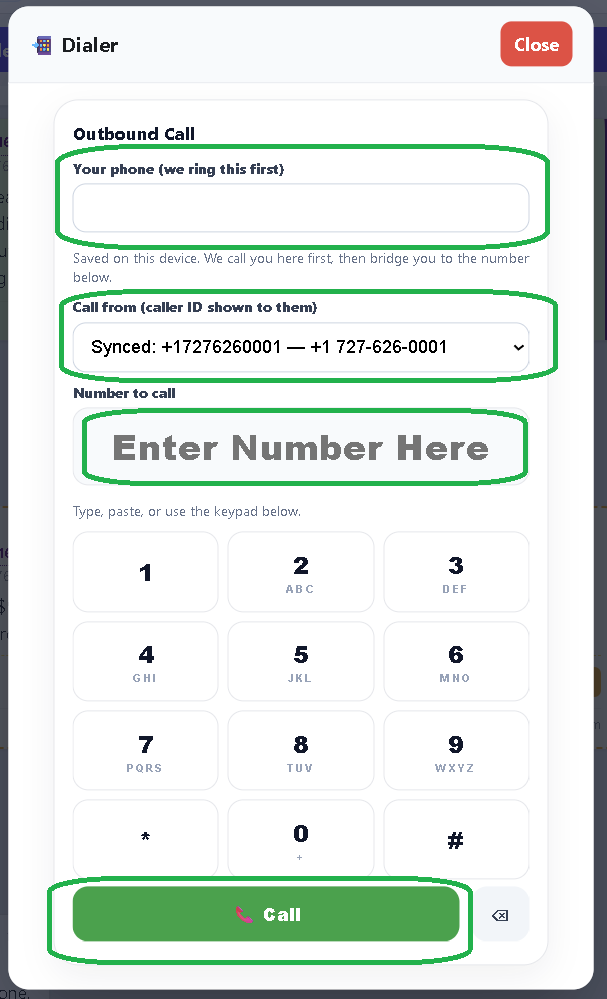
Fill in the three fields, then press Call
Open the Dialer and fill in, top to bottom:
- Your phone (we ring this first) is the phone you will actually talk on. Your mobile, a desk phone, wherever you are sitting.
- Call from (caller ID shown to them) is which of your synced numbers the recipient sees. If you only have one number, it is already selected.
- Number to call is the person you are trying to reach. Type it, paste it, or use the keypad below the field.
Press Call. Your own phone rings within a few seconds. Answer it, and the other person's phone starts ringing.
What gets remembered, and what does not
Your own phone number and the last caller ID you used are saved in the browser you are using, not on your account. That has two practical consequences:
- On the same computer, you fill those in once and the dialer remembers them from then on.
- On a different device or browser, or after clearing your browsing data, you will be asked for your phone number again. Nothing is lost, it just needs entering once more on that device.
This is also why the dialer does not need any setup before first use. There is nothing to configure in advance, you simply fill in the fields the first time and it remembers from there.
Entering numbers
The Number to call field is deliberately relaxed about formatting. All of these work:
(727) 555-0134
727-555-0134
7275550134
+17275550134
A plain ten-digit number is treated as North American. For anywhere else, include the country code with a leading plus, for example +442071838750.
The keypad below the field is there for touch devices and for when you are reading a number off something and want to tap it in without a keyboard. It types into the same field, so you can mix methods freely: paste an area code, tap the rest, whatever is fastest.
Choosing the right caller ID
If you have several numbers synced, the Call from dropdown decides which one the recipient sees. Worth thinking about, because it affects what happens when they call back:
- A callback goes to that number, and gets handled by whatever routing that number has: its phone menu, its forwarding, its business hours.
- So calling a customer from your sales line means their callback lands in the sales flow, not on whoever happened to dial out.
If different numbers represent different locations or brands, this is the setting that keeps the outbound call consistent with the rest of that line.
Troubleshooting
My phone never rings. Check the number in Your phone. It is the most common cause, and easy to miss since it is remembered from last time and easy to scroll past. Also worth confirming your phone is not blocking calls from unknown numbers, since the incoming call arrives from your TelBuddy number rather than a saved contact.
The person I called saw the wrong number. The Call from dropdown was set to a different line. It remembers your last choice, so it can carry over from a previous call.
I answered but nobody was there. The other end had not picked up yet. The call reaches them only after you answer, so a few seconds of silence at the start is normal rather than a fault.
Nothing happens when I press Call. All three fields need a value. If your phone number or the number to call is blank, the call is not attempted.