Home / Docs / Voice & Calling / Voicemail: Setup and Playback
Voicemail: Setup and Playback
When a call is not picked up by forwarding or handled by the AI receptionist, voicemail is there to make sure it is not simply lost. A recorded message is captured and saved directly to that number's activity in TelBuddy.
No separate voicemail system to check. Recordings play back right from the TelBuddy dashboard. There is no PIN to remember, no separate voicemail app, and no dialing into a mailbox from your phone. Whoever has access to that number's activity in TelBuddy can listen to a message the moment it is recorded.
Voicemail is rarely the only setting in play. It is most useful combined with other routing rules rather than left on all the time. For example, paired with Business Hours Routing so calls only reach voicemail outside of when you are actually open, while during business hours the same number might forward to a person or route through the AI receptionist instead. See Business Hours Routing.
When it becomes the final fallback. If forwarding is set up but both the primary and backup do not answer, voicemail is a natural place for the call to land next, rather than the caller getting nothing at all.
Features at a glance
- Recorded messages saved automatically when a call is not otherwise handled
- Playback directly from the TelBuddy dashboard: no external app or PIN
- Your own greeting, in your own words, rather than a generic system message
- Works alongside Business Hours Routing to apply only during the hours you choose
- A useful fallback after forwarding goes unanswered
Two ways to use voicemail
Voicemail shows up in two different places in Voice Settings, and it helps to know which one you want.
Voicemail Only is a Voice Mode. Every call goes straight to the recording, with no ringing first. This suits a number that is not meant to be answered live, such as an after-hours line or a dedicated message line.
Enable voicemail fallback is a checkbox that works alongside forwarding. The call rings your phones first, and only lands in voicemail if nobody picks up. This is the more common setup for a normal business line.
They are not alternatives to each other so much as answers to different questions. If you want the phone to ring first, use forwarding with the fallback checkbox. If you never want it to ring, use Voicemail Only.
Step by step: Voicemail Only setup
-
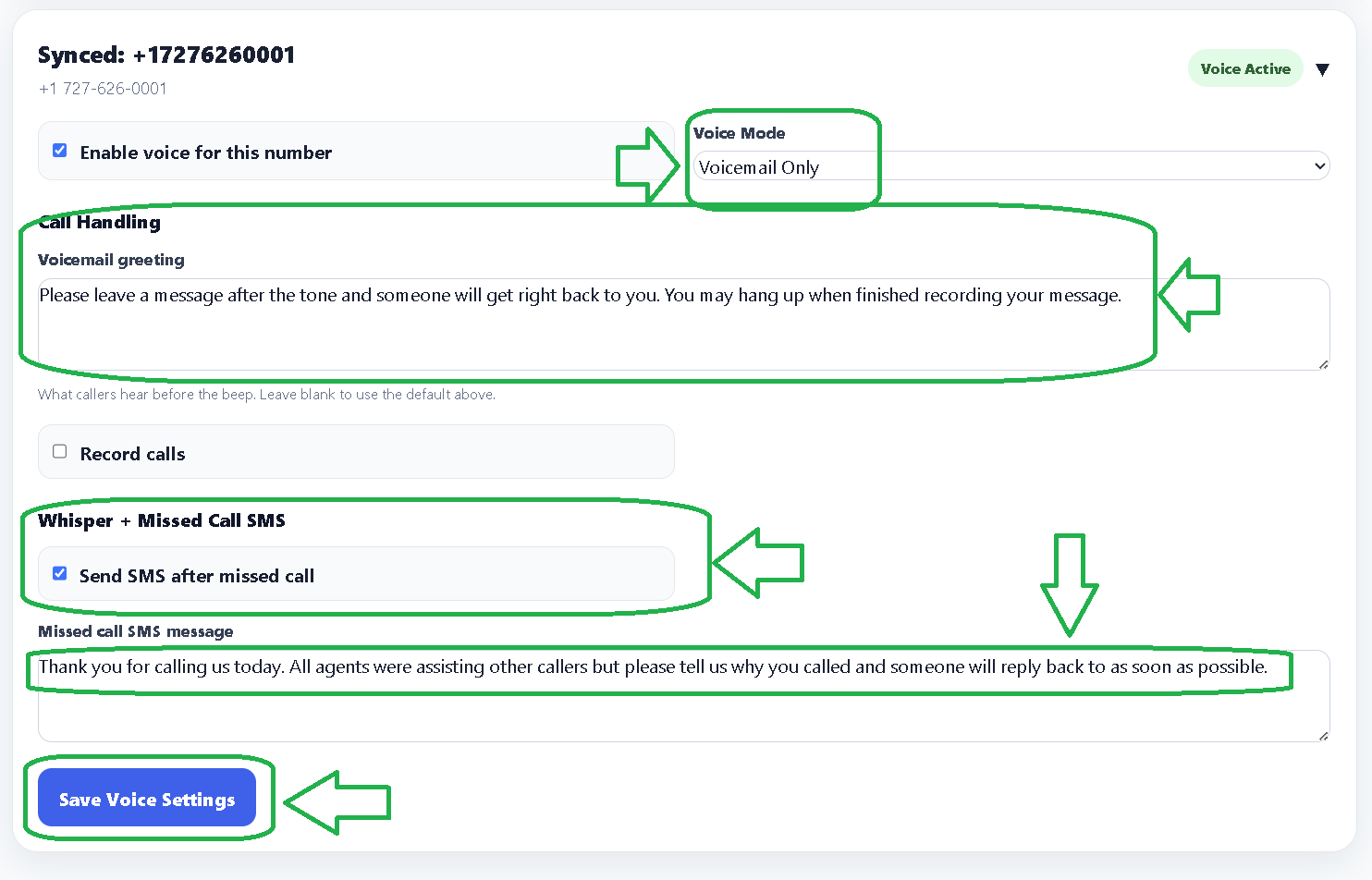
Enable voice, then choose Voicemail Only
In Voice Settings, pick your number from Select Number to Edit and make sure Enable voice for this number is ticked.
Set Voice Mode to Voicemail Only. Calls to this number will now be answered immediately with your greeting, then record.
Fill in the Voicemail greeting field with what you want callers to hear. If you leave it blank, TelBuddy plays a generic message instead, so it is worth writing something in your own words. Click Save when done.
Writing a greeting that works
The greeting is read aloud, so write it the way you would say it rather than the way you would type it. A few things worth including:
- Who the caller has reached. "You have reached Gulf Coast Watersports" reassures someone they dialed the right number.
- When to expect a reply. "We will get back to you within one business day" prevents a second call an hour later.
- What to leave. Asking for a name, number, and a sentence about what they need makes the callback far more useful.
A workable example: "Thanks for calling Gulf Coast Watersports. We cannot take your call right now, so please leave your name, number, and a quick message, and we will get back to you within one business day."
Recordings are capped at two minutes. That is plenty for a normal message, but worth knowing if you invite callers to explain something at length.
Listening to messages
Recordings appear in the dashboard automatically, with no separate mailbox to dial into. Open the voicemail inbox to play a message back, and anyone with access to that number's activity can listen to it.
Because playback is in the dashboard rather than tied to a handset, a message left on a number several people share is available to all of them at once, rather than sitting on whichever phone happened to be forwarded to.
Pairing voicemail with your other settings
Voicemail is at its most useful as the last step in a chain rather than a standalone setting:
- With forwarding. Set your primary and backup numbers, tick Enable voicemail fallback, and callers who go unanswered land in voicemail instead of hearing a dead end.
- With business hours. Set the after-hours behavior to voicemail, and the same number can ring your team during opening hours while quietly taking messages the rest of the time.
- With a phone menu. Any option on an IVR menu can be pointed at voicemail, which is how you build a "press 3 to leave a message" choice.
The Send SMS after missed call setting only applies to calls that were forwarded and went unanswered. It does not currently fire for calls that go straight to voicemail in Voicemail Only mode, because no forwarding attempt happened. If you want an automatic text to every caller who leaves a message, use forwarding with voicemail fallback rather than Voicemail Only.