Home / Docs / Voice & Calling / Setting Up Call Forwarding
Setting Up Call Forwarding
Call forwarding is set per number, and it is built around a simple idea: a call should not just fail or ring forever if the first person does not pick up.
Primary and backup, in that order. Every number can have a primary forwarding destination and an optional backup. If the primary does not answer, whether the line is busy, the phone is off, or there is no signal, the call automatically tries the backup next, without the caller having to hang up and call again.
The whisper message. Before the call actually connects to whoever answers, a short message plays to them, not the caller, a quick heads-up about which line the call is coming in on. This matters most once you have more than one number forwarding to the same person. Without it, someone answering a personal phone that receives calls for three different business lines has no way to know which business they are representing the moment they say "hello."
Configured independently per number. There is no single forwarding setup for your whole account. A number handled by one person can forward differently than a number shared by a team, and changing one number's forwarding rules never affects any other.
Features at a glance
- Primary and backup forwarding destination per number
- Automatic fallback to backup if the primary does not answer
- Ring several phones at once by separating numbers with commas
- Whisper message plays only to whoever answers, identifying the line before they speak
- Optional voicemail fallback if nobody picks up at all
- Fully independent settings per number: no account-wide forwarding rule
What a caller actually experiences
It helps to know the order of events before setting anything up, because most of the fields below map directly onto one step in this chain:
- Someone calls your TelBuddy number.
- Your primary number rings, for as long as Call timeout seconds allows.
- If nobody answers, your backup number rings, if you have set one.
- If nobody answers that either, the caller goes to voicemail, if voicemail fallback is enabled.
- If voicemail is off, the caller hears a short "nobody is available" message and the call ends.
Every step after the first is optional. A number with only a primary and nothing else is a perfectly valid setup, it just ends at step 2.
Step by step: how to enable call forwarding
-
Make sure voice is enabled first
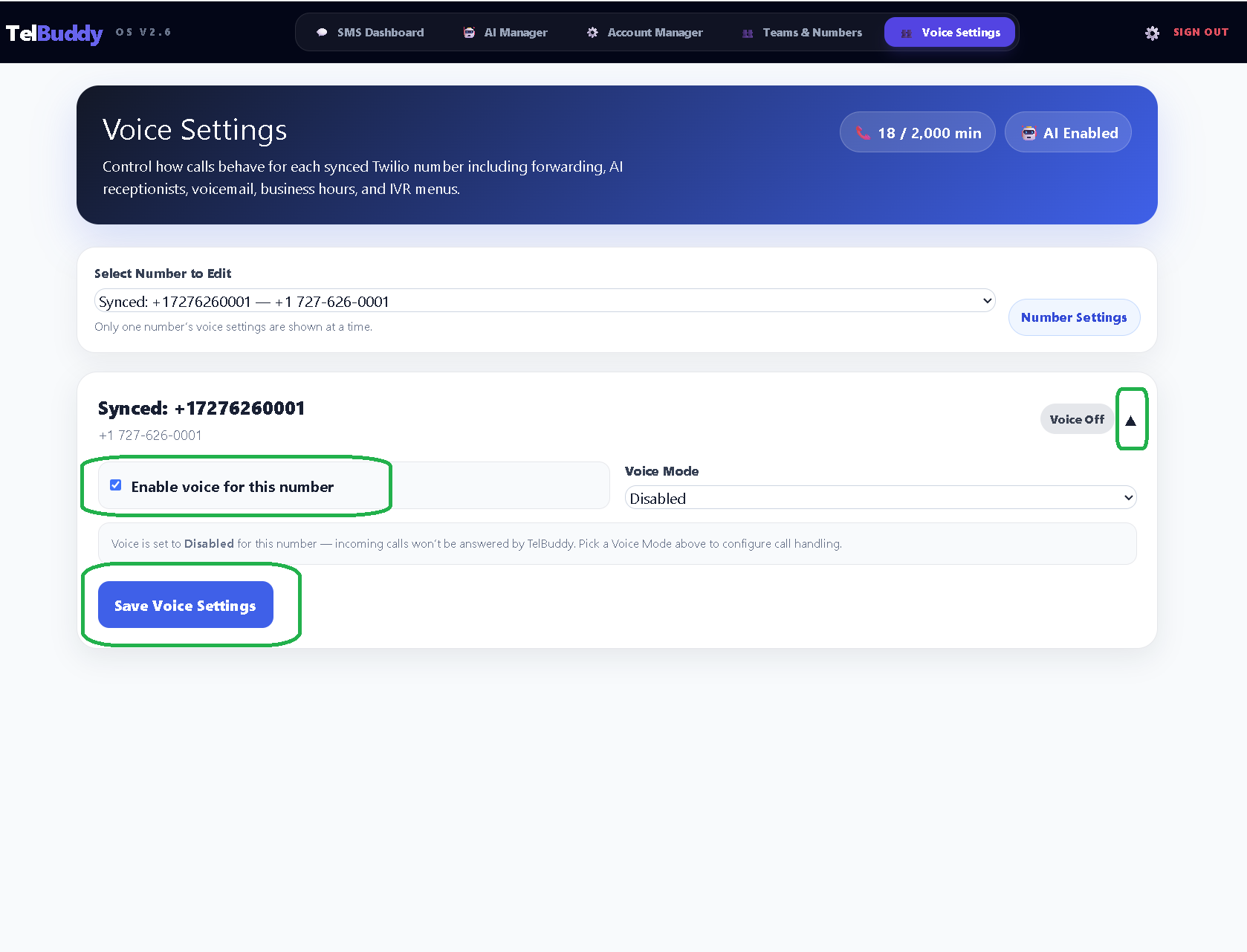
Open Voice Settings, pick your number from the Select Number to Edit dropdown, and confirm Enable voice for this number is ticked.
Nothing below will do anything until this is on. If calls to your number currently do nothing at all, this is almost always why.
-
Choose Forward Calls, fill in the details, then save
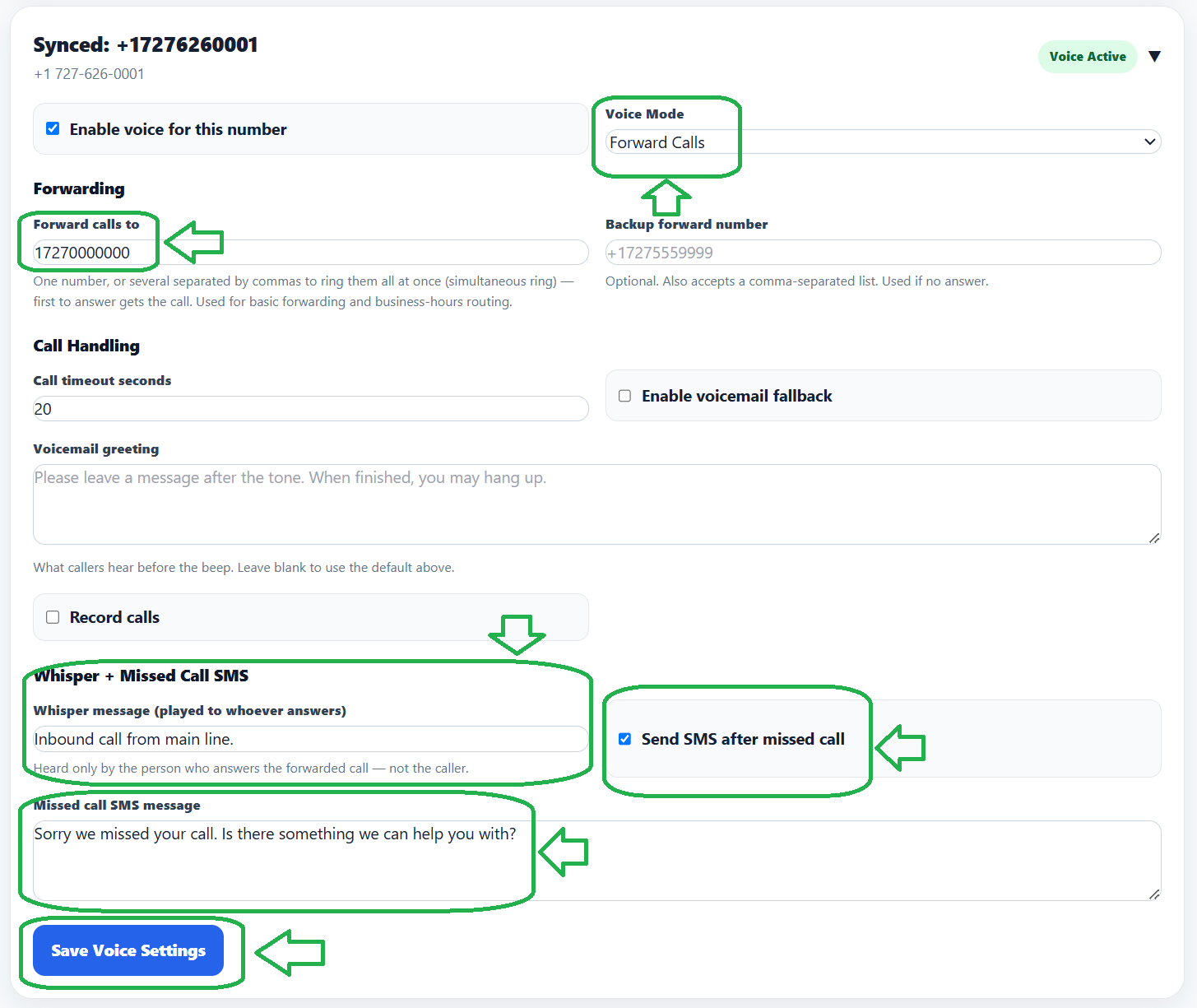
Set Voice Mode to Forward Calls. This tells TelBuddy to pass calls straight through to a real phone rather than answering with a menu or voicemail.
Then fill in:
- Forward calls to is your primary destination. Enter it in full international format, such as
+17275551234. You can also enter several numbers separated by commas, and they will all ring at the same time, with the first person to pick up taking the call. - Backup forward number is tried only if the primary does not answer. Leave it blank if you do not want one.
- Call timeout seconds is how long each destination rings before giving up. The default is 20 seconds, and anything from 5 to 60 is allowed. Around 20 to 25 is usually right: much shorter and you cut off people reaching for their phone, much longer and callers assume nobody is there.
- Whisper message (played to whoever answers) is the short line your team hears before being connected. Keep it to a few words that identify the line, such as "TelBuddy sales call."
- Send SMS after missed call texts the caller automatically if the call is not answered, using the Missed call SMS message you write. This is one of the highest-value settings on the page, because a caller who would otherwise have moved on to a competitor will often just reply to the text.
- Enable voicemail fallback catches anyone who is still unanswered at the end of the chain.
Click Save when you are done. The change is live immediately for the next caller.
- Forward calls to is your primary destination. Enter it in full international format, such as
Ringing several phones at once
The Forward calls to field is not limited to one number. Entering more than one, separated by commas, rings them all simultaneously and connects whoever picks up first:
+17275551234, +17275559876, +18135550147This is usually a better fit than a backup number for a small team, because nobody has to wait through a full timeout before the second phone starts ringing. Use the backup field instead when there is a genuine order of preference, for example a shop phone first and the owner's mobile only if the shop does not answer.
You can enter numbers with or without formatting. (727) 555-1234 and +17275551234 are both understood, and a plain ten digit number is treated as North American.
Numbers outside North America need the full country code and a leading plus, such as +442071838750. A number without a country code cannot be dialed reliably and will be skipped.
Writing a good whisper message
The whisper exists to answer one question for whoever picks up: which business is this call for? A few things that work well in practice:
- Keep it short. The caller is waiting in silence while it plays. Three or four words is plenty.
- Name the line, not the caller. "Sales line" or "Watersports rentals" is far more useful than the caller's number, which the answerer can already see.
- Make it distinguishable by ear. If you have several lines forwarding to one phone, the whispers should sound clearly different from each other, not vary by one word.
Good examples: "TelBuddy sales call", "Rentals line, incoming", "Support call for the shop".
Troubleshooting
Calls go straight to voicemail without ringing. The forwarding destination's own phone is likely off, out of signal, or has its own do-not-disturb enabled. The carrier answers on that phone's behalf, which TelBuddy sees as the call being answered.
The whisper does not play. The whisper only plays on forwarded calls. If the number is set to a call menu or the AI receptionist rather than Forward Calls, there is no forwarded leg for it to play on.
Callers say it rings forever. Check Call timeout seconds. If it is set near the 60 second maximum and you also have a backup number, a caller can be waiting close to two minutes before reaching voicemail.
Nothing happens at all when the number is called. Go back to step 1. An unticked Enable voice for this number is by far the most common cause.