Home / Docs / Voice & Calling / Business Hours Routing
Business Hours Routing
A call at 2pm on a Tuesday and a call at 2am should often be handled completely differently. Business Hours Routing is what makes that automatic instead of something a person has to remember to switch manually.
It sits on top of whatever else you have set up. Business hours is not a separate way of answering calls that replaces your other settings. It is a layer you switch on over them. Your Voice Mode decides what happens while you are open, and business hours only takes over when a call arrives while you are closed.
How it decides "open" versus "closed." You set your actual operating hours for a number, and every inbound call is checked against that schedule the moment it arrives.
- During open hours, the call is handled by whatever Voice Mode you chose: forwarding to your team, a phone menu, or straight to voicemail.
- Outside open hours, the same number can behave completely differently: taking a message, forwarding to an on-call number instead of the daytime one, answering with a different phone menu, handing the call to your AI receptionist, or playing a closed message.
Set independently per number. A number that is genuinely staffed around the clock does not need to follow the same open and closed schedule as one that is only covered during the day. Each number's hours, and what happens on either side of them, are configured on their own.
Why this matters beyond convenience. Callers who reach a business after hours and get a relevant message come away with a very different impression than callers who get the exact same daytime greeting at 11pm, or worse, a phone that just rings out.
Features at a glance
- Real operating hours, set per day, per number
- Works with call forwarding, voicemail, or a phone menu
- Closed hours can take a message, forward elsewhere, run a different phone menu, hand off to the AI receptionist, or play a closed message
- A separate after-hours number, so an on-call mobile does not have to be your daytime line
- Your own closed message, in your own words
- Hours are evaluated in each number's own time zone
- Independent schedule and behavior per number: no single account-wide setting
Which modes it works with
Business hours can be switched on for Forward Calls, Voicemail Only, and Simple Call Menu / IVR.
It is not offered for the AI Voice Receptionist as a Voice Mode. The AI answers every call and can explain that you are closed as part of the conversation, so putting a schedule in front of it would only cut off calls it is perfectly capable of handling.
That is a separate question from using the AI as your after-hours destination, which is fully supported and covered below. The distinction is worth holding onto:
- AI as your Voice Mode means the AI answers every call, at every hour. No schedule involved.
- AI as your after-hours behavior means your team answers during opening hours and the AI picks up the rest. That option appears in the business hours panel whenever your account has the AI add-on.
The time zone is per number, and it matters
Business hours are checked against the time zone set on the number itself, not your account or your browser. A number set to America/New_York closing at 5pm closes at 5pm Eastern, regardless of where you happen to be when you set it up.
This is deliberate, because a company can run offices in more than one zone. If a number has never had a zone chosen, it defaults to America/New_York.
If your hours seem to apply at the wrong time, check the number's time zone on the Teams and Numbers page before changing the hours themselves. A schedule that looks an hour or two off is almost always a zone mismatch rather than a wrong opening time.
Step by step: setting up business hours routing
-
Set up what happens during open hours first
In Voice Settings, pick your number and make sure Enable voice for this number is ticked.
Choose the Voice Mode you want during opening hours, and fill it in as normal:
- Forward Calls and a number in Forward calls to, which accepts several numbers separated by commas so they all ring at once. See call forwarding.
- Simple Call Menu / IVR if callers should hear a menu. See building your first menu.
- Voicemail Only if the line simply takes messages during the day too.
Get this working on its own before adding hours. It is much easier to tell what is wrong when only one thing is new.
-
Open the business hours settings
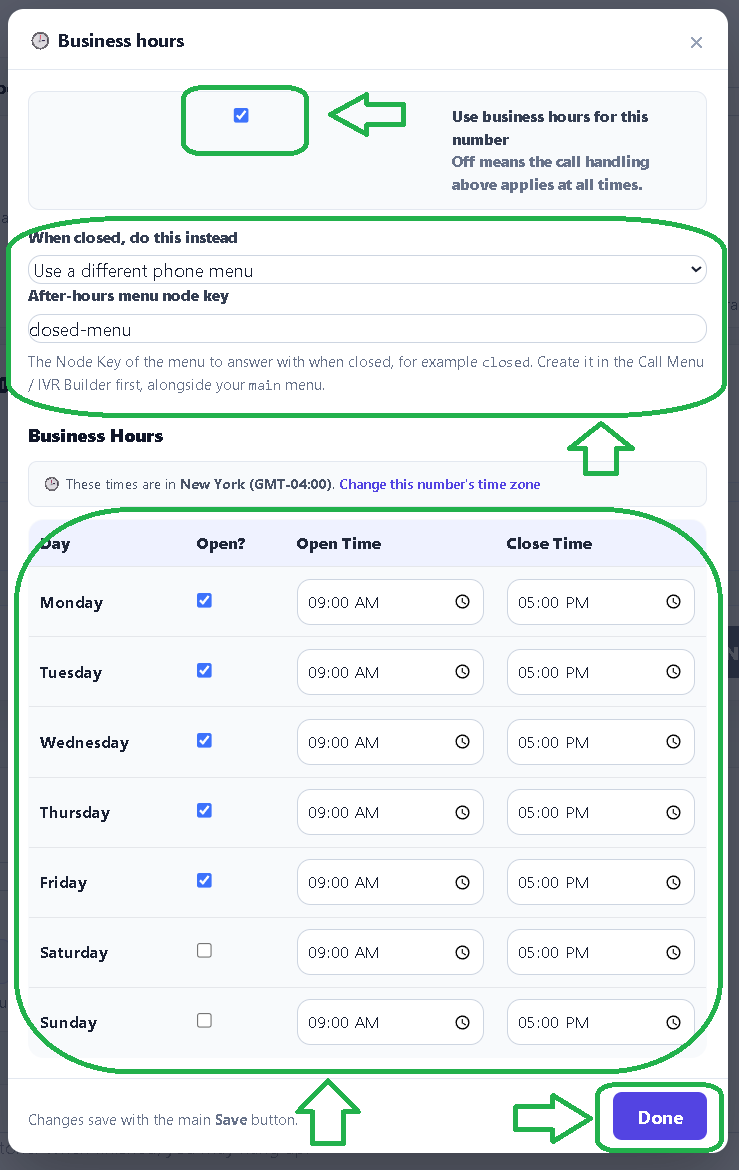
Click 🕒 Configure business hours. The label next to it shows (on) or (off) so you can tell at a glance whether a schedule is currently applied to this number.
In the panel that opens, tick Use business hours for this number. Leaving it off means your Voice Mode applies at all times, which is the correct setting for a line that never changes behavior.
-
Choose what happens when you are closed
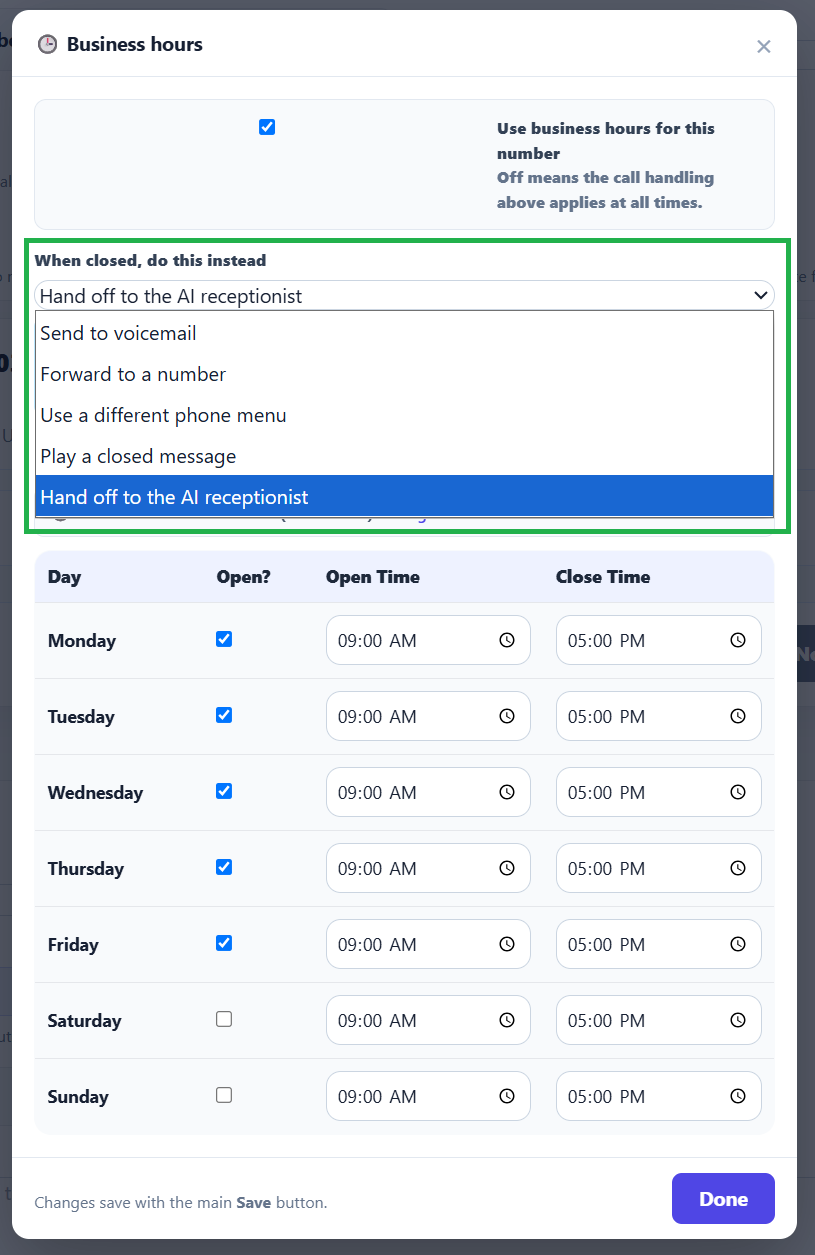
Pick one option under When closed, do this instead. Only the field that option actually needs is shown, so the panel stays short:
- Send to voicemail takes a message. Nothing else to fill in.
- Forward to a number reveals an After-hours number field for your on-call or emergency line. Leave it blank to reuse the daytime forwarding number instead.
- Use a different phone menu reveals a node key field. This is how you run one menu in hours and another out of hours.
- Hand off to the AI receptionist lets the AI answer out of hours. This option only appears if your account has the AI add-on.
- Play a closed message reveals a text box for exactly what callers hear. Leave it blank for the default wording.
-
Set your hours, then save
Set the open and close time for each day. Days you are closed entirely should be left unticked rather than given a zero-length window, which is clearer to come back to later.
Click Done to close the panel, then Save on the page itself. Nothing is stored until you press Save, so closing the panel on its own will not lose your work or apply it.
This is also a good moment to fill in Missed call SMS message. A caller who rings during open hours and does not get an answer will be texted automatically, which recovers a good number of people who would otherwise have moved on.
Running a different menu after hours
This is the setup most businesses with a phone menu actually want: the full menu during the day, a shorter one at night.
Menus are identified by their Node Key, and a number can hold as many as you need side by side in the same builder. So the setup is:
- In the Call Menu / IVR Builder, add a second menu node with a key such as
closed, and give it whatever prompt and options suit out of hours. Something short works best, for example "We are closed right now. Press 1 to leave a message, or press 2 for the emergency line." - In the business hours panel, choose Use a different phone menu and enter
closedas the node key.
During opening hours callers get your main menu. Outside them they get closed. Both live in the same builder and are edited the same way.
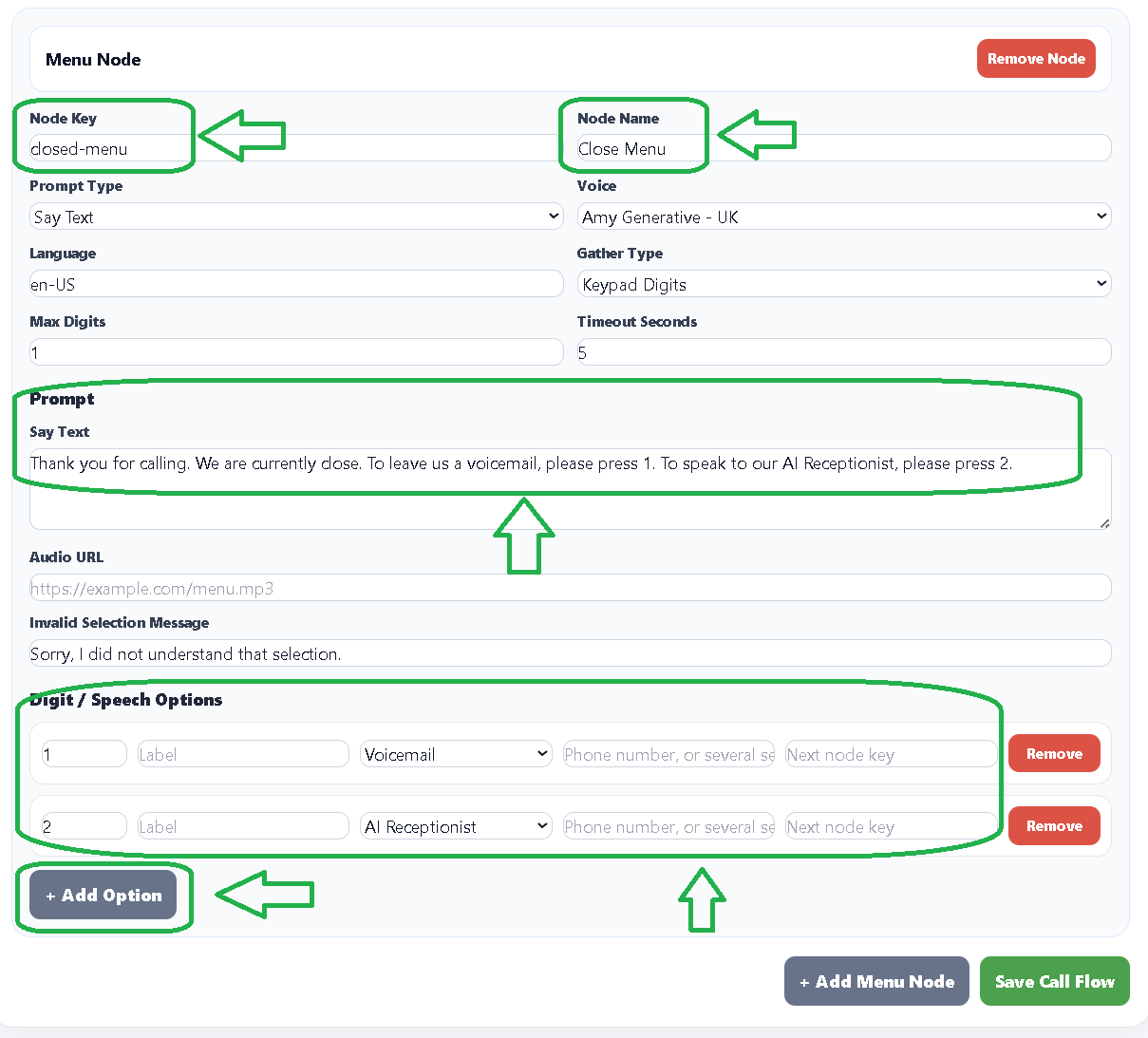
Build the after-hours menu before pointing at it. The link is made by typing a node key, so the menu needs to exist first for the pointer to reach anything.
Letting the AI cover your closed hours
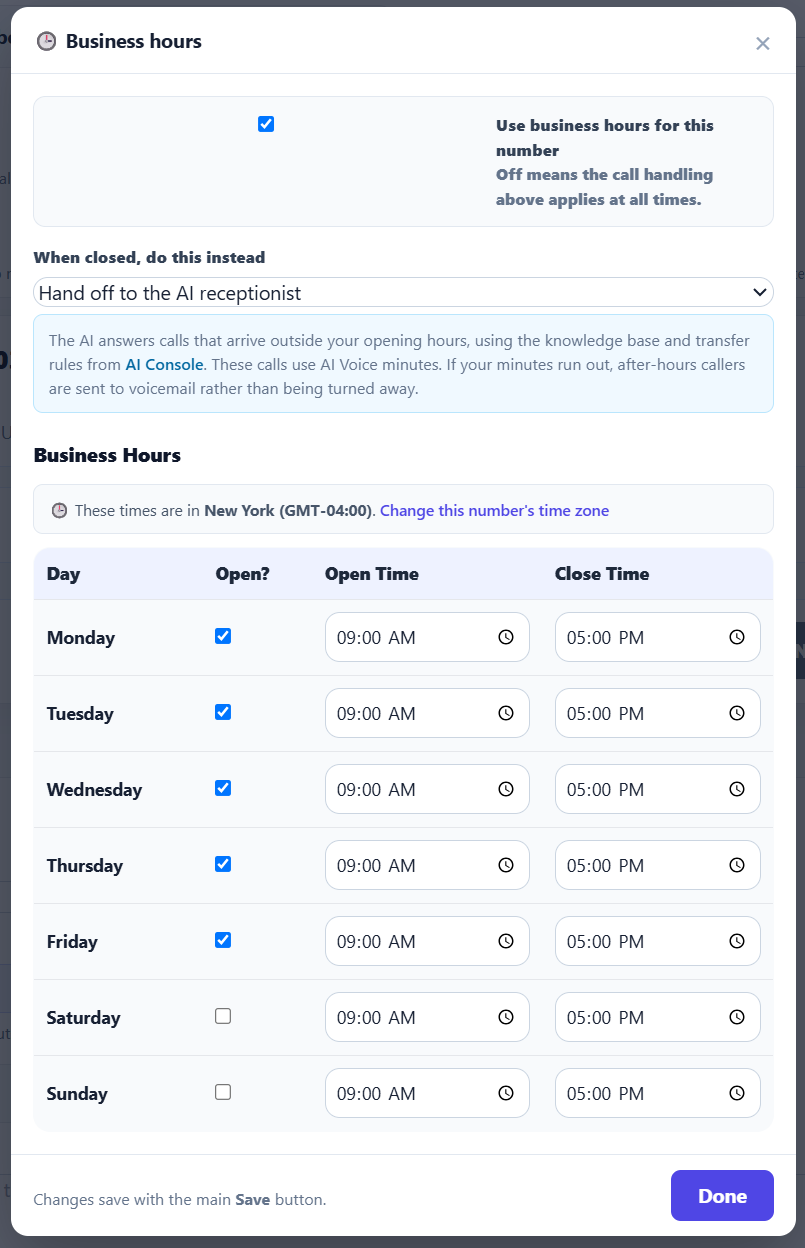
If you have the AI add-on, this is often the most useful after-hours setting available: your team answers during opening hours, and the AI picks up everything outside them.
Unlike voicemail, the AI can hold an actual conversation at 11pm. It answers questions from your knowledge base, takes down what the caller needs, and follows your transfer rules if the call genuinely warrants reaching somebody. The caller gets a real interaction rather than a beep, and you get a transcript rather than a recording to sit through.
To set it up, choose Hand off to the AI receptionist under "When closed, do this instead." There is nothing else to fill in here. The AI uses the same knowledge base, voice, and transfer rules you configured in AI Console, so it behaves consistently with any other AI calls on your account.
After-hours AI calls use AI Voice minutes, the same as any other AI call. If your minutes run out, after-hours callers are quietly sent to voicemail instead of being turned away, so a depleted balance never means a dropped call.
Choosing your after-hours behavior
The five options suit genuinely different businesses, and it is worth picking deliberately rather than leaving the default.
Send to voicemail fits most businesses. The caller gets to explain what they need, and you get a message with their number rather than a bare missed call. Pair it with a voicemail greeting that says when you reopen, so nobody is left guessing.
Forward to a number fits emergency and on-call work: locksmiths, plumbers, medical practices, anything where a 2am call is a real customer rather than a wrong number. Because the after-hours number is separate from your daytime one, the shop phone can ring in hours while the on-call mobile rings overnight. Be honest with yourself about whether somebody will actually answer, because a call that rings out at 2am is worse than one that went cleanly to voicemail.
Use a different phone menu fits businesses that still want to route after-hours callers rather than pool them all into one mailbox. Separating "leave a message" from "this is genuinely urgent" is the common reason to reach for it.
Hand off to the AI receptionist fits businesses that get real enquiries outside opening hours and would rather answer them than collect them. It is the only option that can actually help a caller at midnight instead of asking them to wait.
Play a closed message fits businesses where after-hours calls are genuinely not actionable. It is the shortest interaction of the five, and the caller knows immediately where they stand rather than waiting through a full ring cycle. Say when you reopen, since that is the one thing the caller actually wants to know.
Common setups
Standard weekday business. Voice Mode set to Forward Calls, open 9 to 5 Monday to Friday, voicemail outside those hours. This covers most retail and service businesses.
Menu by day, message by night. Voice Mode set to Simple Call Menu / IVR so callers get your full menu in hours, with after-hours set to voicemail. One line, two clearly different experiences.
Humans by day, AI by night. Forward Calls during opening hours so your team takes everything live, with after-hours set to hand off to the AI receptionist. Nobody works nights, and nobody reaches a dead end either.
Emergency cover. Forward Calls to the shop number during hours, after-hours set to forward to an on-call mobile. The two numbers are separate fields, so nobody has to remember to swap one for the other.
Weekend-only line. A number that is only staffed Saturday and Sunday is just business hours with the weekday boxes unticked. There is no separate feature needed for it.
Testing your schedule
Hours are easy to get subtly wrong, and the failure mode is silent, so it is worth a deliberate check:
- Call during open hours and confirm the call is handled the way your Voice Mode says it should be.
- Temporarily narrow the day's hours to a window that has already passed, save, and call again to confirm the after-hours path behaves the way you chose. Then set the real hours back.
- If you use Forward to a number, actually let it ring out once so you know what a caller experiences when nobody picks up.
- If you use Use a different phone menu, press each option on the after-hours menu, including a key you did not configure.
- If you use Hand off to the AI receptionist, have a short conversation with it rather than just confirming it answers. That is the quickest way to spot a gap in the knowledge base.
Testing by waiting until after hours is the slowest possible way to find a mistake in your schedule. Narrowing a day's window for two minutes tells you the same thing immediately.