Home / Docs / Twilio & Telnyx / Running Twilio and Telnyx at the Same Time
Running Twilio and Telnyx at the Same Time
You're never required to pick one carrier for your whole account: provider is a setting on each individual phone number, which means a single TelBuddy dashboard can run some numbers through Twilio and others through Telnyx simultaneously, all inside the exact same shared inbox and the same team.
What actually stays unified. Regardless of how many numbers you have split across the two carriers, there's still just one inbox, one set of contacts, one team of logins, and one dashboard. A teammate doesn't need to know or care which carrier a given conversation's number happens to be on to answer it. It looks and behaves the same either way.
Why a business would run both at once. Two common reasons: redundancy, so your entire operation doesn't depend on a single carrier's uptime or account health, and flexibility, using whichever carrier makes more sense for a specific number, region, or use case rather than being locked into one choice for every future number you add.
Adding numbers on either carrier. Numbers on each carrier are synced independently, see Connecting Your Twilio Account and Connecting Your Telnyx Account, and both syncs can be set up on the same account without conflicting with each other.
Features at a glance
- Provider is chosen per number, not per account
- Twilio and Telnyx numbers share one inbox, one contact list, and one team
- Reduces dependence on a single carrier's uptime or account
- Lets you choose the best-fit carrier per number rather than committing to one for everything
- Both carriers can be connected and synced on the same TelBuddy account at once
Setting it up
There is no switch to flip. Running both is simply what happens when you sync from both.
-
Open Team & Numbers
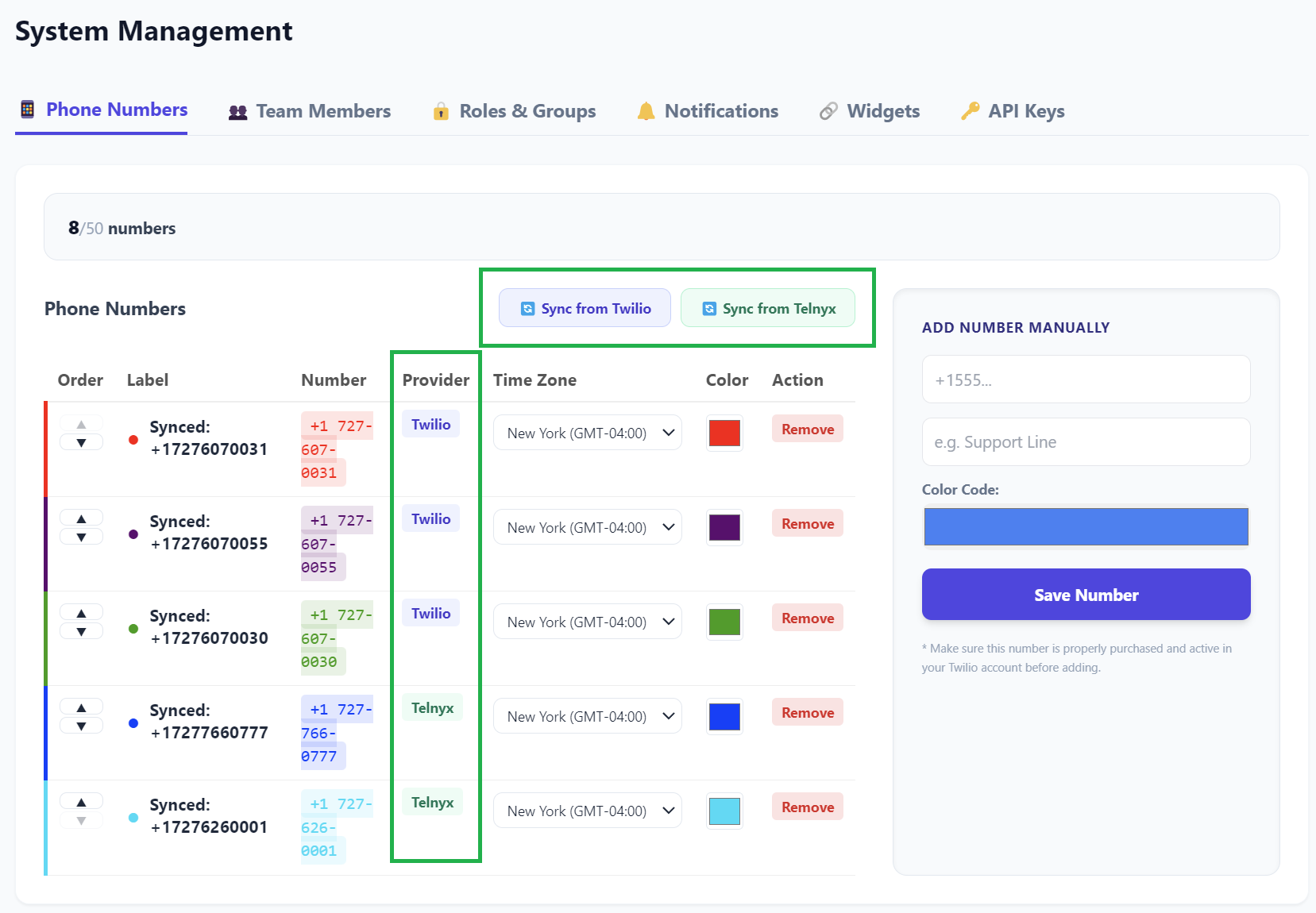
Both sync buttons live side by side at the top of the page: Sync from Twilio and Sync from Telnyx. Connecting one does not disable the other.
-
Sync your first carrier
Follow whichever guide applies: connecting Twilio or connecting Telnyx. Pick the numbers you want to import.
-
Sync the second carrier the same way
Same page, other button, same process. Its numbers appear in the same list alongside the first carrier's, each tagged with its own provider badge.
-
Configure each number as usual
Voice mode, forwarding, business hours, IVR, AI: all set per number in Voice Settings, exactly as they would be on a single-carrier account. Nothing changes because a neighbouring number is on the other carrier.
Your plan's number limit counts every number together, not per carrier. Two carriers does not mean twice the slots, and the sync screen shows how many you have left before you import.
What "unified" actually means day to day
Worth being concrete, because "one inbox" is the sort of claim that deserves detail.
One inbox, all numbers. Conversations arrive in the same place regardless of carrier. Nobody switches views or filters by provider to see everything.
One contact record per person. If a customer has texted a Twilio number and called a Telnyx one, they are one contact, with one notes log and one history.
One team. Logins, permissions, and access work across every number. Adding a teammate does not mean adding them twice.
One set of features. Templates, AI texting, the dialer, business hours, IVR menus, the AI receptionist: all available on every number, whichever carrier it is on.
One AI setup. Your knowledge base and transfer rules are configured once and apply to assistants on numbers from both carriers.
A teammate genuinely does not need to know which carrier they are answering on. The provider badge exists for whoever administers the account, not for the person doing the work.
Redundancy, honestly
Splitting across two carriers gives you real protection, but only against certain kinds of problem. Worth knowing which.
What it does protect against:
- One carrier having an outage. Numbers on the other carrier keep working.
- One carrier account having a problem. A billing failure, a suspension, or a compliance hold affects that carrier's numbers only.
- Rate limits or delivery issues at one carrier, which stay contained to that carrier's numbers.
What it does not protect against:
- Any one specific number going down. A number lives at one carrier. If that carrier is down, that number is down. Redundancy at the account level is not redundancy at the number level.
- Problems on TelBuddy's side, which are the same regardless of how many carriers you use.
So the practical version is this: if you have one published business number, running both carriers changes nothing about that number's availability. It becomes valuable once you have several numbers doing several jobs, because then an outage takes out some of your operation rather than all of it.
If redundancy is the actual goal, split by function rather than at random. Putting your main line and your after-hours line on different carriers means one outage cannot take out both.
Choosing which carrier for which number
Some patterns that come up in practice.
Put transfer-heavy numbers on Twilio. Twilio can ring a whole group at once when the AI transfers a call; Telnyx reaches one destination. If a particular number's whole purpose is getting callers to a team, that is the number that benefits. See Twilio or Telnyx: what's the difference.
Follow number availability. Sometimes the area code you want exists at one carrier and not the other. That alone is a fine reason for a number to be where it is.
Follow pricing at real volume. A number that sends a lot of texts and a number that takes a lot of long calls may genuinely be cheaper on different carriers. Both bill you directly, so the comparison is yours to make.
Keep long-lived history where you need it. Telnyx call logs cover the last 90 days; Twilio's go back as far as your account does. If one number's call history matters to you months later, that is worth weighing.
Things worth knowing
Provider is fixed for a given number. It is determined by where the number actually lives. Changing it means porting the number between carriers, which is a process at the carrier, not a setting in TelBuddy.
Each carrier connection is separate. Two sets of credentials, two accounts, two bills. That separation is exactly what makes the redundancy real, but it also means two accounts to keep in good standing.
Two accounts is two things to keep an eye on. A payment failure at a carrier you rarely think about will still take its numbers offline. Whatever billing alerts you rely on, set them up at both.
Compliance registration is per carrier. Anything you had to register to send texts in the US applies at each carrier separately. Numbers synced from a newly connected carrier are not covered by registration you completed at the other one.
Before moving real traffic to a newly added carrier's number, place a test call and send a test text to it. Confirming delivery on a new carrier before customers depend on it takes two minutes.
Troubleshooting
A newly synced number is not appearing. Check your plan's remaining number slots on the sync screen. The limit covers both carriers together, and numbers over the limit will not import.
One carrier's numbers work and the other's do not. Almost always something at that carrier's account rather than in TelBuddy: billing, credentials, or a compliance hold. Check that account directly, then re-run its sync.
A number shows the wrong provider. The badge reflects where the number was synced from. If it is genuinely wrong, re-run the sync for the correct carrier.
Transfers behave differently on two numbers. Expected if they are on different carriers. Twilio rings a group, Telnyx rings one destination.
A call log stops around three months back. That number is on Telnyx, which reports the most recent 90 days.