Home / Docs / Getting Started / Connecting Your Telnyx Account
Connecting Your Telnyx Account
Telnyx connects the same way Twilio does (one credential, entered once, then a sync) and lives on the exact same screen, so you do not need to hunt for a separate setup flow.
Where to find your credential. Telnyx uses a single API key rather than Twilio's Account SID and Auth Token pair. Generate or copy it from your Telnyx Mission Control Portal, under your account's API Keys section.
Where to enter it in TelBuddy. Go to System Management → Phone Numbers → API Keys tab, the same screen used for Twilio, paste in your Telnyx API key, and save.
You do not have to choose one carrier. A single TelBuddy account can run Twilio and Telnyx at the same time, with different numbers on each, all inside the same shared inbox and the same team. There is no account-level "which carrier" setting to commit to.
What Sync from Telnyx does. Same idea as the Twilio sync: it reads the numbers already in your Telnyx account and lists them in TelBuddy, and nothing is moved or repurchased. Once synced, TelBuddy wires each number up so inbound activity reaches your shared inbox, IVR menus, and AI receptionist.
The one real difference once you are set up. Almost everything behaves identically between the two carriers once a number is synced: texting, forwarding, voicemail, business-hours routing, the IVR builder, and the AI Voice Receptionist all work the same way. The one genuine capability gap: on a Telnyx number, the AI Voice Receptionist transfers a call to one destination at a time. On a Twilio number, it can also ring an entire team simultaneously. Everything else is equivalent. This is not a case where Telnyx is a lesser experience, just a narrower one for that specific feature.
One difference worth knowing about call logs. Call history for Telnyx numbers covers the most recent 90 days, and each log row shows everything Telnyx reports about that call, so there is no separate details view to open, unlike Twilio. This affects only how far back you can review history in the dashboard. Call handling itself is identical. See Twilio or Telnyx: What's the Difference.
What syncing actually does
- Reads your existing Telnyx numbers: never moves, ports, or repurchases anything
- Wires each synced number up so messages and calls reach TelBuddy
- Safe to re-run anytime to pick up numbers added later
- Preserves the colour you assigned a number, so a re-sync does not undo your setup
- Your API key can be updated any time from the same screen
How Telnyx wiring differs from Twilio's
Worth understanding, because it changes where you look if something goes wrong.
Twilio stores webhook URLs on each individual phone number. Change a number, and only that number is affected.
Telnyx stores them on shared objects instead, and numbers get attached to those. On your first sync, TelBuddy creates what it needs in your Telnyx account:
- A Messaging Profile that carries the inbound SMS webhook
- A TeXML Application (a Connection) that carries the voice webhook
- An Outbound Voice Profile attached to that Connection, which Telnyx requires before any outbound call can be placed
Each number you sync is then assigned to those. They are created once and reused for every subsequent number, so a second sync does not make a second set.
The practical consequence: if a Telnyx number's calls stop working, the setting to check is on the Connection in the Telnyx portal, not on the number itself. Looking at the number will not show you a voice URL, because Telnyx does not keep one there.
What you need before you start
- A Telnyx account with at least one phone number already in it
- An API key from the Telnyx Mission Control Portal
- A free number slot on your TelBuddy plan, since each plan includes a set number of lines
As with Twilio, connecting is additive. Nothing is ported, nothing is cancelled, and the numbers stay in your own Telnyx account throughout.
Step by step
-
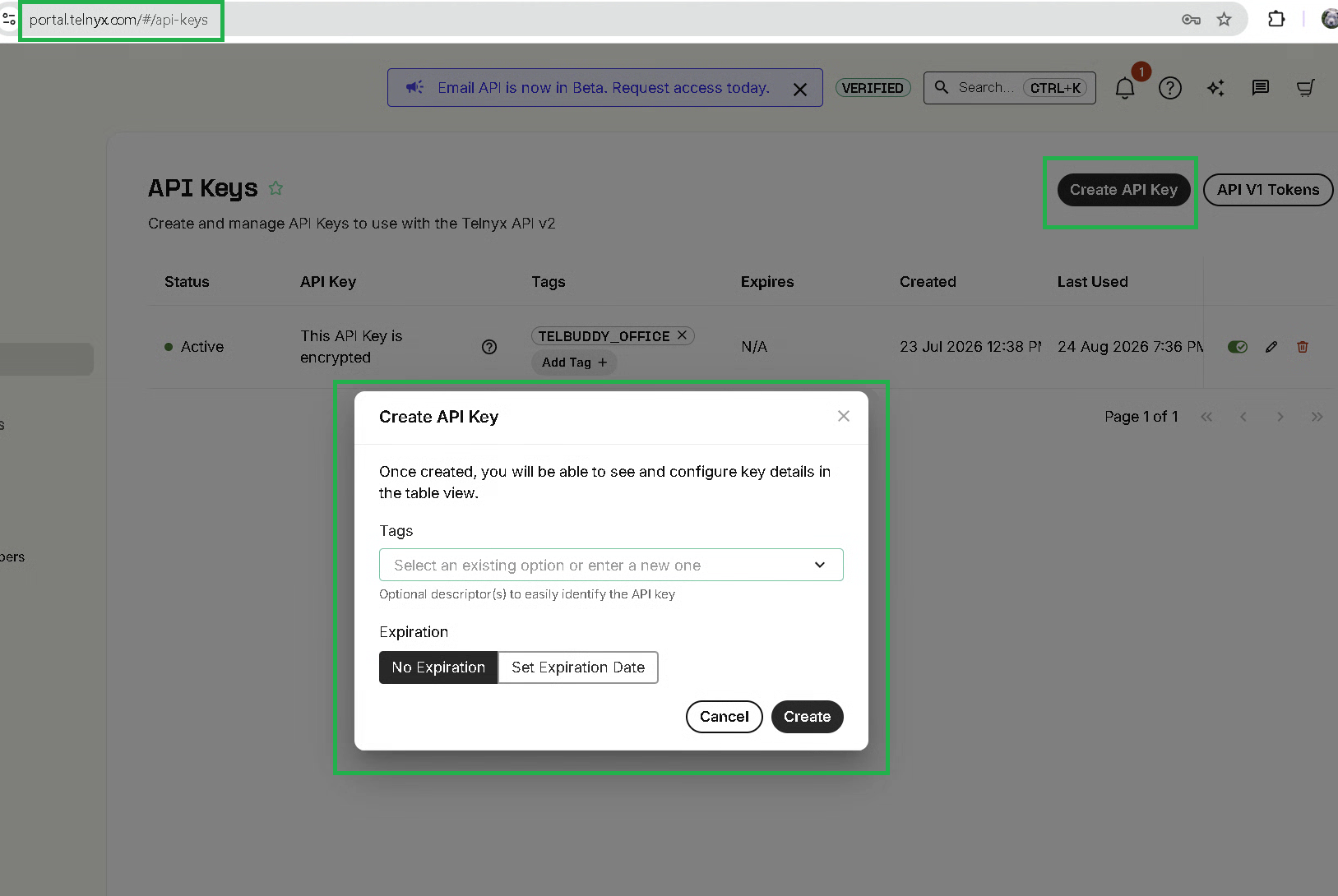
Copy your API key from Telnyx
Log into the Telnyx Mission Control Portal and open the API Keys section of your account. Copy an existing key or create a new one.
Unlike Twilio, there is only one value to copy. There is no separate account identifier to find.
Screenshot 1: the Telnyx API Keys page The Mission Control Portal API Keys section. Blur or crop the actual key value.
-
Paste it into TelBuddy and save
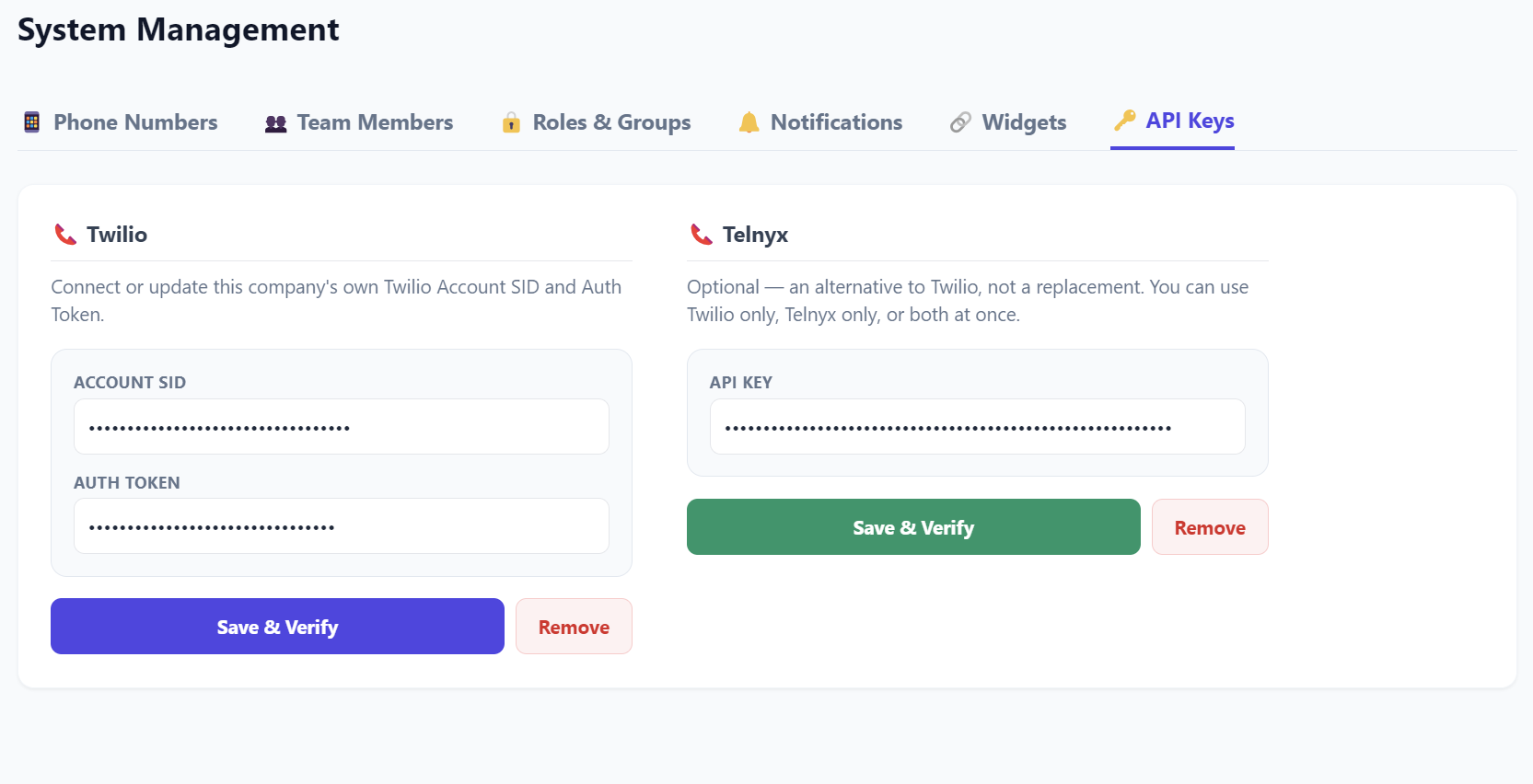
In TelBuddy, go to System Management → Phone Numbers → API Keys tab. This is the same screen where Twilio credentials live, so if you already run Twilio numbers you will recognise it.
Paste your key into the Telnyx field and save. Nothing happens to your numbers yet: saving only tells TelBuddy how to reach your account.
Screenshot 2: the API Keys tab with the Telnyx field The same API Keys tab, showing the Telnyx key field alongside the Twilio ones. Blur the real value.
-
Click Sync from Telnyx
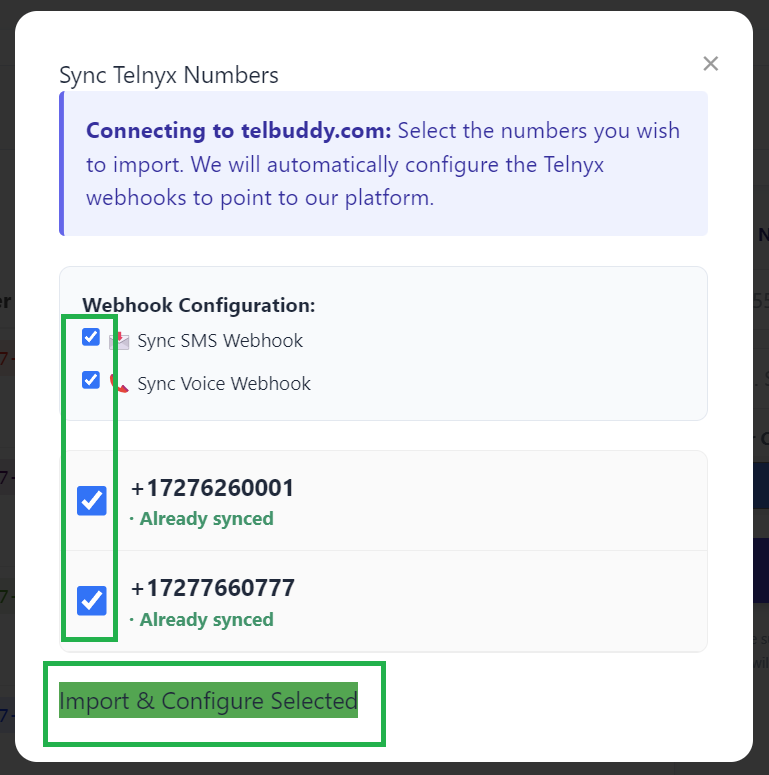
Click 🔄 Sync from Telnyx. TelBuddy reads your account, lists the numbers it finds, and lets you pick which to bring in.
The first sync also creates the Messaging Profile, TeXML Application, and Outbound Voice Profile described above. That happens automatically and only once.
Screenshot 3: the Sync from Telnyx window The sync modal showing the Telnyx number list with checkboxes.
-
Configure each number as normal
Synced Telnyx numbers appear in your number list alongside any Twilio numbers, tagged with their provider. From there they are configured exactly like a Twilio number: forwarding, a phone menu, voicemail, or business hours.
Nothing in the rest of the app asks you which carrier a number is on.
Twilio vs. Telnyx inside TelBuddy
- Shared inbox, MMS, templates, contacts: identical on both
- Call forwarding, voicemail, business hours, IVR builder: identical on both
- In-app dialer: identical on both
- AI Voice Receptionist: works on both. The one gap is transfer behavior: a ring group on Twilio, a single destination on Telnyx
- Call log history: 90 days on Telnyx, with everything shown on the row itself
- You can mix both carriers freely, number by number, in the same account
If something is not working
No numbers appear when I sync. Check the API key on the API Keys tab. Telnyx keys can be revoked from the portal, and a revoked key fails silently from TelBuddy's side. Also confirm you have a free number slot left on your plan.
Texts work but calls do nothing. Check the Connection in your Telnyx portal rather than the number. Telnyx keeps the voice webhook on the Connection, so a number that looks correctly configured can still be attached to the wrong one. Re-running the sync reattaches it.
Outbound calls fail but inbound works. This is usually the Outbound Voice Profile. TelBuddy attaches one automatically, and re-syncing will reattach it if it went missing, since that step is designed to self-heal.
Calls connect but nothing answers. The wiring is fine and the number simply has no Voice Mode set. Open Voice Settings, tick Enable voice for this number, and choose what should happen.