Home / Docs / Getting Started / Professional Setup Services
Professional Setup Services
Setup services are optional, one-time pieces of work where our team configures part of your account for you. They are not a subscription, and nothing about them is required. Everything they cover, you can also do yourself from the dashboard.
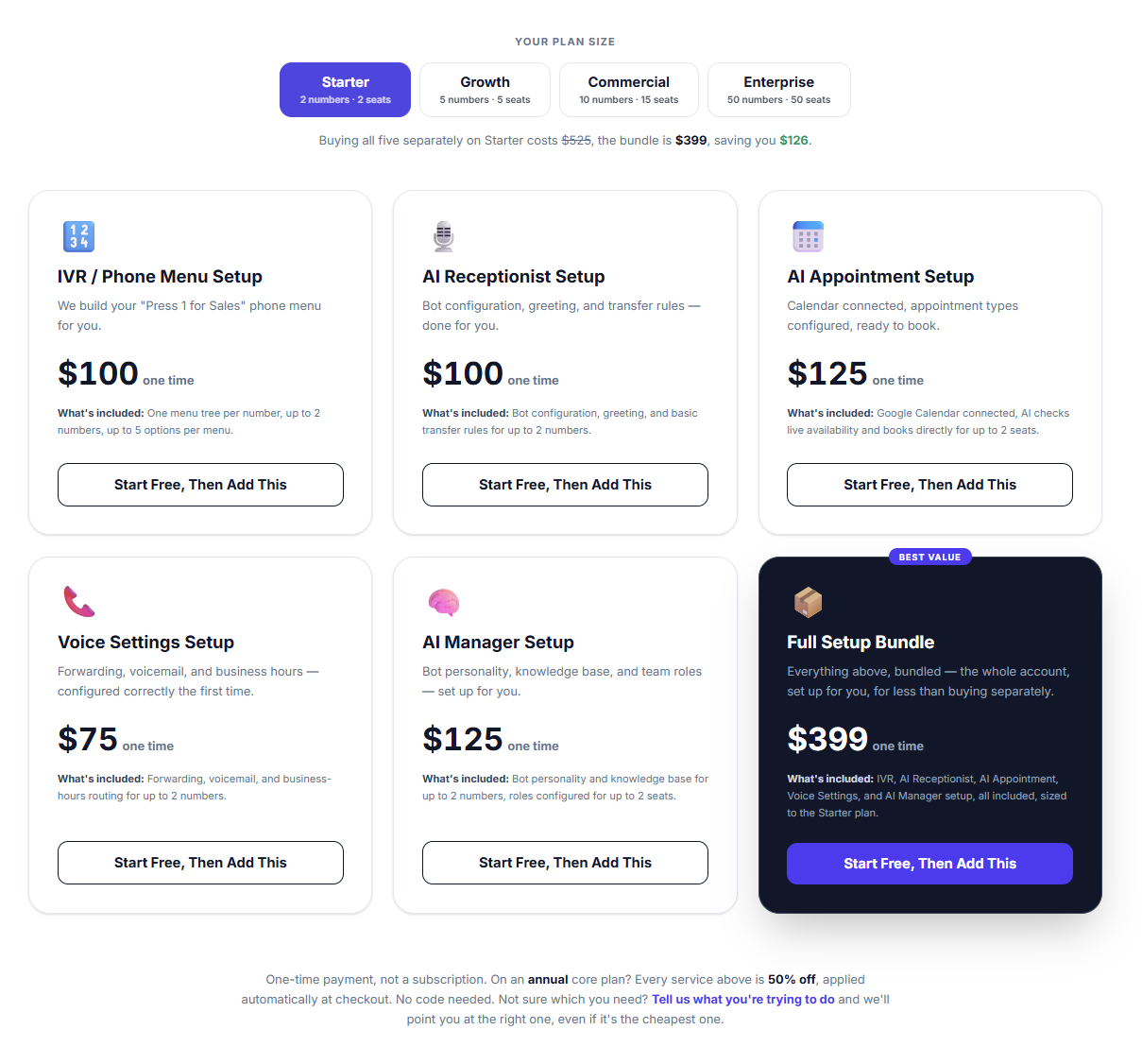
What can be set up for you. Five services, individually or bundled:
- IVR / Phone Menu Setup: your "Press 1 for Sales" menu, built and tested.
- AI Receptionist Setup: the bot configured, given a greeting, and given transfer rules.
- AI Appointment Setup: your calendar connected and appointment types defined.
- Voice Settings Setup: forwarding, voicemail, and business-hours routing.
- AI Manager Setup: bot personality, knowledge base, and team roles.
- Full Setup Bundle: all five, for less than buying them separately.
How they're priced. Each service is priced by your plan tier, because the work scales with the account: configuring 2 phone numbers is less work than configuring 50. The exact price for your account is shown at checkout, and every service lists what it covers at your tier before you buy. If you are on an annual core plan, every setup service is 50% off, applied automatically at checkout with no code needed.
You need an account first. A setup service configures your account, so the account has to exist before one can be purchased. Every plan starts with a 7-day free trial, so a common order is to start the trial, then add a setup service and have the work done before the trial ends.
What happens after you buy. You will get a confirmation email with a link to a short set of questions about your business: things like the top three reasons people call you, and who each of those should reach. Nothing on that form is technical, and everything except your contact details is optional. Anything you skip is covered on the call instead. Our team then contacts you within one business day, builds the configuration on your account, and places a real test call through it before handing it back.
Everything stays yours. The configuration lands in your own dashboard and stays fully editable. Nothing is locked behind us, and there is no ongoing contract attached. The fee is a single payment for a single piece of work.
What a setup service can't do. A2P 10DLC Brand and Campaign registration happens directly with your carrier and requires your business's real legal and EIN details, so no third party can complete it on your behalf. See A2P 10DLC: What TelBuddy Does and Doesn't Do.
Features at a glance
- One-time payment, never a subscription or retainer
- Five individual services, or a discounted Full Setup Bundle
- Priced by plan tier, with the scope for your tier stated before purchase
- 50% off every service for annual core-plan subscribers, applied automatically
- Requires an existing account, since the work configures that account
- A short, mostly optional intake form after purchase, then a call within one business day
- Configuration is tested with a real call, then handed over fully editable
- Does not cover A2P 10DLC registration, which must be done with your carrier
Which service you actually need
Most people need fewer than they expect. A quick way to narrow it down:
If callers should reach a menu ("press 1 for sales, press 2 for support"), that is IVR / Phone Menu Setup. This is the most commonly bought one on its own, because a menu with several branches is the fiddliest thing to get right first time.
If calls should just ring the right phone, with a backup, voicemail, and different behaviour outside opening hours, that is Voice Settings Setup. No menu involved.
If you want the AI answering calls, that is AI Receptionist Setup. It covers the greeting and the transfer rules that decide when a call reaches a human.
If the AI should book appointments during the call, add AI Appointment Setup, which connects your calendar and defines the appointment types.
If the AI needs to know things about your business to answer properly, that is AI Manager Setup: the knowledge base, the bot's personality, and team roles.
If you want the whole thing configured end to end, the Full Setup Bundle is all five and costs less than buying them individually.
The three AI services only make sense if you have the AI add-on. If you do not, IVR and Voice Settings are the two that apply to you, and between them they cover every call-handling feature on your plan.
What the intake form actually asks
The form after purchase is short and deliberately mostly optional. Only three fields are required, and they are all about reaching you:
- Who should we speak to?
- Best number to reach you on
- Best time to call
Everything else is optional and skippable. The questions that follow are plain-English things like "What does your business do, in one line?", "When are you open?", and "What are the top 3 reasons people call you?" (that last one usually becomes your menu options).
Answering more of it up front makes the call shorter, but a blank form does not block anything. Anything you skip simply gets asked on the call instead.
How to buy one
-
Make sure you have an account
A setup service configures your account, so it has to exist first. If you are only trialling, that is fine: the trial is a full account and the work can be done during it.
If you are not logged in when you reach the checkout, you will be sent to log in and returned straight back.
-
Pick your service and check the scope
Each service shows the price for your plan tier and exactly what is covered at that tier. Read the scope line before buying: it is written per tier, so what "IVR setup" covers on Starter is not the same amount of work as on Enterprise.
If you are on an annual core plan, the 50% discount is applied at checkout automatically. There is no code to enter and nothing to ask for.
Screenshot 2: the setup services page The service cards showing prices for the selected plan tier, with the tier switcher visible.
-
Pay, then fill in the intake form
Payment is a single charge, not a subscription. Your confirmation email links to the intake form described above.
Fill in the three contact fields at minimum. Anything else you answer saves time on the call.
-
We build it and test it
Our team contacts you within one business day, configures the work on your account, and places a real test call through it before handing it back.
The configuration is in your dashboard and fully editable from that point on. Nothing is locked, and you can change any of it yourself later.
Common questions
Is this a subscription? No. It is a single payment for a single piece of work. There is no renewal and no retainer.
Can I buy one during my free trial? Yes, and it is a common way to do it. The account exists during the trial, so the work can be done before the trial ends.
What if I want changes afterwards? Everything lands in your own dashboard and stays editable, so you can adjust it yourself at any time. Nothing about the configuration depends on us continuing to be involved.
Do I have to buy one to use TelBuddy? No. Every feature a setup service configures is available to you directly, and the docs cover each one. Setup services exist to save you the time, not to unlock anything.
Can you do my A2P registration? No, and no third party can. Brand and Campaign registration happens with your carrier and needs your business's real legal and EIN details. See A2P 10DLC for what is involved and what TelBuddy can help with.
What if I am on a monthly plan? The services are available on any plan. The 50% discount is specific to annual core-plan subscribers, so if you were already considering annual billing, switching first makes the setup service half price.