Home / Docs / Getting Started / Connecting Your Twilio Account
Connecting Your Twilio Account
Connecting Twilio is a one-time setup: give TelBuddy the two credentials it needs to talk to your account, then sync your numbers in.
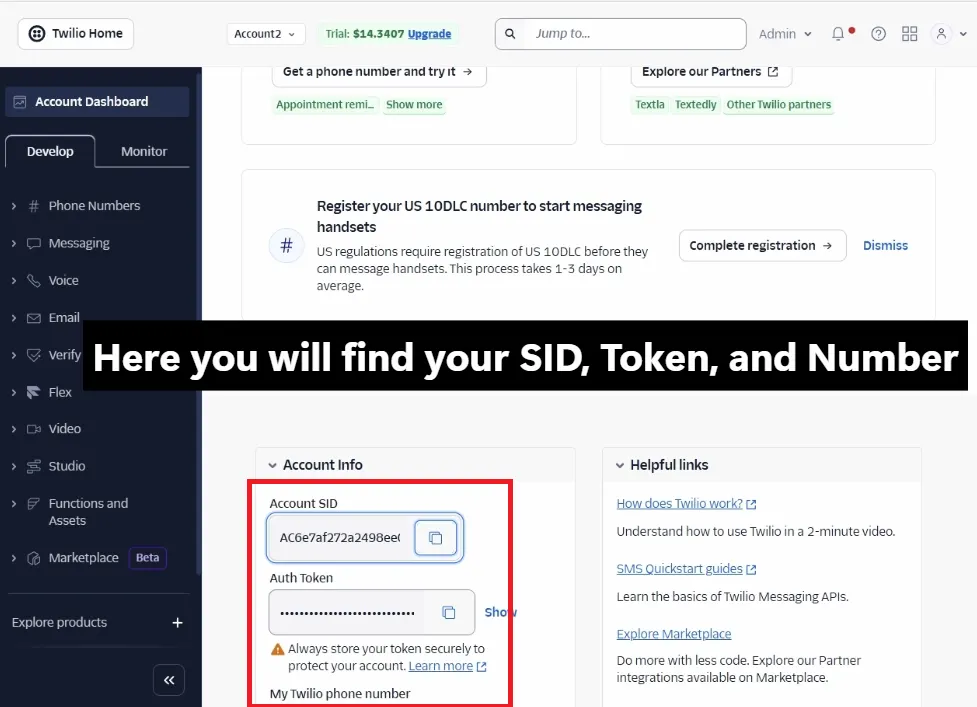
Where to find your credentials. Log into your own Twilio Console and look at the dashboard homepage. Your Account SID and Auth Token are both displayed there. These two values are how TelBuddy authenticates as your account when it reads your numbers and configures their webhooks. They are not a username and password, and they do not grant TelBuddy any access beyond your Twilio account's own API.
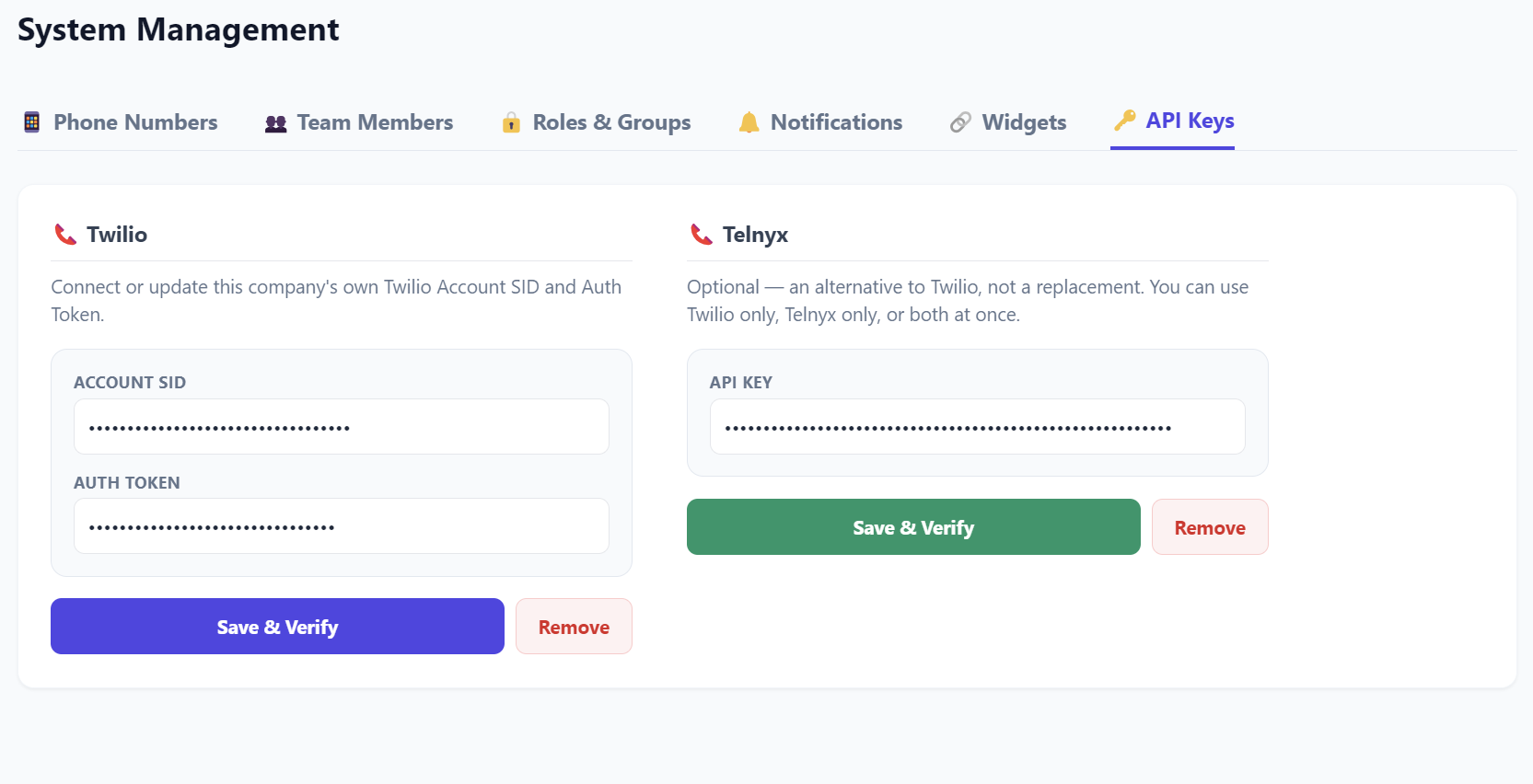
Where to enter them in TelBuddy. Go to System Management → Phone Numbers → API Keys tab, paste in the Account SID and Auth Token, and save.
What the Sync from Twilio button actually does. It reads your Twilio account and lists the phone numbers already there. It does not move, port, or repurchase anything. Once you pick which numbers to bring in, TelBuddy points those numbers' webhooks at its own endpoints. That single step is what makes inbound texts land in the shared inbox and inbound calls reach your IVR menu, forwarding rules, or AI receptionist.
If a number is already attached to a Messaging Service. TelBuddy updates that Messaging Service's inbound webhook so the change applies correctly. It does not create a new Messaging Service or attach the number to a different one on its own. If you manage Messaging Services directly in Twilio for other reasons, this is worth knowing before you sync.
Keeping credentials current. If you ever rotate your Auth Token in Twilio, which is a normal security practice, come back to the same API Keys tab and update it. TelBuddy's connection breaks silently otherwise, so it is worth re-checking here first if numbers stop syncing or webhooks stop firing.
What syncing actually does
- Reads your existing Twilio numbers: never moves, ports, or repurchases anything
- Sets each synced number's webhooks to TelBuddy, so messages and calls reach the dashboard
- Updates an existing Messaging Service's inbound webhook if a number is already attached to one, and never creates a new attachment
- Safe to re-run anytime: re-syncing just refreshes the number list and webhook targets
- Preserves the colour you assigned a number, so a re-sync does not undo your setup
- Credentials can be updated any time from the same screen if they change
What you need before you start
- A Twilio account with at least one phone number already in it
- Your Account SID and Auth Token from the Twilio Console dashboard
- A free number slot on your TelBuddy plan. Each plan includes a set number of lines, and the sync screen warns you before importing if you are out.
You do not need to port anything, cancel anything, or move numbers between accounts. Connecting is additive, and everything stays in your own Twilio account throughout.
Step by step
-
Copy your credentials from Twilio
Log into the Twilio Console. Your Account SID and Auth Token are both on the dashboard homepage. The Auth Token is hidden until you click to reveal it.
-
Paste them into TelBuddy and save
In TelBuddy, go to System Management → Phone Numbers → API Keys tab. Paste both values in and save.
Nothing happens to your numbers at this point. Saving credentials only tells TelBuddy how to reach your account.
-
Click Sync from Twilio and choose your numbers
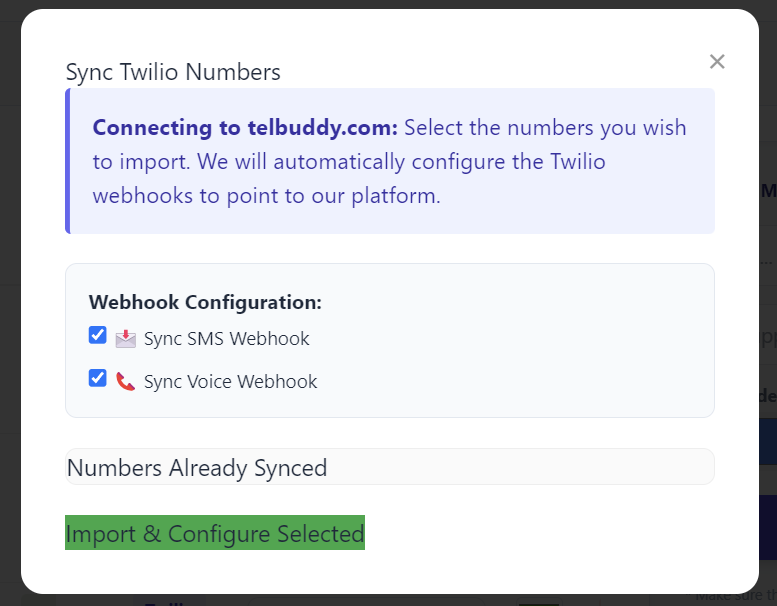
Click 🔄 Sync from Twilio. TelBuddy reads your account and lists the numbers it finds, with a checkbox for each. Tick the ones you want to bring in.
Under Webhook Configuration you also choose what to point at TelBuddy:
- 📩 Sync SMS Webhook makes inbound texts arrive in your shared inbox.
- 📞 Sync Voice Webhook makes inbound calls reach your phone menu, forwarding, or AI receptionist. This option requires the AI add-on, and is shown greyed out if your account does not have it.
Both are ticked by default when available.
-
Set up how each number should behave
Synced numbers appear in your number list straight away. From there you can give each one its own forwarding rules, phone menu, voicemail, or business hours.
A freshly synced number will receive texts immediately. Calls need a Voice Mode chosen before anything answers them.
Re-syncing is safe
You can press Sync from Twilio as often as you like. It is not a one-shot operation and re-running it will not duplicate numbers or reset your configuration.
Re-syncing is the right move when you:
- Buy a new number in Twilio and want it in TelBuddy
- Suspect a webhook has been changed in the Twilio Console by something else
- Rotate your Auth Token and want to confirm the connection still works
Your per-number settings, including the colour you assigned it, survive a re-sync.
If something is not working
Numbers do not appear when I sync. Almost always the credentials. Check the Account SID and Auth Token on the API Keys tab, especially if you have rotated the token in Twilio recently. Also check you have a free number slot left on your plan, since the sync screen will tell you if you are at your limit.
Texts arrive but calls do nothing. The voice webhook was not synced. If your account does not have the AI add-on, that checkbox is disabled, and Twilio has no voice URL pointing at TelBuddy for that number. You can set it manually in the Twilio Console to https://telbuddy.com/sms/voice-webhook if you want voice features without the add-on.
Calls ring but nothing answers. The webhook is set, but the number has no Voice Mode chosen yet. Open Voice Settings, tick Enable voice for this number, and pick what should happen.
It worked and then stopped. The most common cause is an Auth Token rotated in Twilio without updating TelBuddy. Update it on the API Keys tab and re-sync.
If you would rather not use the sync button at all, you can point a number's webhooks at TelBuddy manually from the Twilio Console. Sync is a convenience, not a requirement, and manual numbers behave identically once the URLs are right.