Home / Docs / AI Features / AI Transfer Rules
AI Transfer Rules
Transfer rules are what decide when the AI stops handling a call itself and hands it to a real person instead. The AI is not meant to be the final word on every conversation, and transfer rules are the mechanism for drawing that line.
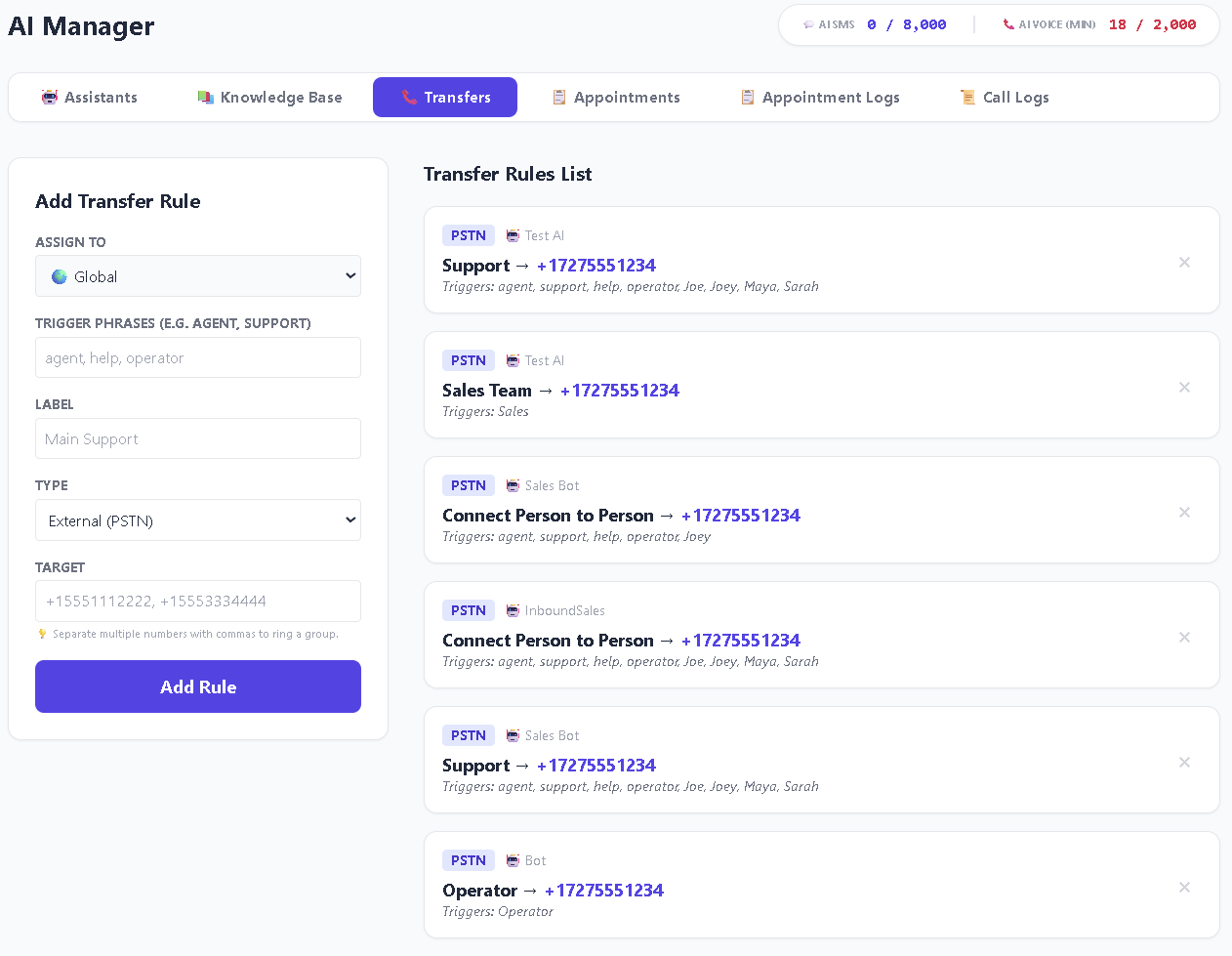
How a transfer is triggered. Each rule holds a list of trigger phrases, comma-separated, such as agent, help, operator. When the caller says something that matches one of them, the AI transfers to that rule's target instead of continuing. The AI is explicitly instructed not to transfer unless a trigger matches, so the rules you write are the complete list of ways a call can reach a human.
Where a transfer goes. Each rule has a Target: one phone number, or several separated by commas. On a Twilio number, multiple targets ring simultaneously and whoever answers first takes the call. On a Telnyx number, only the first number in the list is dialled, because Telnyx's transfer command reaches one destination at a time.
Rules can be global or per-assistant. A rule set to Global applies to every assistant on your account. A rule assigned to a specific assistant applies only to that one. That is how one number can transfer differently from another.
Why this matters for call quality. An AI that never transfers and tries to push through every situation frustrates callers who genuinely need a person. An AI that transfers at the first real question is an expensive ring tone. Getting these rules right is really about defining the boundary of what the AI should confidently handle versus what it should hand off.
Features at a glance
- Trigger phrases decide when a call transfers: you control the exact wording
- Rules apply globally or to one specific assistant
- Twilio: multiple targets ring at once as a group
- Telnyx: the first target in the list is dialled
- Rules live under the Transfers tab in AI Console
- Works alongside the knowledge base: a transfer is the fallback for what the AI should not answer alone
Creating a rule
-
Open AI Console and go to the Transfers tab
From AI Console, choose Transfers. The form on the left adds a rule; the list on the right shows what you already have.
-
Choose who the rule applies to
Assign To is either Global (every assistant) or one specific assistant. Start global for anything universal, like asking for a person, and use per-assistant rules only where two numbers genuinely need different destinations.
-
Write your trigger phrases
Comma-separated, in Trigger Phrases. This is the field that does the actual work, and it is where most transfer problems come from. Cover the ways real callers phrase it, not just the tidy version.
A reasonable starting set for a general "get me a human" rule:
agent, human, person, operator, representative, someone else, speak to someone, real person, manager. -
Give it a label
Just for you. Main Support, Billing, Emergency Line. It appears in the rules list so you can tell rules apart at a glance.
-
Set the target
A phone number in full international format, for example
+15551112222. To ring several phones, separate them with commas.Multiple comma-separated numbers ring together only on Twilio. On Telnyx, only the first number is dialled and the rest are ignored, so put your most reliably answered line first.
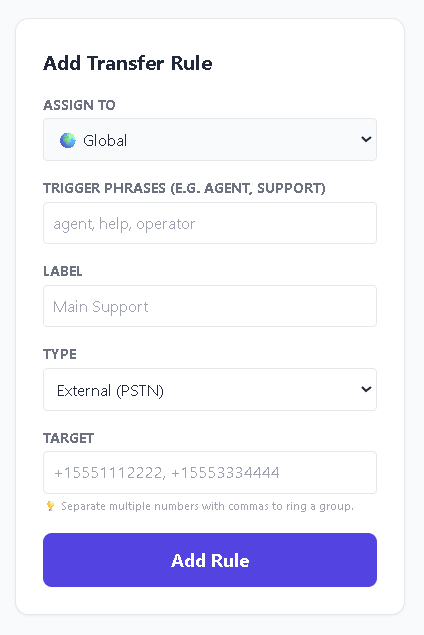
Screenshot 2: the Add Transfer Rule form filled in The form with Assign To, Trigger Phrases, Label, and Target completed.
-
Save, then call and test it
Say one of your trigger phrases out loud on a real call. This is the only way to know the rule works, and it takes under a minute.
The rule everyone should have first
If you have no transfer rules at all, nobody can reach a human. The AI is instructed to transfer only when a trigger phrase matches, so with zero rules there is no path off the call. A caller can ask for a person as clearly as they like and the AI will keep trying to help instead.
So before anything clever, create one global rule whose triggers cover asking for a person, pointing at whichever phone is most reliably answered. Everything else is refinement.
Trigger phrases are the whole mechanism. A rule labelled "Emergency" transfers nothing unless the words your callers actually use appear in its trigger list. The label is for you; the triggers are for the AI.
Getting the boundary right
Both failure modes are costly, in different ways.
Transferring too rarely produces the experience people complain about publicly: a caller repeating "representative" at an AI that keeps offering to help. Every one of those is a customer who now believes you made it deliberately hard to reach a human.
Transferring too eagerly means the AI hands off at the first sign of a real question, which saves nobody any time.
The practical rule: transfer on consequence, not on difficulty. A question the AI finds hard but where being wrong is harmless is worth attempting. A question the AI finds easy but where being wrong is expensive is worth transferring. The cost of a mistake, not the AI's confidence, is the right axis.
Worth a transfer rule almost universally:
- Asking for a person, in all its phrasings. Never argue with this one.
- Money that is not a published price. Custom quotes, disputes, refunds.
- Anything urgent or an emergency, where a wrong answer has real consequences.
- Complaints. A frustrated caller stuck with an AI is a complaint that escalates.
- Anything legally or medically consequential, where the correct answer is a qualified human.
Usually fine to let the AI handle:
- Hours, location, directions, parking
- Published prices and standard services
- Availability and booking, if you have appointment setting connected
- Anything clearly covered by your knowledge base
Writing trigger phrases that actually fire
This is where nearly every "transfers do not work" report comes from.
Use the caller's words, not yours. Internally you might call it "escalation." A caller says "this isn't helping."
Cover several phrasings per rule. "Agent", "human", "person", "operator", "representative", "someone else" are all the same request. Listing one covers one.
Keep phrases short. Fragments match more of what people actually say than full sentences do. speak to someone catches more than I would like to speak to someone please.
Think about what an urgent caller says. For an emergency rule: emergency, urgent, flooding, no heat, burst, leak, danger, whatever genuinely applies to your business.
Watch for overlap between rules. If help appears in both a support rule and a billing rule, which one wins is not something you want to leave to chance. Keep each rule's triggers distinct.
After a week of real calls, read through your call logs and look for the moments a caller clearly wanted a person and did not get one. The exact words they used are the phrases to add.
What a caller experiences
Worth knowing so you can judge whether the handoff is acceptable.
When a trigger matches, the AI says a short line about connecting the caller, finishes speaking, and only then dials. That small delay is deliberate: transferring mid-sentence leaves the caller listening to silence with no idea what is happening.
On Twilio with several targets, all of those phones ring at once and the first to answer takes the call. On Telnyx, the first target rings.
The thing to actually test is what happens when nobody answers, because that is the case that never comes up during a deliberate test and happens constantly in real life.
Place a test call, say a trigger phrase, then deliberately do not answer the transfer. Whatever the caller hears at that point is what a real customer gets every time your team is busy. Fix it before going live.
Choosing your destinations
Point it at a phone that gets answered. A transfer to a desk nobody sits at is worse than no transfer, because the caller has now been promised a person.
On Twilio, list several numbers. Simultaneous ringing dramatically improves the odds someone picks up and removes the single point of failure of one person's phone being off.
On Telnyx, order matters and only the first number is used. Choose the line most reliably answered, not the most senior person.
Have a fallback in mind. Voicemail on the destination number is usually the right answer, and it is far better than the caller hearing nothing at all.
If you need different destinations at different times of day, business hours routing is the right tool for that, since it changes behaviour by schedule rather than by phrase.
How transfer rules and the knowledge base work together
These two are easy to tune in isolation and get wrong together.
A strong knowledge base with weak transfer rules gives you an AI that attempts everything, including conversations it should not be having.
Good transfer rules with a weak knowledge base gives you an AI that hands off constantly, because almost nothing is answerable. Safe, but pointless.
They tune against each other: as your knowledge base improves, the set of things worth transferring shrinks. Reviewing them together beats adjusting either alone.
If the AI is transferring calls it should have handled, add knowledge base content rather than narrowing the triggers. Narrower triggers without better content just means it guesses instead of transferring, which is worse.
Testing your rules
-
Say a trigger phrase, exactly
Confirm the rule fires at all and reaches the number you expect. If this fails, nothing else matters.
-
Ask for a human indirectly
"Is anyone there?", "I'd rather talk to a person", "this isn't helping." These are the ones that slip through, and each miss is a phrase to add to the rule.
-
Test each rule separately
If you have a billing rule and a support rule, trigger both and confirm each reaches its own destination rather than whichever rule you wrote first.
-
Let a transfer go unanswered
The case everyone forgets. Confirm the caller lands somewhere sensible instead of silence.
Troubleshooting
Transfers never fire. Either there are no rules at all, or the caller is not saying any of your trigger phrases. Check the Transfers tab first, then widen the phrase list.
A rule fires, but the caller says nobody was there. The destination rang unanswered. On Twilio, add more numbers to the target. On either carrier, make sure the destination has voicemail.
Only the first number rings on Telnyx. Expected. Telnyx transfers reach one destination at a time, so the extra numbers are ignored. Put the best-answered line first.
A rule works on one number but not another. Check Assign To. A rule assigned to one assistant only applies to that assistant, and each number is answered by a specific assistant. Set it to Global if it should apply everywhere.
The wrong rule fires. Two rules share a trigger phrase. Make each rule's phrases distinct.
Transfers fire constantly. Your triggers are matching ordinary conversation. A word like help appears in a great many innocent sentences, so prefer more specific phrases.