Home / Docs / Team & Accounts / Managing Multiple Businesses (Sub-Accounts)
Managing Multiple Businesses (Sub-Accounts)
If you're responsible for more than one business: a common situation for agencies, franchise owners, or anyone running multiple locations, TelBuddy's sub-accounts let you manage all of them from a single login, instead of juggling a completely separate username and password for each one.
What stays separate. Each sub-account has its own numbers, its own shared inbox, and its own settings: nothing about one business's conversations, contacts, or configuration bleeds into another's. From inside a given sub-account, it looks and behaves exactly like a standalone TelBuddy account.
What's unified. You can switch between the sub-accounts you manage from one central login, rather than logging out and back in with different credentials every time you need to move from one business to another.
Why this matters for agencies specifically. Managing several clients' phone and texting setups is common work for an agency, and doing that with a separate login per client account is a real friction point, one login that can move between multiple fully-separated business environments removes that friction without compromising the separation each business needs.
Features at a glance
- One login can manage multiple fully-separated TelBuddy sub-accounts
- Each sub-account has its own numbers, inbox, contacts, and settings
- No data or configuration shared between sub-accounts
- Switch between managed businesses without separate logins per account
- SMS and voice credits are allocated to each business from your own pool
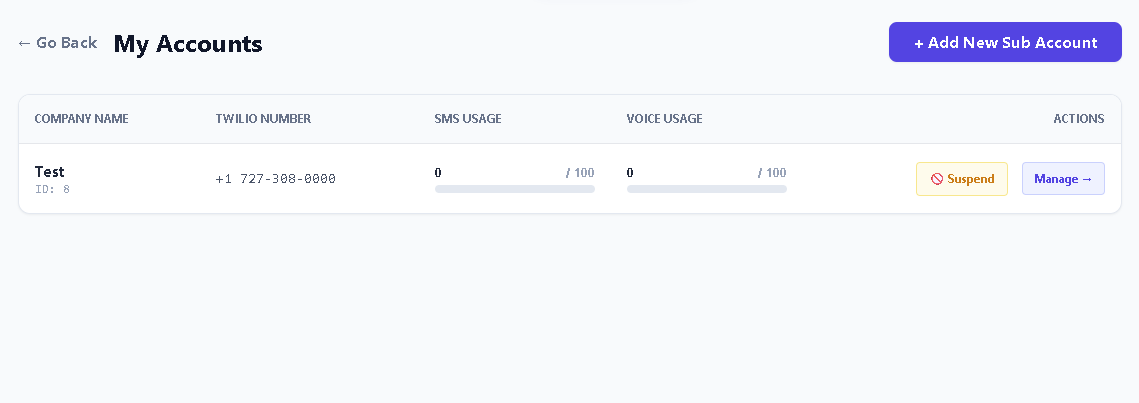
- Usage per business is visible at a glance from the parent view
- Any business can be suspended without deleting it
Every business needs its own carrier account
This is the most important thing to understand before you start, because it shapes everything else.
Each sub-account must have its own dedicated Twilio account, with its own Account SID, Auth Token, and phone number. TelBuddy never shares carrier credentials or numbers between businesses.
That is not an arbitrary restriction. Carrier compliance, A2P 10DLC registration in particular, is tied to a specific business's legal identity. Running several businesses' traffic through one carrier account would misrepresent who is actually sending those messages, which is exactly what A2P registration exists to prevent.
So the practical requirement is: before adding a business in TelBuddy, that business needs its own Twilio account with a number on it.
Sub-accounts are Twilio only today. If a business you manage is on Telnyx, it cannot be added as a sub-account, and it needs its own top-level TelBuddy account instead.
Adding a business
-
Open My Accounts and click Add New Sub Account
The page opens showing Your Available Inventory at the top: how many SMS and voice credits you currently have left to hand out.
-
Fill in the business details
Business name, admin email, and a password. That email and password become the Admin login for that business, so if you are setting this up for a client, this is the login you hand over.
-
Allocate credits
Set an SMS limit and a voice limit for this business, each capped by what you have left in inventory. This is what stops one business consuming everything you have.
-
Enter that business's Twilio credentials
Account SID, Auth Token, and the Twilio phone number, including the country code. These belong to that business's own Twilio account, not yours.
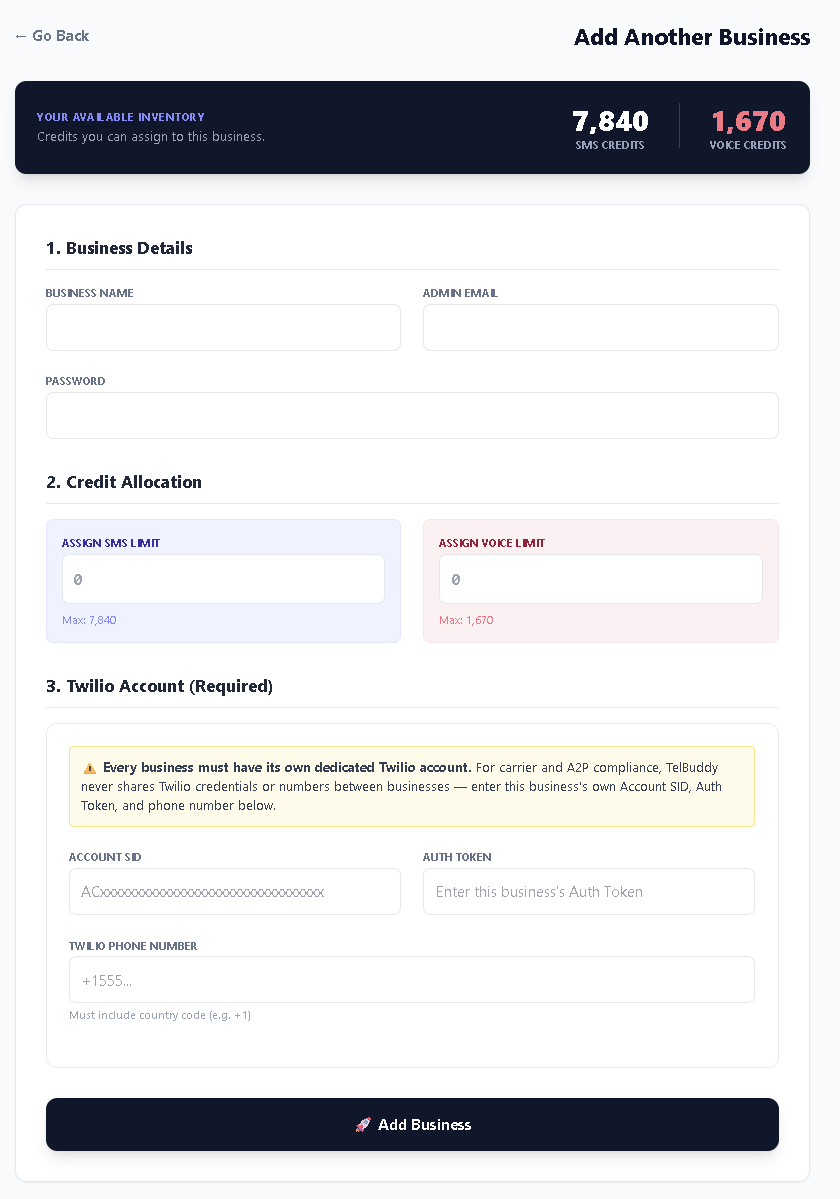
Add Another Business. Credits come out of your available inventory, and each business supplies its own Twilio credentials. -
Add Business, then switch in and set it up
It appears in the My Accounts list. Click Manage to switch into it and configure it like any normal account: sync its numbers, set up voice routing, invite its team.
How credits work
Worth being precise about, because it is the part that most affects how you plan.
You hold a pool of SMS and voice credits. When you add a business, you assign it a slice of that pool as its limit. The My Accounts list then shows each business's usage against its own allocation, so you can see at a glance which one is running hot and which is barely using what it has.
This gives you two things a shared pool alone would not:
- A runaway business cannot drain everything. Its limit is its limit.
- You can see where your capacity is actually going, which matters if you are billing clients for it.
Allocate conservatively at first. Watching a month of real usage tells you far more about the right number than an estimate does, and raising an allocation later is easy.
Seats and numbers are a shared pool
Credits are allocated per business, but two other limits are not, and this catches people out.
Your plan's seat limit and number limit are shared across the entire account group, meaning your parent account plus every sub-account together. Ten seats across three businesses is ten logins total, not ten each. The same is true of phone numbers.
If you try to sync a number past the limit, the error says so explicitly, including that sub-accounts count toward it. See Admin vs Agent roles for how seats are counted.
Plan your seat count across all the businesses you intend to manage, not just the first one. Adding a business does not add seats, and running out mid-onboarding is an avoidable surprise.
Working across businesses day to day
Switching in. From My Accounts, Manage takes you into that business. From there everything looks and behaves like a standalone account: its inbox, its numbers, its settings, its AI configuration.
Nothing crosses over. Conversations, contacts, notes, templates, business hours, IVR menus, and AI setup all belong to the business they were created in. There is no shared inbox spanning businesses, and a teammate in one business cannot see another's conversations.
Which means configuration is per business too. Each one needs its own knowledge base, its own transfer rules, and its own business hours. That is the point, since two businesses rarely want identical answers, but it does mean setup effort scales with the number of businesses rather than being done once.
Suspending a business. Each row has a Suspend action, which stops a business without deleting it. Useful when a client pauses, or when an account needs holding while something gets sorted out. The data stays where it is.
If you are an agency
A few things that come up repeatedly.
The admin login you create is the client's. Decide up front whether you are handing it over or holding it. If the client gets it, they can invite their own team and change their own settings, which is usually what you want.
Their Twilio account should be in their name. Beyond compliance, it means the numbers and the billing relationship belong to the client. That is cleaner for both of you, particularly if the relationship ends.
Budget seats before you sell. Since seats are shared, taking on a fourth client can mean upgrading your plan, not just adding an account.
Set each business up properly rather than cloning. There is no copy-settings-between-businesses feature, so the AI knowledge base and routing for each client are genuine setup work. Worth pricing in.
Troubleshooting
I cannot add a business without Twilio details. Correct, they are required. Every business must have its own dedicated Twilio account before it can be added.
My client is on Telnyx. Sub-accounts are Twilio only. That business needs its own top-level TelBuddy account today.
A number will not sync into a sub-account. Almost always the shared number limit across the whole group. The error message names the limit and mentions sub-accounts explicitly.
I am out of seats but only have a few users per business. Seats are counted across every business together. Add them up, then compare to your plan.
I cannot allocate the credits I want. The maximum is whatever is left in your inventory, shown at the top of the Add Business page. Credits already assigned to other businesses are not available to assign again.
A business's usage bar is full. It has hit its allocation. Raise it if you have inventory left, or upgrade if you do not.