Home / Docs / Compliance / How Bulk Sync Works
How Bulk Sync Works
Configuring webhooks for a single phone number in the Twilio or Telnyx console is a manageable, if tedious, task. Doing it for dozens of numbers one at a time is where Bulk Sync earns its name, it applies the same configuration across many numbers at once, with a visible log of what happened to each one.
What it actually does. You select which numbers from your connected account you want to configure, and Bulk Sync sets each one's SMS and/or voice webhook automatically: one number at a time internally, with a live progress log so you can see exactly which numbers succeeded and which (if any) ran into a problem, rather than a single opaque "done" message at the end.
What it precisely does not do, stated plainly:
- It does not register an A2P 10DLC Brand or Campaign: that's a separate, carrier-direct process. See A2P 10DLC: What TelBuddy Does and Doesn't Do.
- It does not create a new Messaging Service or attach a number to one for the first time, it only updates the webhook of a Messaging Service a number is already attached to.
- It does not "auto-import" your Twilio or Telnyx API credentials: you enter and save those yourself, once, when you first connect the account, and Bulk Sync uses that existing connection rather than requesting anything new.
Why the distinction matters in practice. Bulk Sync is genuinely useful for saving time on repetitive Console work, but it's not a compliance shortcut and it's not account-connection automation: it's specifically webhook configuration, applied at scale, to numbers and Messaging Service attachments that already exist.
Features at a glance
- Configure SMS and/or voice webhooks across many selected numbers in one action
- Live progress log showing per-number results as it runs
- Updates an existing Messaging Service's webhook: never creates or attaches a new one
- Does not touch A2P 10DLC registration in any way
- Uses your already-saved API credentials: no separate credential entry required
- Also imports the selected numbers into TelBuddy so they appear in your inbox
What a webhook is, briefly
Worth thirty seconds if the term is unfamiliar, because it explains why this step exists at all.
Your carrier owns the phone number. When someone texts or calls it, the carrier needs to be told where to send that event. A webhook is simply that address: a URL the carrier calls the moment something happens on your number.
Bulk Sync sets those URLs to TelBuddy's. Until it does, your carrier has a number that rings and receives texts but has nowhere to deliver them, so nothing reaches your inbox.
That is the entire job. It is not glamorous, and doing it by hand across thirty numbers in a carrier console is exactly as tedious as it sounds.
Running it
-
Connect your carrier account first
Bulk Sync uses credentials you have already saved. If you have not connected yet, start with connecting Twilio or connecting Telnyx.
-
Open Phone Numbers and start the sync
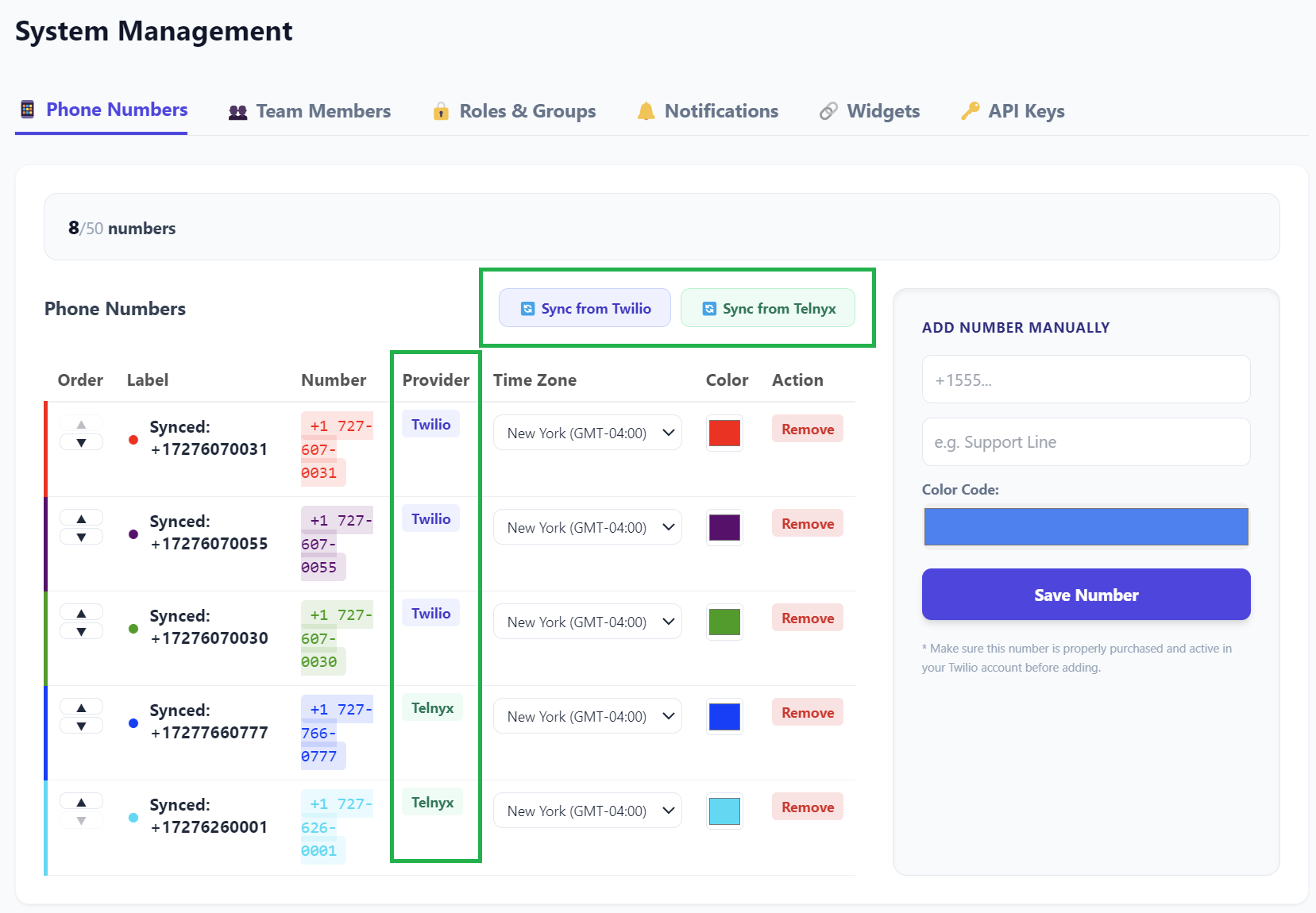
Under System Management, the Sync from Twilio and Sync from Telnyx buttons sit above your number list. Each carrier has its own button and its own run.
-
Choose what to configure
Two checkboxes, both on by default:
- Sync SMS Webhook, so incoming texts reach your inbox
- Sync Voice Webhook, so incoming calls follow your TelBuddy voice routing
Leave both on unless you have a specific reason not to. Turning one off means that half of the number keeps whatever it was pointing at before.
-
Select your numbers
The modal lists what is on your carrier account. Tick the ones you want. Numbers already in TelBuddy are marked, and the panel shows how many plan slots you have left.
-
Run it and watch the log
Numbers are processed one at a time, and each result appears in the log as it happens. That is deliberate: if something fails, you can see exactly which number it was rather than being told the batch had a problem.
-
Verify one number
Send a test text to a synced number and place a test call. Delivery into your inbox is the only real confirmation.
The progress log is worth actually reading rather than dismissing. A number that failed for its own reasons, a permission issue or a number in an odd state, is easy to miss if you assume the whole run either worked or did not.
The Messaging Service rule
This is the subtlety most worth understanding, because it explains an otherwise confusing outcome.
On Twilio, a number can belong to a Messaging Service, a grouping that carries its own webhook configuration. When a number is in one, the Messaging Service's webhook takes precedence over the number's own.
So Bulk Sync does both: it sets the number's webhook, and then, if that number is already attached to a Messaging Service, it updates that service's inbound webhook too.
What it will not do is create a Messaging Service, or attach a number to one for the first time. Those are decisions about how your carrier account is organised, and they are usually bound up with your A2P Campaign. TelBuddy will not reorganise your carrier account behind your back.
If your A2P Campaign expects numbers in a specific Messaging Service, put them there in the carrier console first, then run Bulk Sync. Running it first is not harmful, it simply will not do the attaching for you.
What else the sync does
Bulk Sync is named for the webhook work, but the same run also imports the selected numbers into TelBuddy, which is what makes them appear in your inbox, in Voice Settings, and in the number list.
A few details that follow from that:
Existing numbers are updated, not duplicated. Re-running the sync on a number you already have refreshes it rather than creating a second copy, and your chosen colour is preserved.
Your plan's number limit applies. The limit is shared across your whole account group including any sub-accounts, and the sync panel shows how many slots remain before you select anything.
Per-number settings are yours, not the carrier's. Forwarding, business hours, IVR menus, and AI are all configured in TelBuddy afterwards. Syncing connects the number; it does not decide what happens on it.
When to re-run it
After adding numbers at your carrier. New numbers are not picked up automatically.
If a number stops receiving texts or calls. Something may have changed the webhook at the carrier end. Re-running is quick and harmless.
After changing Messaging Service membership. Moving a number into a service means the service's webhook now governs it, so run the sync again to point that service at TelBuddy.
Re-running is safe. It overwrites the same settings with the same values.
Troubleshooting
A number synced but texts still are not arriving. Check whether it belongs to a Messaging Service that it was not in when you last synced. The service's webhook wins over the number's own. Re-run the sync.
Texts arrive but calls do not reach my routing. Confirm Sync Voice Webhook was ticked when you ran it. If it was, note that voice webhook syncing on Twilio is currently gated behind the AI add-on, so on a core plan the voice half of the sync may not apply. Telnyx has no such gate. If this affects you, set the voice webhook manually in the Twilio console to https://telbuddy.com/sms/voice-webhook and it will work normally.
A number failed in the log. The message names the number. Usually the credentials lack permission for that number, or the number is in a state the carrier will not let us update. Check it directly in the carrier console.
Some numbers were greyed out and I could not select them. You are at your plan's number limit. The panel shows remaining slots, and the limit counts sub-accounts too.
The sync will not start. Your saved carrier credentials are missing or no longer valid. Reconnect the account and try again.
I want this to also handle my A2P registration. It cannot, and neither can any tool. Registration is carrier-direct. See A2P 10DLC explained.