Home / Docs / Website Chat / Security: site key and allowed websites
Security: site key and allowed websites
Your install code is visible to anyone who views your website's source. Two settings make sure it only works where you want it.
Overview: Website Chat docs
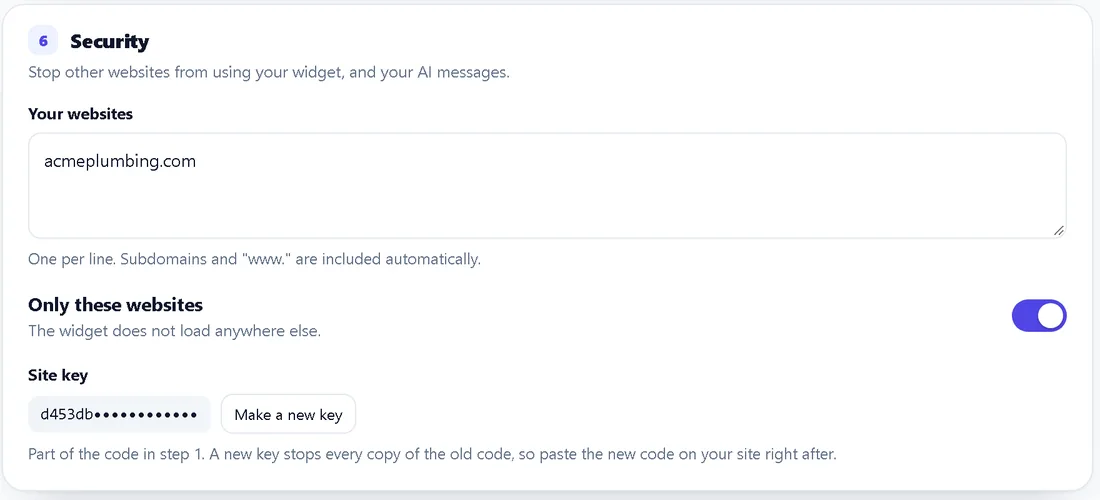
Only these websites
- In System Manager, Widgets, section 6 Security, list your websites, one per line (for example
yourbusiness.com). - Switch Only these websites on and save.
The widget then loads only on those sites. Subdomains and "www." count automatically: listing yourbusiness.com covers www.yourbusiness.com and shop.yourbusiness.com. On any other website the widget does not appear, so nobody can put your chat on their site or use your AI messages. You cannot switch it on with an empty list.
The Preview on a test page button always works.
Site key
The install code carries a site key (data-key). Make a new key creates a fresh one and stops every copy of the old code, for example after a developer you no longer work with had it. Paste the new code from section 1 on your site straight after.
Code from before the site key existed (no data-key) keeps working until you switch Only these websites on.
Also built in
- Spam protection on the contact form, and limits on how fast one visitor can send messages and photos.
- Fair-use limits on AI replies per chat, per hour and per day.
- Photos are checked as real images before they are stored.