Call Queues for Small Business on Twilio & Telnyx: The Complete Guide
If your phone is busy enough that callers hang up, get bounced to a voicemail nobody checks, or land on whoever happened to pick up last, you do not need a new phone system. You need a real call queue on the Twilio or Telnyx number you already own. This guide covers all of it: hold music, ring strategies, what happens when the wait runs out, letting callers hang up and keep their place, and a live board to run the whole thing from.
- Who needs a call queue
- Queue vs forwarding vs ring group
- Where the queue actually runs
- Set up a queue in eight steps
- Hold music, greeting and agents
- The four ring strategies
- When the wait runs out
- Callback: keep my place
- Queue monitor and live call board
- Menus, AI and hours into a queue
- Playbooks by industry
- Do you need Flex?
- What it costs
- Launch checklist
Call queues, callback, the queue monitor and the live call board are included on every TelBuddy plan, Starter included. They run on your own Twilio or Telnyx account. Agents use any phone or mobile, with no softphone to install. TelBuddy is a flat software fee and never marks up your minutes.
Who needs a call queue
A queue earns its place the moment more than one person shares a phone line and callers sometimes arrive faster than anyone can answer. That covers far more businesses than the phrase "call center" suggests:
Front desks
Dental, medspa, clinics and vets where two or three people juggle bookings, walk-ins and the phone.
Service and dispatch
HVAC, plumbing, towing and logistics, where the caller with the emergency must reach whoever can book a truck.
Sales and support teams
Agencies, dealerships, property managers and SaaS teams with a shared support or sales number.
The warning signs are the same everywhere: callers complain they "could never get through", the busiest person answers everything, missed calls pile up at lunch, and nobody can say how many people hung up today. A queue fixes all four.
Call queue vs call forwarding vs a ring group
Most teams on Twilio or Telnyx start with call forwarding. It is perfect when one person should always take the call. It breaks down the day three people share a line.
Forwarding
Rings one destination and hopes. Busy, in a meeting or on mute, and the caller gets whatever that phone does next.
Ring group
Rings several phones at once. Fast when someone is free, but no waiting line, no fair turns, no overflow plan and no wallboard.
Call queue
Answers straight away, holds callers in order, offers agents by strategy, and ends every wait somewhere you chose.
If one always-on destination is all you need, keep forwarding. If you need fair distribution, order, overflow, callback and visibility, you need a queue. The rest of this guide assumes you do.
Where the queue actually runs
The queue runs on your Twilio or Telnyx account. Callers wait on your carrier's queue, hear hold music served by your carrier, and are connected by your carrier. TelBuddy never sits in the audio path. It decides who to ring and when.
- Call quality is whatever your carrier gives you, with no extra hop in the middle.
- Your number stays yours. Nothing is ported. The number, rates and registrations stay with the carrier.
- Billing stays clear. Hold time and agent calls appear on your carrier bill at their rates. TelBuddy is one flat fee.
- Both carriers, same behaviour. Nothing here is Twilio-only or Telnyx-only, and one account can run both side by side.
How to set up a call queue on Twilio or Telnyx
No Flex workspace, no Studio flow, no TwiML or TeXML to write. Here is the whole path:
- Connect Twilio or Telnyx and sync the number.
Paste your Twilio Account SID and Auth Token, or your Telnyx API key, and sync the number. See connect Twilio or connect Telnyx.
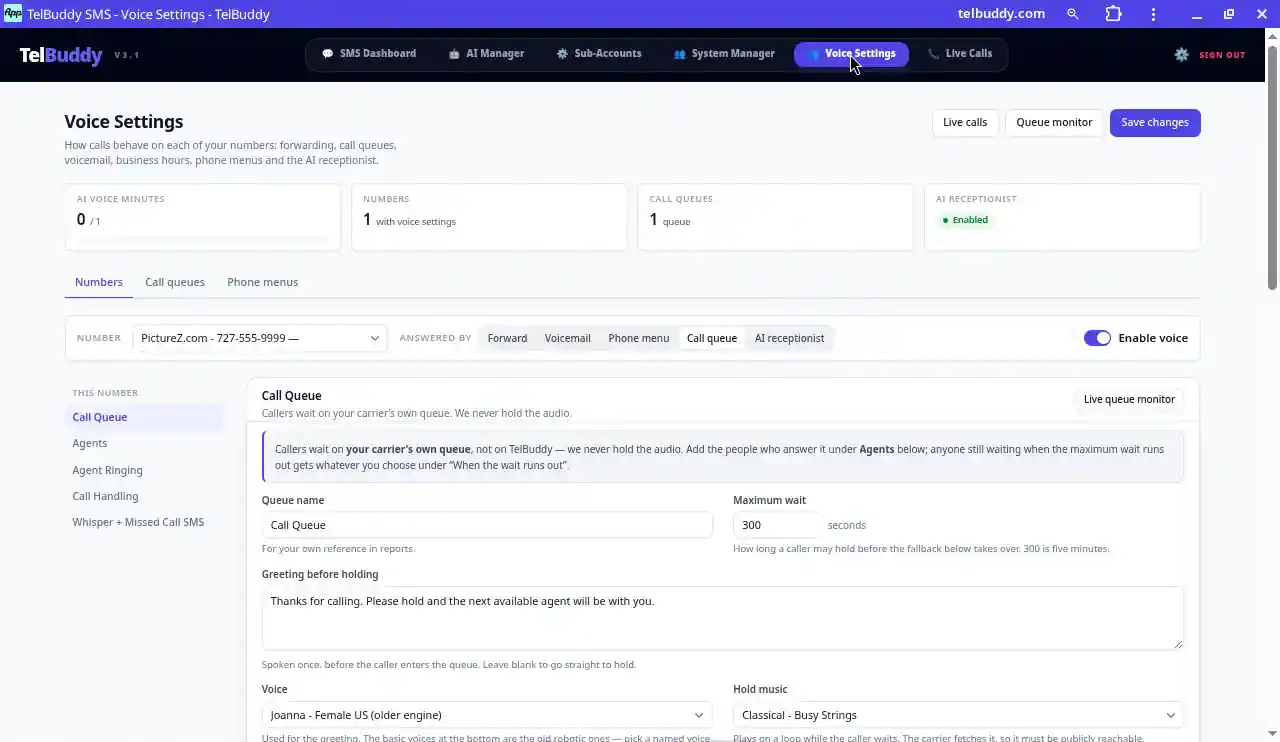
- Open Voice Settings and pick the number.
Everything about how that number handles calls lives on one screen.
- Set Answered By to Call queue.
TelBuddy points the carrier at the queue for you. That is the moment the number becomes a queue.
- Name it something people can read.
Support, Sales, Service desk. The name shows up in reports and in what agents hear.
- Add a greeting and hold audio.
The greeting plays once. Hold music can be a built-in track or your own MP3 or WAV.
- Add agents as phones.
Pick teammates and the number to ring. Any mobile or desk phone works.
- Choose a ring strategy, a maximum wait and a fallback.
Leave press 1 to accept switched on.
- Call it yourself and watch the monitor.
Wait in line, accept from an agent phone, and check that the fallback fires when you let the wait run out.
The full reference for every control is in the call queues docs, and the overview is on the call queues feature page.
Hold music, the greeting, and agents as phones
A queue is only as good as the wait it gives callers and the reliability of who gets offered the call.
The greeting
Played once before hold. Keep it short and specific: "Thanks for calling Northside Dental. You are in line for the front desk." Leave it blank to go straight to hold audio. Pick a natural voice rather than the old robotic ones; callers notice.
Hold music or a holding message
Four built-in tracks ship with the product, or use the URL of your own MP3 or WAV. Your own audio is usually better because it sounds like your brand. For clinical, legal or dispatch lines, a calm spoken holding message often fits better than music.
Agents are just phones
Add a team member and the number to ring. Mobiles are fine and nothing needs installing. Being signed in to TelBuddy is not the same as taking queue calls: agents are only rung while they are marked available, and a supervisor can switch them on or off from the queue monitor.
A mobile's voicemail answers faster than a person. Without a keypress, a caller who waited four minutes can be dumped into an agent's personal voicemail while the queue thinks the call was answered. A voicemail box cannot press 1, so it cannot steal the call. That is why press 1 to accept is on by default, and why it cannot be switched off for strategies that ring several agents at once. Agents also hear which queue it is and the caller's number before they accept.
One call at a time, then a breather
An agent is only ever offered one call, and the queue skips anyone already talking. After a call ends they get a cool-off (30 seconds by default) before they can be rung again. That short pause is what makes ordinary mobiles workable as queue phones all day.
Miss three, go offline
Anyone who misses three queue calls in a row is taken offline automatically. Without that rule, one phone left in a drawer quietly absorbs a share of every caller, and the only symptom is that the queue "feels slow".
The four ring strategies, and how to choose
The right choice is a trade between how fast the caller reaches someone and how many phones you ring to get there.
Round robin
One agent at a time, longest idle first. Work is shared evenly and each attempt rings one phone. The best default for teams of equals.
Priority
One at a time in the order you set. Senior people get first refusal and everyone else is overflow. Good when one person should handle most calls.
Ring all at once
Every available agent at the same moment, and the first to press 1 gets the call. Fastest for the caller, but it places one carrier call per agent every time.
Ring the top tier at once
Your best people together first, then the next tier. Speed where it matters without ringing the whole company.
Ringing everyone is the tempting first choice and the one worth thinking twice about. On a four-person team it is four carrier calls for every caller, including the ones who hang up. If you want speed without blasting every mobile, start with Round robin or Priority and a realistic maximum wait.
What happens when the wait runs out
The maximum wait is how long someone may hold before your fallback takes over. People usually set it too high. Five minutes of music is a long time when you are the one holding. Two minutes followed by a good fallback beats ten minutes of music.
📼 Voicemail
Recorded, transcribed and in your inbox, with an email alert to whoever you pick.
📲 Forward
Ring an on-call mobile or another office.
🤖 AI receptionist
Optional add-on. The caller still gets a conversation, answers and even a booking.
🔀 Another queue
Support overflows into Sales. Capped, so two queues can never pass a caller back and forth forever.
🔊 Message and hang up
A clean, honest close when nobody can help right now.
↩️ Or avoid it entirely
Offer a callback before the wait gets long. Read on.
Callback instead of hold: keep my place
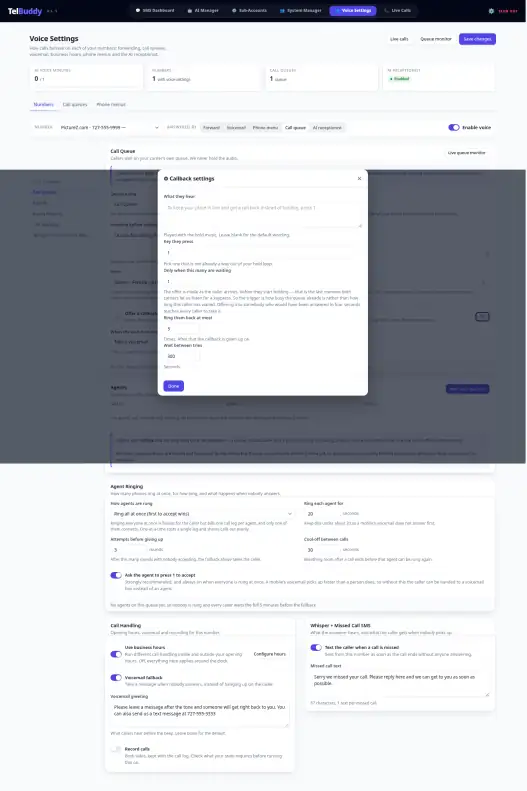
This is the feature that changes the economics of a busy line. When the queue is busy, callers are offered a key to press. They hang up, their exact place in line is held, and TelBuddy rings them back when it is their turn and an agent is free.
🔊 "All of our team are busy. To keep your place and have us call you back, press 1."
▸ Caller presses 1 and hangs up
↳ place #3 held · no hold minutes running
📲 Their turn, agent free: TelBuddy rings them back
✓ Connected to the agent, in their original place
- Offered as they arrive.
Only when the queue is as busy as you set, so nobody is offered a callback for a 20 second wait.
- One key, then hang up.
Their exact place is held. Everyone who called after them is still behind them.
- Rung back in turn.
When their place is next and an agent is free, TelBuddy calls the number they called from.
- Same rules for the agent.
The agent presses 1 to accept and gets a cool-off after, exactly like any other queue call.
Built for real callers
- Missed the ring-back? It tries again, as many times as you choose, with the gap you choose.
- Called back on their own? Their number is recognised and the held place moves to the call they are on now. They keep their turn and are not rung twice.
- Different per queue. Wording, key, how busy before it is offered, and retries are all set per queue with a simple switch and a settings cog.
Why callback cuts abandoned calls and hold minutes
Stay on hold
- Music keeps playing
- Abandon risk climbs every minute
- Hold minutes run on your carrier bill
- Fine when the wait is short
Keep my place
- One key when the queue is busy
- Exact place kept until the ring-back
- No hold minutes while they wait
- Fewer people giving up
Every minute a caller sits on hold is a live call on your Twilio or Telnyx account. A caller who takes a callback is not on the line while they wait, so those minutes never happen. Your TelBuddy fee stays the same and your carrier bill gets smaller. More on the feature: queue callback.
The queue monitor and the live call board
You do not need a contact center platform to see a wallboard. Every plan includes two live views, and most teams keep both open on a second screen.
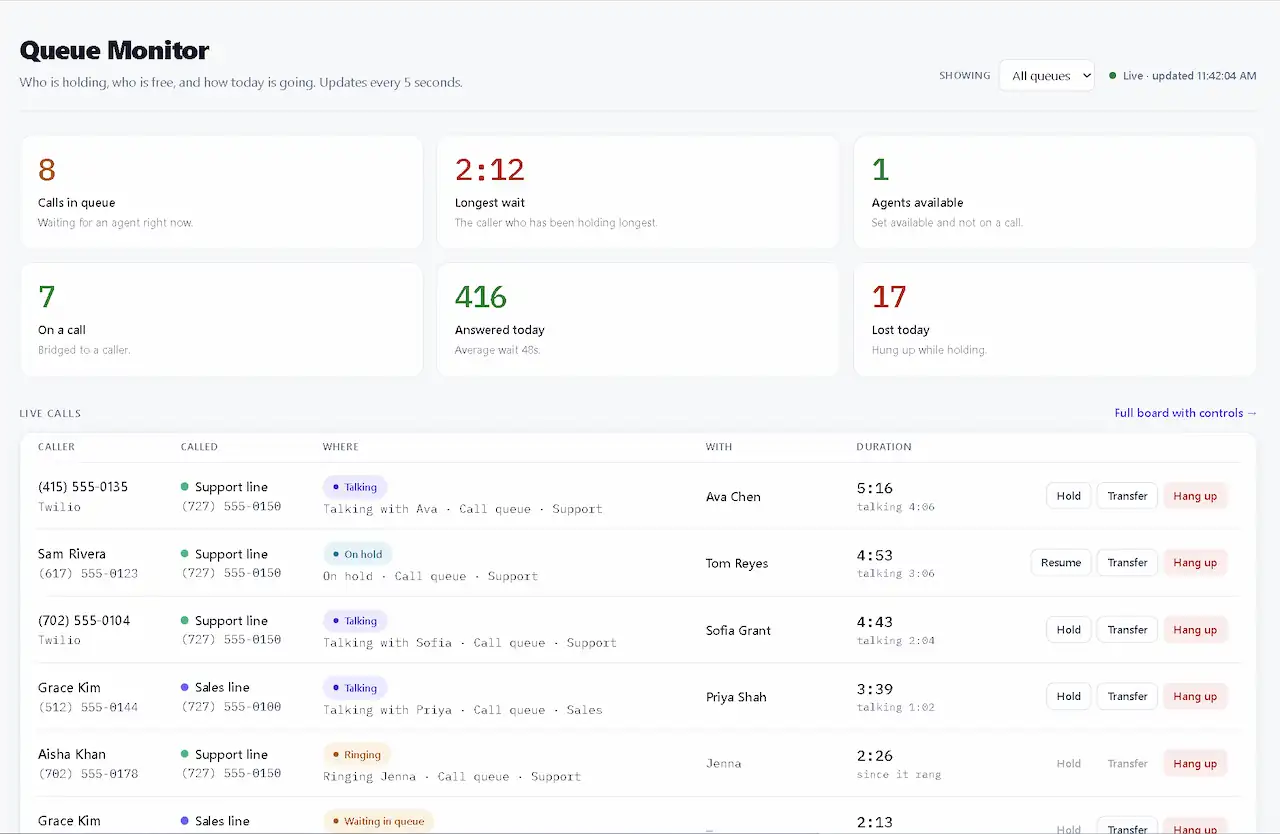
Queue monitor
- Calls waiting right now, and the longest wait
- Every agent's state: available, ringing, on a call, cooling off or offline
- Answered today and lost today (callers who hung up while holding)
- Callers waiting for a callback, in their real place in line, so "3 waiting" means three people
- Switch agents on and off from the board, and filter to one queue or see them all
- Refreshes every five seconds
Live call board
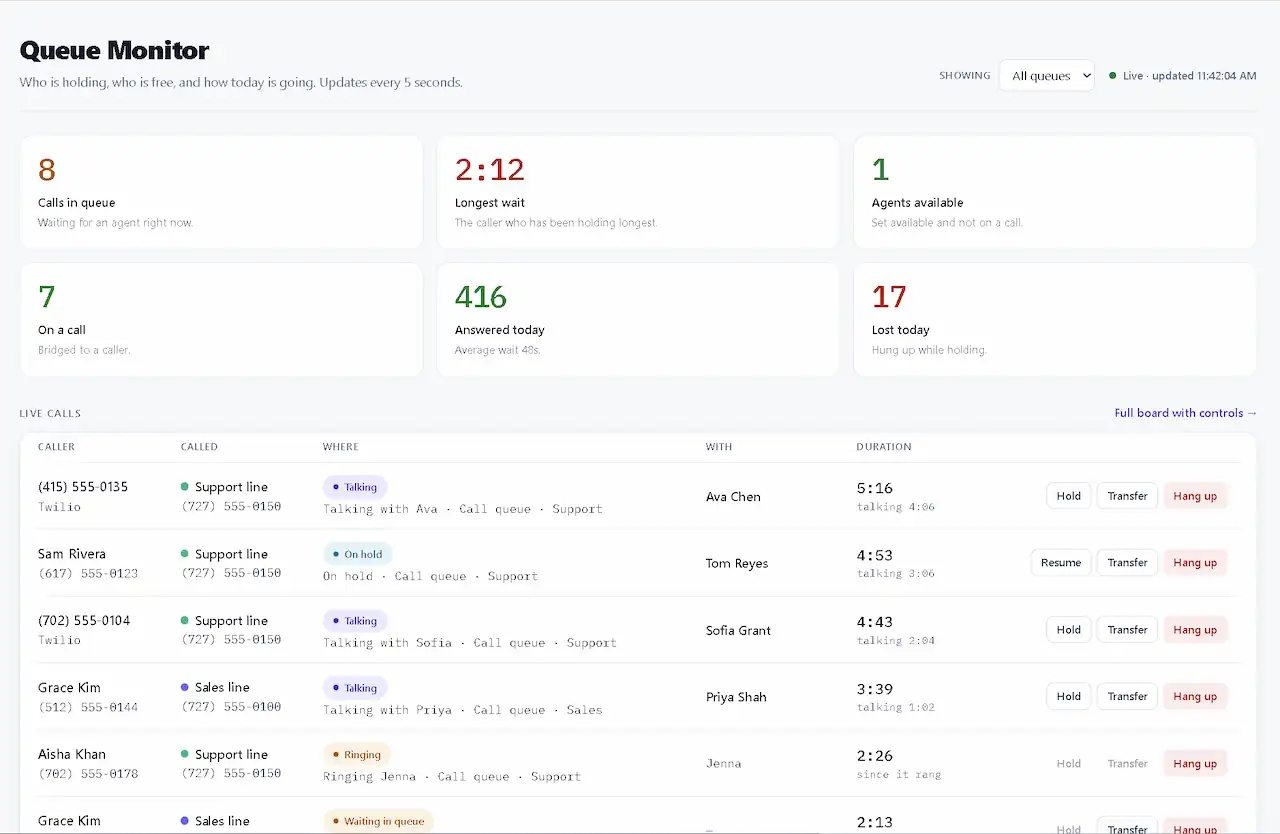
Every call in progress on your numbers: who called, which number they rang, who has them, how long it has run, and what stage it is at (ringing, in a phone menu, holding, talking, leaving a voicemail). It updates every 1.5 seconds and keeps the last hour of ended calls underneath.
Hold and resume
Park the caller with hold music, bring them back when ready.
Transfer
The caller holds while the new phone rings, and is connected when whoever answers presses 1.
Hang up
End a stuck or mistaken call for everyone on it.
Its own permission
Give a supervisor Live Calls access without the keys to your menus and routing.
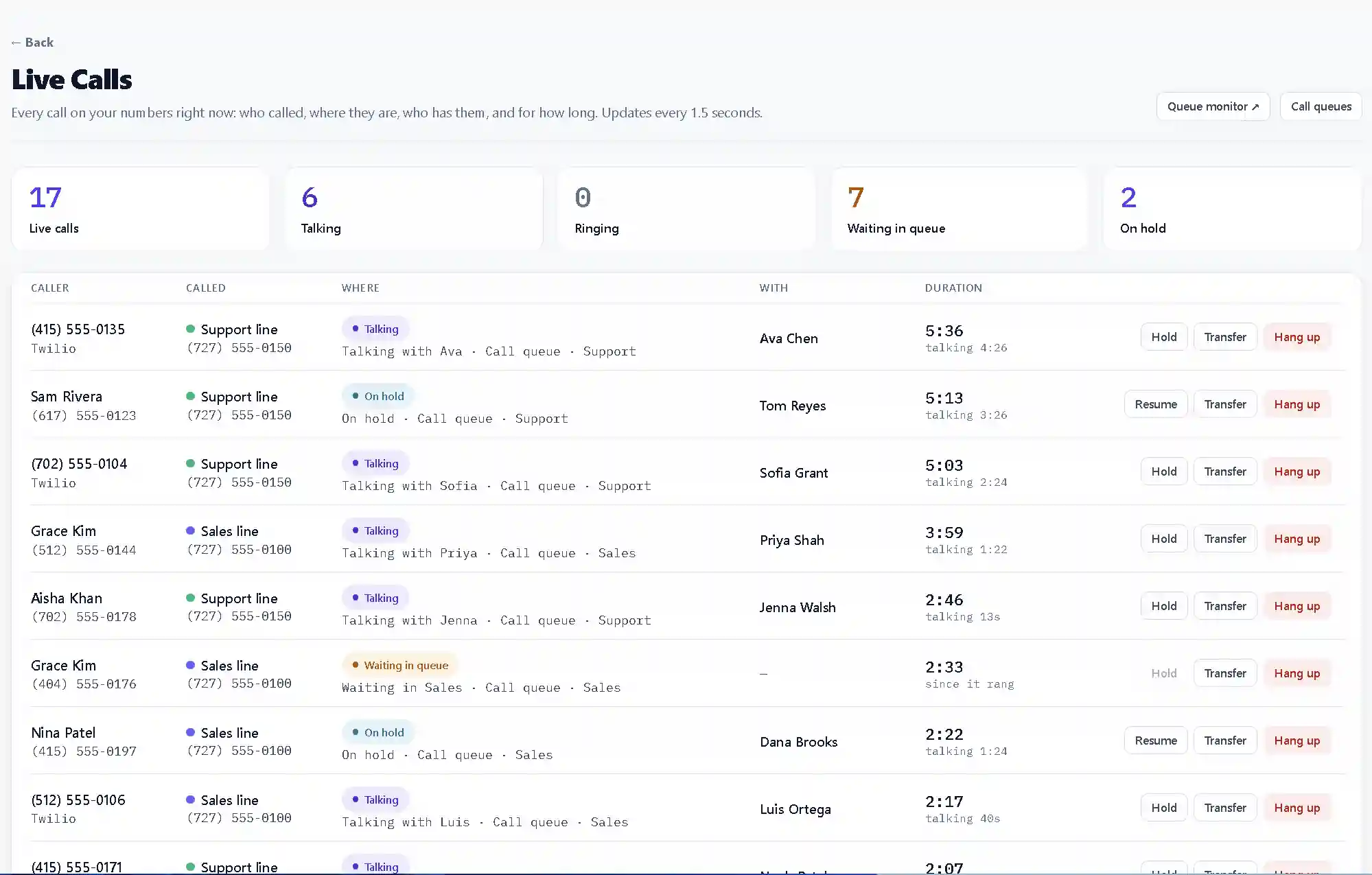
A parent account sees calls on its sub-accounts, and nobody ever sees another customer's calls. Read Only lets someone watch; Full Access lets them hold, transfer and hang up. More: live call board.
Phone menus, AI and business hours as ways into a queue
A queue is not only a setting for a whole number. It is a destination other parts of your phone system can send callers to, which is where it starts to feel like a real phone system.
- From a phone menu. "Press 2 for support" can drop the caller straight into the Support queue, from any level of a multi-level menu. See phone menus, or the ten minute build in IVR, call queue and AI receptionist setup.
- From the AI receptionist. A transfer rule can name a queue, so a caller who asks for a person waits in line instead of ringing one desk phone. See voice transfer rules.
- From another queue, as capped overflow.
- Around your hours. A queue respects the business hours on that number, so after-hours handling takes over before anyone is queued for a team that has gone home.
Queues belong to your account, not to one number, so one Support queue can sit behind several numbers. And if a call is missed anyway, a missed call text can reply to the caller automatically.
Call queue playbooks by industry
The product is the same everywhere. What changes is how you name queues, who goes first, and where the wait ends.
Call queue for a dental office or medspa
Short greeting, calm hold audio, and Priority so the senior front desk person takes booking changes first. Overflow to voicemail with a same-day return promise beats ten minutes of music during the lunch rush. Callback helps when every chair is full and patients would rather not hold.
Call queue for a medical clinic
Respect business hours strictly: never queue clinical callers after close. Use a spoken holding message rather than upbeat music. Round robin across equal roles, Priority when a triage desk must clear first. Let the wait end in voicemail or a nurse line, not in a second queue. Callback shines on refill lines that spike mid-morning.
Call queue for legal intake
A phone menu split (new matter, existing client, billing) feeding separate queues, with Priority so intake specialists take new matters first. Keep holds short. The live board lets partners see when intake is backing up without buying a contact center.
Call queue for property management and real estate
Separate day and night: Leasing and Resident Support queues during hours, an emergency forward or voicemail after. Ring all at once can make sense for a small on-call group when a burst pipe cannot wait for Round robin. Callback helps on busy leasing days.
Call queue for HVAC, plumbing and home services
Dispatch-shaped: Priority to the dispatcher, then technicians as overflow, or Ring the top tier at once for the two people who can book a truck. Let the wait forward to an on-call mobile quickly; a no-heat caller should not sit on music. Technicians already live on their mobiles, so no softphone is needed.
Call queue for a dealership service department
A menu splitting Service, Parts and Sales into their own queues. Round robin across service advisors, Priority to the parts lead. Callback keeps Saturday callers from abandoning, and a manager can transfer a live call to the right desk from the board.
Call queue for logistics and dispatch
Speed first: Ring all at once or Ring the top tier at once for the on-duty group, short ring times, and press 1 so a driver's voicemail cannot take a shipper's call. Cool-off stops the same phone ringing the moment a call ends. Let the wait forward to a supervisor.
Multi-location businesses and agencies
Run many numbers into shared or per-location queues. A parent account sees its sub-accounts on the live board, and every client keeps their own carrier relationship.
Do you need Twilio Flex for a call queue?
When people say "call center on Twilio" they often mean Flex: a full contact center platform with its own workspace, TaskRouter underneath, and an implementation project to match. It is the right answer for some teams.
Stay on Flex if
- You are standardising on a contact center platform
- Engineers will own custom TaskRouter workflows
- You already have staff to run it
Use a no-code queue if
- You already have Twilio or Telnyx numbers
- You want queues, callback and a board this week
- Agents use ordinary phones
- You want a flat fee with no minute markup
TelBuddy does not replace TaskRouter, and it is not trying to be Flex. The same goes for Studio: excellent when you want to own every widget in a flow, but it is a project. Building your own queue in TwiML or TeXML is possible too. The expensive part is everything around it: hold, strategies, cool-off, press 1, callback and a board, maintained forever. That is the part this does for you.
What call queues cost
Queues change behaviour; they do not invent a new price list. Hold time, agent calls and callback ring-backs appear on your Twilio or Telnyx bill at their rates. Two things move that bill: blast strategies ring more phones per caller, and callback removes hold time for everyone who takes it.
Call queues, callback, the queue monitor and the live call board are on every TelBuddy plan from Starter at $19/month. Plans differ only by how many numbers and seats you have. There is a 7-day trial; a card is required and nothing is charged until day 8. See pricing.
For a wider look at carrier costs against rented call center software, read I compared Twilio cost vs call center software. For the short explainer on what a queue is, see call queues (ACD) explained.
Your call queue launch checklist
- Number synced and Answered By set to Call queue
- Queue named something people understand
- Short greeting in a natural voice
- Hold music or holding message chosen
- Agents added, with the right phone numbers, and marked available
- Ring strategy chosen on purpose, not by default
- Maximum wait of two to three minutes, with a real fallback
- Press 1 to accept left on
- Callback switched on for busy periods, with wording that sounds like you
- Business hours set so nobody is queued after close
- A test call through the whole path, including letting the wait run out
- Queue monitor open on a second screen for the first week
Connect Twilio or Telnyx, set Answered By to Call queue, and your first queue is live in minutes. Feature details: call queues, queue callback and live call board.
Frequently asked questions
How do I set up a call queue on Twilio without Flex?
Connect your Twilio account to TelBuddy, sync the number, open Voice Settings, set Answered By to Call queue, add your agents as phone numbers, pick a ring strategy and a maximum wait, and save. TelBuddy points the carrier at the queue for you. There is no Flex workspace, Studio flow or TaskRouter project involved.
Can I set up a call queue on Telnyx?
Yes. Call queues, callback, the queue monitor and the live call board work the same on Telnyx as on Twilio, and one account can run numbers on both carriers.
What is the difference between a call queue and a ring group?
A ring group rings several phones at once and hopes someone answers. A call queue answers the caller straight away, holds them in order with music, offers agents by a strategy you choose, and sends the caller somewhere you chose if the wait runs out.
How do I reduce abandoned calls on a busy phone line?
Keep the maximum wait realistic, give it a real fallback, and offer a callback when the queue is busy. Callers who take the callback hang up, keep their place in line and are rung back in turn, so they have no reason to give up.
Do callers lose their place when they choose a callback?
No. Their place is held exactly where it was. If they call back on their own while waiting, their number is recognised and the held place moves to the new call, so they are not rung twice.
Do agents need a softphone or an app?
No. Agents are ordinary mobiles or desk phones. The queue rings them, they hear which queue it is and the caller's number, and they press 1 to accept.
Why do agents have to press 1 to accept a queue call?
So an agent's mobile voicemail cannot answer the call. A voicemail box cannot press 1. It is on by default and cannot be turned off for strategies that ring several agents at once.
Which ring strategy should a small business use?
Round robin for a team of equals, Priority when one person should take most calls, and Ring all at once or Ring the top tier at once when speed matters more than the number of phones rung.
What happens when a caller waits too long?
When the maximum wait runs out the caller goes to your fallback: voicemail, a forward, the optional AI receptionist, another queue, or a message and hang up.
Can I see who is waiting and transfer live calls?
Yes. The queue monitor shows who is waiting, every agent's state and today's answered and lost calls. The live call board shows every call in progress and lets you hold, transfer or hang up.
Are call queues an extra cost on TelBuddy?
No. Call queues, callback, the queue monitor and the live call board are included on every plan from Starter. Plans differ only by numbers and seats.
Does TelBuddy mark up my call minutes?
No. TelBuddy is a flat software fee. Hold time and agent calls are billed by Twilio or Telnyx at their rates. Callback reduces hold time on that bill.
Skip the Twilio Console entirely
TelBuddy turns everything in this guide into point-and-click settings: IVR menus, forwarding, voicemail, webhooks, and A2P sync, on top of your own Twilio account.
