Turn TelBuddy Into an App on Your iPhone: No App Store Required
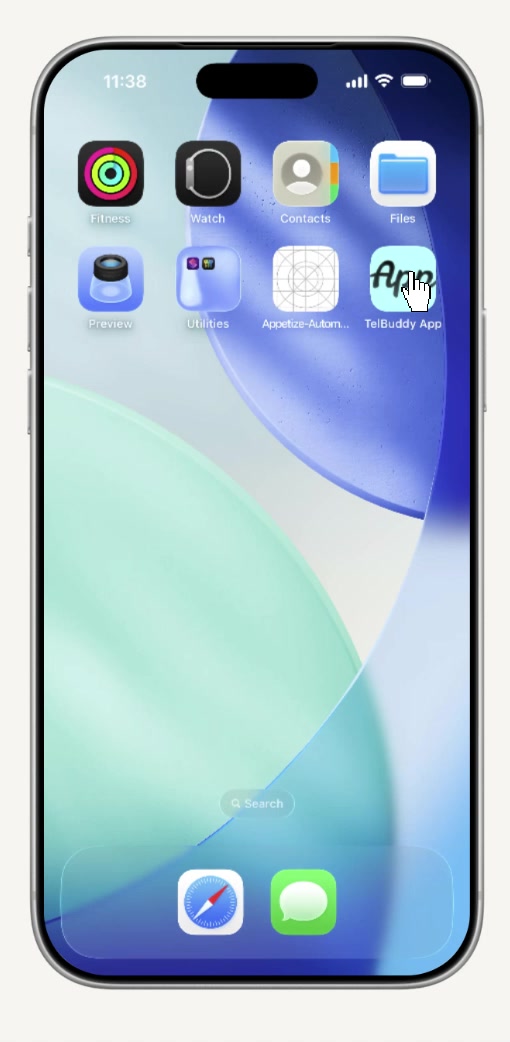
Every business tool wants to be an app. An icon on your Home Screen, one tap from your thumb, sitting right next to Messages and Phone, because that's where the tools you actually rely on live.
Until now, TelBuddy lived in a Safari tab. Findable, but not there. You'd close the tab, and the next time you needed it, you were retyping the address or hunting through bookmarks.
That's fixed.
One Tap. No App Store.
TelBuddy can now sit on your iPhone Home Screen as its own icon: full-screen, no Safari address bar, no browser tabs cluttering the view. Tap it, and you're straight into your inbox.
No App Store listing to find. No download to wait on. No storage eaten up. It's the same TelBuddy you already log into on the web, just one tap away instead of three.
Why This Actually Matters
If you're checking texts between calls, replying to a customer from the truck, or glancing at a voicemail on your way into a meeting: every extra tap is friction you don't have time for. An icon on your Home Screen turns "let me open Safari, type the address, wait for it to load" into a single tap.
It's a small thing. It's also the difference between checking TelBuddy five times a day and actually keeping up with your customers in real time.
How to Set It Up
It takes about a minute, and you only do it once. We put together a full screenshot-by-screenshot walkthrough, see the step-by-step guide here.
The short version: open telbuddy.com in Safari, tap Share, tap Add to Home Screen, tap Add. That's it.
What This Is, and Isn't
Worth being straight about this: this isn't a native App Store app, and it doesn't (yet) add push notifications or offline access. What it does give you is a real icon, a full-screen window with no browser chrome, and one-tap access to everything TelBuddy already does. If that changes, this is the page that will say so first.
Set it up once, and TelBuddy stops being a website you visit, it's just an app on your phone, the way it always should have been.
Frequently asked questions
Do I need to download anything from the App Store?
No. This creates a real Home Screen icon that opens TelBuddy full-screen, using the same account you already log into on the web — no App Store, no install.
Does this cost extra?
No. It's included for every TelBuddy account, on every plan.
Does this work on Android?
Android has its own version of this through Chrome's "Add to Home screen" option, but the exact steps differ from Safari's — our current walkthrough is written for iPhone.
Skip the Twilio Console entirely
TelBuddy turns everything in this guide into point-and-click settings: IVR menus, forwarding, voicemail, webhooks, and A2P sync, on top of your own Twilio account.
