
Twilio and Telnyx. One dashboard. Optional AI receptionist.
The dashboard on top of the Twilio or Telnyx account you already own: shared team texting, phone menus, call queues, website chat, voicemail and business hours, without the carrier console. Your numbers stay yours, with no markup on minutes.
Starter plan $19/mo · flat software fee · AI receptionist optional
Card required. Nothing charged for 7 days. Cancel anytime. No coding and no number port.
Optional AI receptionist from $19.99/mo, not included in the free trial. See all plans
▶ Watch a 10-minute build: AI receptionist, phone menu and call queue on YouTube
Run your whole phone system
on Twilio or Telnyx.
The carrier console is a developer tool. TelBuddy is the front desk on top of it: phone menus, forwarding, voicemail, business hours, call queues, a shared SMS inbox, and an optional Twilio AI receptionist or Telnyx AI receptionist, all from one clean dashboard.
Not for you if you do not already have a Twilio or Telnyx account, or if your phone system is custom Studio or TaskRouter.
Visual IVR / Phone Menu
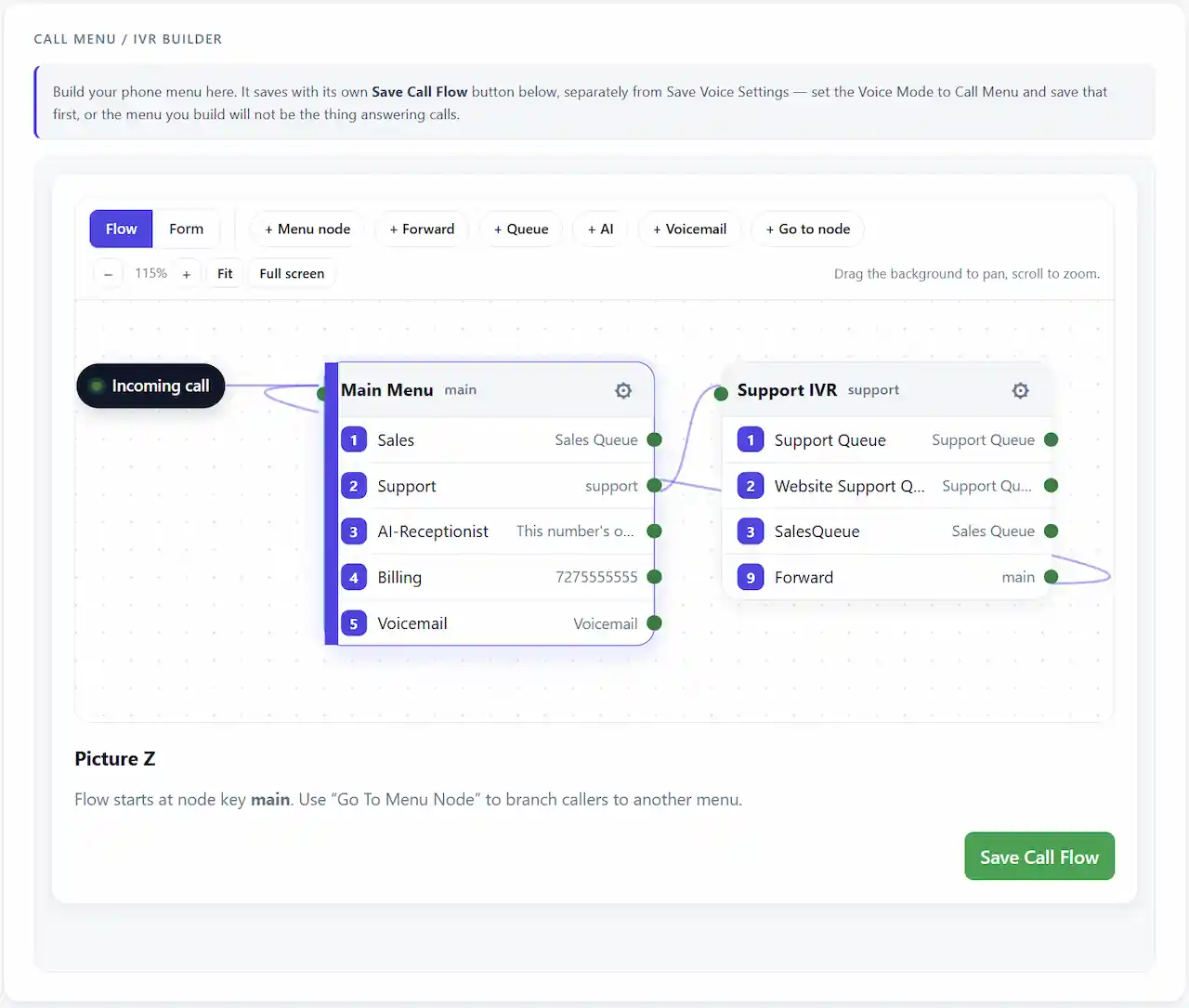
Build "Press 1 for Sales, Press 2 for Support" in a visual editor. Route each option to a person, voicemail, or another menu. No TwiML or code.
Call Forwarding & Voicemail
Forward calls to a primary and backup number, and capture voicemail with transcripts when no one answers. Set it once per number, Twilio or Telnyx.
Business Hours Routing
Define your open hours per day. Calls ring your team during business hours and roll to voicemail or a custom message after hours, automatically.
Set up a professional phone system in minutes instead of fighting the Twilio or Telnyx console.
Built specifically to enhance, not replace, your existing Twilio or Telnyx account.
Built for Teams. Ready for Scale.
TelBuddy is the easiest way to manage Twilio and Telnyx calling and texting in one clean dashboard, with an optional AI receptionist on top. No console, no code, no headaches.
Connect in Minutes
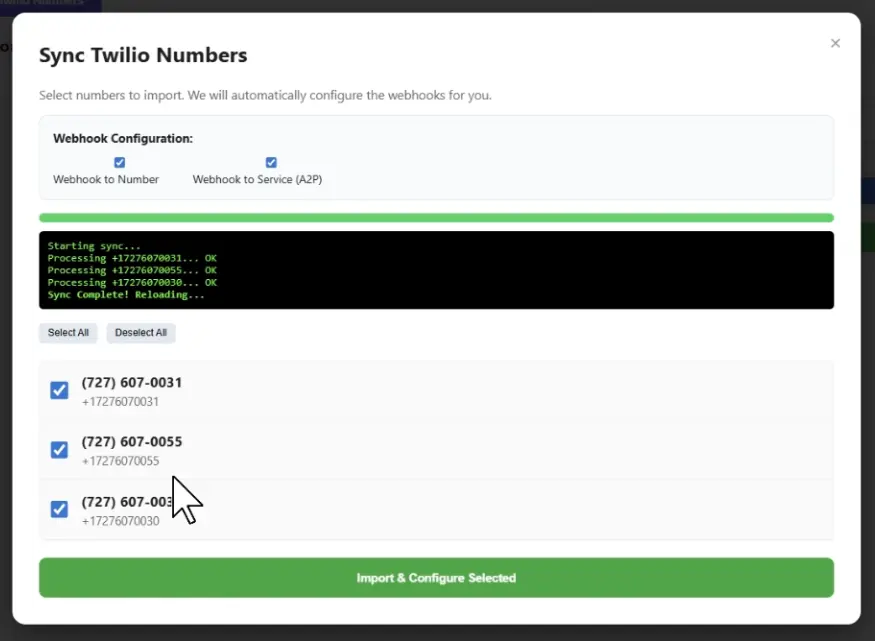
Keep your Twilio or Telnyx account. We import your numbers and configure webhooks for you. No rebuilding your phone system.
Shared Team SMS Inbox
Turn one Twilio or Telnyx number into a shared inbox. Your whole team texts customers together with templates, MMS, and roles.
No Carrier Console
Build menus, forwarding, voicemail, and business hours from simple screens. Never touch TwiML, TeXML, or raw webhooks again.
Want calls and texts answered automatically too? An optional AI add-on can handle reception and replies. Connect your Google Calendar and it can check availability and book real appointments right on the call. See our AI receptionist solutions.
Engineered for A2P 10DLC.
Managing Twilio or Telnyx numbers at any scale? Our Bulk Sync Engine deploys webhooks across every number in one pass and keeps your messaging setup organized while you register. A2P 10DLC Brand and Campaign registration stays in your carrier account, and we do not file it for you. We explain each step plainly in our A2P 10DLC guide, and every plan includes STOP and opt-out handling.
Real Appointments, Booked On The Call Or By Text.
Connect your Google Calendar, or one per person on the team, and the optional AI add-on checks real availability, confirms a time with the customer, and books it, live, during the call or inside the text thread. No voicemail, no missed callbacks, no double-booking.
👤 "I'd like to come in today at 2pm."
🤖 One moment while I check the calendar...
▸ Checked Google Calendar → 2:00 PM open
🤖 "2pm is available. Can I get your name?"
✅ Booked · Event added to Google Calendar
Ask the people already running on it.
Real businesses, in their own words.
“I tried to use Twilio and nearly gave up, then I found TelBuddy. Now I can run my entire phone system from my iPhone. It’s so much easier to use!”
“Thanks to TelBuddy, I no longer have to log into Twilio just to check who called me. Calls don’t get missed, and I get a copy of every text in my email. We couldn’t operate without it.”
A few honest answers.
Do I need to understand the Twilio or Telnyx console to use TelBuddy?
No. TelBuddy connects to your existing Twilio or Telnyx account and gives you a simple dashboard for SMS, phone menus (IVR), call forwarding, voicemail, business hours, and an optional AI receptionist. You never have to touch the carrier console or write any code.
Can I build a phone menu (IVR) without coding?
Yes. TelBuddy includes a visual IVR builder. Create options like "Press 1 for Sales, Press 2 for Support" and route each choice to forwarding, voicemail, another menu, or your AI receptionist, all without writing TwiML, TeXML, or code.
Can TelBuddy forward calls and take voicemail?
Yes. Set a primary and backup forwarding number, enable voicemail with transcripts, and configure business hours so calls route differently after hours, all from one screen per number.
Does TelBuddy work with my existing Twilio or Telnyx number?
Yes. Connect your Twilio Account SID and Auth Token, or your Telnyx API key, and TelBuddy syncs your existing numbers and configures webhooks automatically. No platform migration and no porting required.
Does TelBuddy work with Telnyx too?
Yes. TelBuddy also connects directly to Telnyx, so you can use Twilio, Telnyx, or both at the same time under one account. No migration required either way.
Nothing ported
Your number stays in your own carrier account, in your name, on your billing.
No usage markup
Twilio or Telnyx bills you directly at their own rates. We never sit in the middle.
Leave any time
Disconnect and your number keeps working, because it never moved.
7 days free
Card required, nothing charged until day 8, and we email twice before it happens.